ComparisonLast reviewed: October 2026

Snatr vs Amedra: a comparison for teachers and tutoring centers in Egypt (2026)

For a center owner or a teacher in Egypt, Snatr is the better choice. Branches, attendance and a parent portal are on every plan, plus a website in your name and encrypted video. Students pay online by card, Fawry or wallet, and the course opens automatically, from 999 EGP. Amedra is a system for running a center internally, multiple branches are on its Enterprise plan, and selling and paying online are not stated.

⁨Amedra⁩

An Arabic system for running tutoring centers, academies and private lessons: barcode attendance that works offline, fee collection, expenses and teacher salaries, and portals for parents and students, from 400 EGP a month.

Subscription starts at
400 EGP, center only
Managing several branches
Enterprise plan only
Lesson videos
For group students, on Professional
Students pay you online
Not stated

Snatr and ⁨Amedra⁩ in one table

We compared 20 things that matter to a teacher or a center, and the table shows which platform does each one better.

4

about even

7

only in ⁨Amedra⁩

Swipe the table sideways to see every column.

What we comparedSnatr⁨Amedra⁩
Price and money
One subscription for the center and online teaching
From 999 EGPThe center, branches, courses and online payment together
From 400 EGP for the centerProfessional is 700, and selling and paying online are not stated
Students pay online by card, Fawry and wallets
AvailableIn EGP, and the money goes into your wallet
Not statedCollection is recorded at the center
Top-up codes and cards sold for cash
AvailableA code unlocks a course or group, or adds credit
Not statedThere are session packages deducted at each attendance
Center fees, late payers and expenses
Not availableOnline payments and codes only
AvailableInstallments, discounts, receipts and expenses
Teacher salaries
Not availableOne teacher on the platform
AvailableCalculated from the sessions actually taught
Video and protection
Selling courses online
AvailableVideo you upload or a YouTube link, priced in EGP
Not statedThere are videos for group students inside the portal
Video encrypted against download tools
EncryptionPlus a watermark with the student's name
For group studentsThe video is not public; encryption is not stated
Student account on one device
One deviceAt a time
Device restrictionOn the student portal, with every sign-in logged
Live classes and exams
Live classes inside the platform
On ProChat, raised hands and the mic, with attendance recorded automatically
Not stated
Timed online exams that grade themselves
AvailableAnd the exam timer runs on the server
On ProfessionalInstant results and an analysis of the most-missed questions
Student ranking and a top-students board
Not available
AvailablePlus level badges for each student
Completion certificates for students
AvailablePrintable, with a QR code to a verification page
Not stated
Centers and parents
Attendance with a student card
QR cardA signed code, or a manual register
BarcodeBy phone camera or a barcode scanner, or by hand
Attendance without internet
Needs internet
AvailableUploaded with its original time when the internet is back
Managing several branches
Every planWith a seat count per group
On EnterprisePriced by agreement
Parent notifications
Not availableThe parent sees attendance when they open their portal
On ProfessionalInstant notice of attendance, absence and grades
Assistants and secretaries with permissions
4 templatesAnd a removed permission is gone that same moment
RolesOwner, manager, teacher and secretary
AI assistant
Not available
AvailableOn Professional according to the pricing card
Your platform, your name
A website in your name with ready-made designs
30 designsReady from day one
A dashboard on your linkA dashboard, not a public site; a website is not stated
Mobile app
Not availableThe platform opens in the phone's browser
Installs from the browserWith no app store

Snatr or ⁨Amedra⁩?

Choose ⁨Amedra⁩ if

  • all you need is an accounts and attendance system for the center, and you do not plan to teach online.
  • your center has many teachers paid from attendance, and you do not need to sell courses.
  • your students pay cash in installments and session packages, and you need no online payment.
  • the internet at your center drops often, and all your students come from center groups only.
On this page
  1. What is Amedra, the tutoring center software, and who is it for?
  2. How much is Amedra, and what do you get in a Snatr subscription?
  3. Does Amedra accept online payment through Fawry and mobile wallets?
  4. Does Amedra have lesson videos, and are they protected from download?
  5. Exams and live classes: Amedra or Snatr?
  6. Amedra or Snatr for running a tutoring center?
  7. Parent follow-up: the Amedra portal or the Snatr portal?
  8. A website in your name or a dashboard on an Amedra link?
  9. How do you get started with Amedra and with Snatr, and who helps you?
  10. How to move from Amedra to Snatr
  11. Snatr's limits, before you sign up
  12. Frequently asked questions

What is Amedra, the tutoring center software, and who is it for?

Amedra, also written without the hamza in Arabic, is an Arabic system for running tutoring centers, academies and private lessons. Its website is amedra.net, its prices are in EGP, and its interface is Arabic, right to left. It says it serves Egypt mainly, along with Saudi Arabia, the UAE, Kuwait, Jordan and Libya.

The system is built for running the center from the inside. It has barcode attendance, collection by the month or by a session package, installments, late payers and receipts, expenses, and teacher salaries calculated from attendance. It also has grades and online exams, portals for parents and students, and an AI assistant.

Amedra is focused on the center's money, and on centers with many teachers. Each teacher has a separate account, and their salary is calculated from the sessions they taught. Attendance is recorded without internet, with lateness and make-up sessions tracked. Its website says it has more than 500 centers.

What is not stated on Amedra is selling online. It has lesson videos for group students on the Professional plan, but selling courses, online payment, live classes and video protection are not stated. Several branches are on the Enterprise plan only.

Snatr at snatr.com brings the center and online teaching together in one account: branches, QR card attendance and a parent portal, plus your website, courses, encrypted video and payment in EGP. If you are comparing other center software, see all Snatr comparisons.
How much is Amedra, and what do you get in a Snatr subscription?

Amedra Basic is 400 EGP a month, and Professional is 700 with the videos, exams and parent app, for running the center internally. Snatr starts at 999 EGP and includes the center and branches, plus your website, online payment and encrypted video.

In Snatr

  • Starter: 999 EGP a month, 100 students, 50 GB, and 15 EGP per extra student.
  • Basic: 1,999 EGP, 200 students, 150 GB, and 10 EGP per extra student.
  • Pro: 2,999 EGP, 400 students, 300 GB, 7 per extra student, plus live classes and the custom domain.
  • An extra student is charged once, and a branch student with no online enrollment does not count toward the plan.
  • Branches, attendance, the parent portal, video and exams are on all three plans.

In ⁨Amedra⁩

  • Basic: 400 EGP a month, or 3,800 a year.
  • Professional: 700 EGP a month, or 6,700 a year.
  • Enterprise: by agreement, with several branches and automation.
  • No setup fee, and the 7-day trial is requested on WhatsApp.
  • The number of students on each plan is not stated.

Example: a teacher with 100 students paying 300 EGP a month, teaching at the center and online

On Snatr you keep 29,001 EGP, with branches, your website, encrypted video and online payment in one subscription

Snatr (Starter)Amedra (Professional)
Monthly software subscription999 EGP700 EGP
Attendance, collection, grades and a parent portalIncluded in the subscriptionIncluded in the subscription
Managing more than one branchIncluded in the subscriptionOn Enterprise, by agreement
A website in your name and encrypted videoIncluded in the subscriptionNot stated
Students pay online and the course opens automaticallyIncluded in the subscriptionNot stated
A second platform to sell courses and collect onlineNot neededNeeded, at its own price
What you keep from 30,000 EGP a month29,001 EGP29,300 EGP minus the second platform's subscription

We used Amedra Professional because it is the plan with lesson videos and online exams. Basic is 400 EGP. Over a year, Snatr Starter is 11,988 EGP, and Amedra Professional is 8,400 monthly or 6,700 on the yearly plan. On Snatr, the student pays the online payment fee on top of the 300 EGP.

AmedraBasicProfessionalEnterprise
Per month400 EGP700 EGPBy agreement
Per year3,800 EGP6,700 EGPBy agreement
Parent portalIncludedIncludedIncluded
Parent app and instant notificationsNot includedIncludedIncluded
Lesson videos and online examsNot includedIncludedIncluded
Managing several branchesNot includedNot includedIncluded

These prices are from the pricing page on Amedra's website on 10 October 2026. Their yearly plan saves about two months. The subscription itself is paid by bank transfer, Vodafone Cash or InstaPay.

Note that videos, online exams, the parent app and instant notifications are on Professional, not Basic. If you need them, compare Snatr with the 700 EGP plan, not the 400 one.

On Snatr you get your price in full. The online payment fee is added on top of your price for the student, and a student who paid you cash is enrolled manually with no commission. See Snatr's pricing in detail.

Does Amedra accept online payment through Fawry and mobile wallets?

Students paying online is not stated on Amedra. It records the collection that happens at the center, by the month or by a session package, with installments, discounts and reminders. Snatr has online payment by card, Fawry and wallets, plus top-up codes you sell for cash.

In Snatr

  • The student pays on your website by card, a Fawry code, or a wallet such as Vodafone Cash.
  • The money goes into your Snatr wallet, and you withdraw to Vodafone Cash, InstaPay or the bank.
  • Cards with codes that you print and sell for cash; a code unlocks a course or group or adds credit.
  • Discount coupons by percentage or a fixed amount, for the whole site, a course, a group or a stage.
  • No tracking of late payers, expenses or teacher salaries.

In ⁨Amedra⁩

  • A monthly subscription per group, or a session package deducted at each attendance.
  • Dues are counted from the day the student joined; discounts record the reason and approver.
  • Installments, late payers, electronic receipts, and reminders to parents.
  • Secretaries record payments but cannot edit or delete the amounts.
  • Expenses and an accountant, plus the profitability of each group in the reports.

The difference here is where the payment happens. Amedra organizes the money you receive at the center. On Snatr the student pays on your website, and the money goes into your wallet, which you withdraw after a safety period of currently 7 days.

Session packages, installments, revenue booked in its real month and salaries from attendance are in Amedra, and not in Snatr. In return, on Snatr the student pays on your website by themselves, and the course opens without anyone recording the payment by hand.

Snatr's top-up codes bridge the two approaches. You sell the card for cash at the center, and the student types the code on your website to unlock the course or group by themselves. A coupon can have a usage limit or be unlimited, and works once per student.

Does Amedra have lesson videos, and are they protected from download?

Yes, on the Professional plan. The teacher uploads lesson videos, the student watches them from their portal, and they are not public beyond the group's students. Encryption and selling online are not stated. Snatr sells courses with encrypted video carrying the student's name.

In Snatr

  • Courses with video lessons you upload, or a YouTube link for free lessons.
  • Uploaded video is encrypted, and download extensions and yt-dlp cannot save it.
  • A moving watermark on the video with the student's name.
  • A student account works on only one device at a time.
  • Any student can buy the course on your website, not only students at your center.

In ⁨Amedra⁩

  • The teacher uploads the lesson video to the portal, and the student watches it any time.
  • Each group has its own video library, open to its students only.
  • The student portal has device restriction and logs every sign-in.
  • Video encryption or a watermark is not stated.

At Snatr we measured the protection. The file without the key comes out as noise, with a similarity to the original of only 10.6 dB. With the key it plays cleanly at 59.9 dB, and the higher the number, the closer the picture is to the original.

Screen recording is not blocked on Snatr, and neither is a phone filming the screen. The watermark deters, because the student's name shows on the recording, but it is not proof. On iPhone and iPad the protection is a little weaker against a technically skilled person.

The other difference is that Amedra's videos are for your group's students only. On Snatr a course has a price, and any student in any governorate can pay and watch from your website. Learn how video protection works on Snatr.

Exams and live classes: Amedra or Snatr?

Both have timed online exams that grade themselves. Amedra also has student ranking and a top-students board. Snatr has live classes on the Pro plan and completion certificates, and neither of those is stated for Amedra.

In Snatr

  • Exams and homework that grade themselves, with the grade shown to the student and the parent.
  • The exam timer runs on the server, so refreshing the page gives the student no extra time.
  • Live classes inside your platform on Pro, with chat, raised hands and the mic for students.
  • Live attendance is recorded automatically: present or late.
  • A printable course completion certificate with a QR code that opens a verification page.

In ⁨Amedra⁩

  • Exams with a time limit and a countdown, and an instant result with answer review.
  • An analysis of the questions students got wrong most.
  • Assessment types: exam, oral recitation, homework and online exam.
  • A top-students board, student ranking, and level badges.
  • Live classes are not stated.

The top-students board and oral recitation grades are real Amedra features for a center that announces its top students. Snatr shows each student's grade to them and their parent, and has no ready-made ranking of top students.

Recording a live class on Snatr is a feature that has to be switched on, and when it is on, the recording is added to the students' group. Live classes are not encrypted like uploaded video: they carry a watermark and a temporary link, and screen recording works.

In short: If you teach live classes to students at home, Snatr replaces Zoom, and live attendance is recorded next to center attendance.

Amedra or Snatr for running a tutoring center?

Both record attendance with a student card or by hand. Amedra has offline work, lateness and make-up sessions, and accounts for several teachers. Snatr gives you branches on every plan, and brings center and live attendance, the parent portal and courses into one account.

In Snatr

  • Branches and groups with their schedules and seat counts, on all three plans.
  • A printed, signed QR card for each student; statuses are present, late, absent or excused.
  • An attendance rate per group and branch, and a record per student covering center and live.
  • Assistants with their own accounts, 4 permission templates, and a log of their key actions.
  • Scanning needs internet, and there are no salaries or multiple teachers.

In ⁨Amedra⁩

  • Barcode by phone camera or a barcode scanner, by hand, or for the whole group.
  • Check-out, lateness with a threshold each teacher sets, and approved make-up attendance.
  • Absence is worked out from the group schedule, and attendance works without internet.
  • Each teacher is isolated from colleagues, and their salary comes from their attendance.
  • Several branches on Enterprise, and an online link for enrollment requests.

Offline work and centers with many teachers are two Amedra features. If the internet drops, scans are saved on the device and uploaded with their original time. And if you have ten teachers, each one sees only their own students.

On Snatr, the QR card carries a signed code that cannot be forged, and the assistant scans it from a phone or a computer. But the card can be photographed and sent to someone else, so this is attendance by card, not by fingerprint. And scanning needs internet.

The four assistant templates are front desk, branch supervisor, academic assistant and full access. If you remove a permission from an assistant, it is gone at that moment, without them signing out and back in.

On Snatr you also choose the fields on the student registration form: governorate, city, stage, a photo of the national ID and the parent's phone. See center management on Snatr.

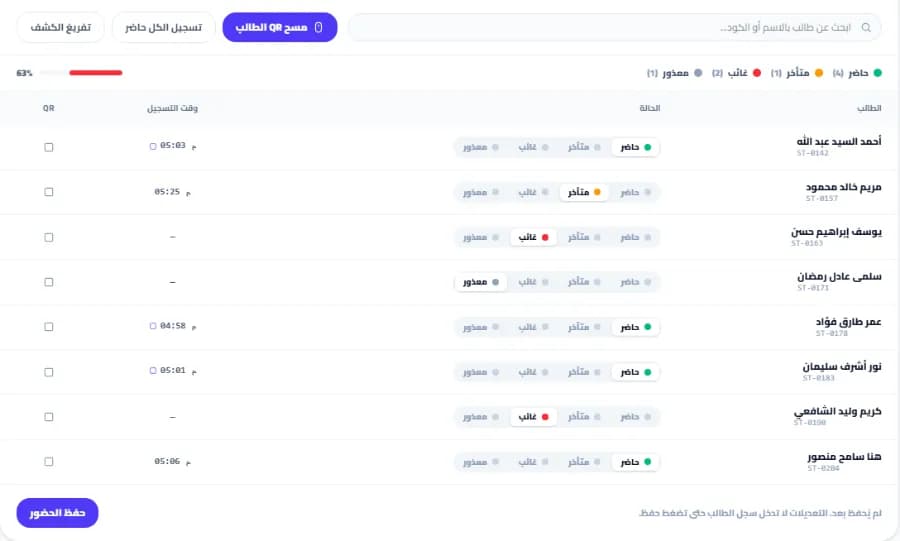
A session attendance register for a center on Snatr, with a button to scan a student's QR card, each student's status as present, late, absent or excused, the time recorded, and an attendance rate of 63%
A session attendance register at a branch on Snatr. The data shown is an illustrative example.

Parent follow-up: the Amedra portal or the Snatr portal?

Both have a parent portal with attendance, grades and payments. On Professional, Amedra adds instant notifications and a chat with the teacher and secretaries. Snatr puts center and live attendance together in the portal, without notifications.

In Snatr

  • A portal on your own website, opened with a password you set.
  • The parent sees their child's attendance at the branch and in live classes, in one place.
  • The parent sees grades and payments if the child is enrolled in your online courses.
  • One parent follows all their children from the same account.
  • No notifications or messages reach the parent's phone.

In ⁨Amedra⁩

  • Attendance, absence and lateness, grades, homework and rank, fees and what was paid.
  • Instant notifications on the phone, on Professional.
  • A chat with the teacher and secretaries, on Professional.
  • Following more than one child, and the portal installs as an app with no store.
  • An AI assistant for parents that answers about their own children only.

A notification that arrives by itself and a chat with the teacher are real features of Amedra Professional. Many parents expect a message after the class, and not all of them will open a portal.

On Snatr, the portal opens in any browser on an iPhone or Android phone, it is view only, and nobody can see a child who is not their own. The advantage is that a class at the branch and a live class from home show on the same page.

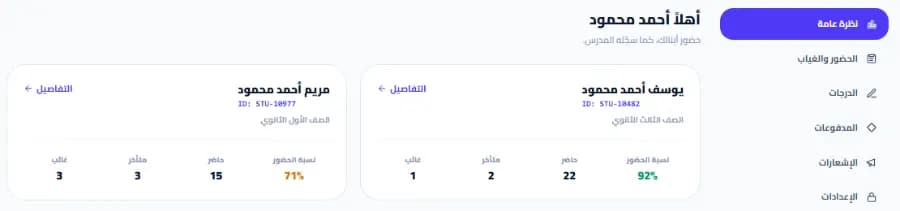
The parent portal on a teacher's Snatr website: a card for each child with the attendance rate and counts of present, late and absent, and a side menu with attendance, grades, payments and notifications
The parent portal on the teacher's Snatr website, opened in the browser. The data shown is an illustrative example.

A website in your name or a dashboard on an Amedra link?

Amedra opens a dashboard for your center on a link with your name, such as name.amedra.net, and says it is not public content. Snatr gives you a public website in your name with 30 designs, where a new student finds your courses, signs up and pays.

In Snatr

  • Your platform on a site in your name, with the custom domain on Pro.
  • 30 designs whose text, colors and images you edit with no code; the first two are free.
  • Each website has its own sitemap, so Google can find your pages.
  • No mobile app in your name. Students open your platform in the phone's browser.

In ⁨Amedra⁩

  • A private copy for the center on a link in its name, with an isolated database.
  • It runs in the browser and installs as an app on a phone or computer.
  • A printable student card with a barcode, photo and the center's logo.
  • A public center website with its courses and prices is not stated.

A custom domain such as mybrand.com is available on Snatr's Pro plan only, and not during the trial. The Snatr team buys and connects it, and the first year is free with the plan.

Amedra's link is built for your team and your enrolled students. Snatr's website is your storefront for anyone looking for you: it shows your courses and prices, and students sign up and pay there. See Snatr's designs.

How do you get started with Amedra and with Snatr, and who helps you?

Both have a 7-day trial. On Amedra the trial opens when you message customer service on WhatsApp, and they help you upload your student data. On Snatr you sign up and start by yourself, with support in Arabic on WhatsApp and email.

In Snatr

  • You sign up at snatr.com and start the trial right away, without waiting for anyone.
  • An Arabic dashboard, right to left, with English too.
  • Support in Arabic on WhatsApp and email at support@snatr.com, 24 hours a day.
  • No import of the student list from Excel. You add students from the dashboard.

In ⁨Amedra⁩

  • The trial is requested on WhatsApp, with no instant self sign-up on the website.
  • They help you upload your current student data during the trial.
  • WhatsApp for sales, WhatsApp and phone for technical support, and email.
  • Your data is yours, and you can request a full copy at any time.
  • A separate database for each center, with daily backups.

Having your student data uploaded with you during the trial is a real Amedra advantage if you have a long list in Excel. On Snatr you add students yourself from the dashboard.

On Snatr, your website closes when the trial ends without a subscription. Changing your plan after that is done through support.

How to move from Amedra to Snatr

  1. 1

    Try Snatr before you stop anything

    Open your Snatr account and use the free 7-day trial. Keep Amedra running until you are sure everything has moved. Note that your Snatr website closes when the trial ends without a subscription.

  2. 2

    Request a full copy of your data

    Amedra says your data is yours and you can request a full copy. Ask for your list of students, groups and parents. Snatr has no Excel import, so you will add them from the dashboard with the list in front of you.

  3. 3

    Create your branches and groups and print the cards

    Create each branch and its groups with their schedules and seat counts, and add the students. Then print a QR card for each student, because Amedra's barcode card will not work on Snatr.

  4. 4

    Open accounts for assistants and parents

    Open an account for each assistant and pick a permission template. Create an account for each parent with a password, link it to their children, and send them the link to their portal on your website.

  5. 5

    Move your videos and start selling online

    Upload your lesson videos to Snatr so they are encrypted, and set a price in EGP for each course. If your students are used to paying cash, print top-up cards and sell them at the center.

  6. 6

    Decide how you will track the accounts

    Snatr has no late payers, installments, expenses or teacher salaries. Decide how you will track them before you stop your Amedra subscription.

Snatr's limits, before you sign up

We list them up front so you decide knowing everything.

  • No center accounts: Snatr does not track monthly group fees, late payers, installments or expenses. Only online payments and top-up codes are recorded automatically.
  • One teacher on the platform: there are no separate accounts for several teachers, and no salaries calculated from attendance. If your center has many teachers, each one needs their own platform.
  • No parent notifications: no WhatsApp, SMS or notifications are sent automatically. The parent sees attendance and grades when they open their portal.
  • QR attendance needs internet: scanning happens in the dashboard and does not continue if the internet drops.
  • No top-students ranking and no AI assistant: each student's grade shows to them and their parent, with no ready-made ranking.
  • No app in your name: your platform opens in the phone's browser, and there is no app on Google Play or the App Store.
  • No cheaper plan for the center alone: the first plan is 999 EGP for 100 students, and it includes the center and online teaching together.
  • No Excel import: you add your students from the dashboard.
  • Screen recording is not blocked: nor is a phone filming the screen. The watermark puts the student's name on the recording, which deters, but it is not proof.
  • Live classes and the custom domain are on Pro only: the domain is not available during the trial. Changing your plan is done through support.

Frequently asked questions

Snatr or Amedra: which is better for a teacher in Egypt?

Snatr is better for a teacher or a center owner in Egypt. It has branches, attendance and a parent portal on every plan, plus a website in your name, encrypted video and online payment in EGP, from 999 EGP. Amedra is a system for running a center internally, at 400 EGP on Basic and 700 on Professional, with fee collection, salaries and offline work. But selling and paying online are not stated, and multiple branches are on Enterprise by agreement, so to sell your lessons online you would need a second platform beside it.

How is Amedra spelled, and what is its official website?

Both Arabic spellings are the same software. The official name is "Amedra" in English, and in Arabic it is also written without the hamza. Its official website is amedra.net, with features, prices and pages for private lessons, academies and independent teachers.

How much does Amedra cost?

According to their page on 10 October 2026: Basic is 400 EGP a month or 3,800 a year, Professional is 700 EGP or 6,700 a year, and Enterprise is by agreement. There is no setup fee. Snatr starts at 999 EGP for the center and online together.

Is there a free trial on Amedra and on Snatr?

Yes on both, and it lasts 7 days. On Amedra you message customer service on WhatsApp, and they open a copy for you and help you upload your data. On Snatr you sign up and start by yourself, and your website closes when the trial ends without a subscription.

Does Amedra work without internet?

Yes, according to their website. Attendance, grades and payments are saved on the device, and uploaded with their original time when the internet comes back. On Snatr, QR scanning needs internet.

Does Amedra manage several branches?

Yes, on the Enterprise plan only, priced by agreement according to the center's size and number of branches. On Snatr, branches and groups are on all three plans, from the Starter plan at 999 EGP.

Can I sell cards or codes to students on Snatr?

Yes. You print cards with codes and sell them for cash at the center. A code either unlocks a specific course or group, or adds credit to the student's balance on your website. There are also discount coupons by percentage or a fixed amount, once per student.

Does Snatr take a cut of my sales?

No. On Snatr you get your price in full. If the student pays online, the payment fee is added on top of your price for them, and it is not deducted from you. A student who pays you cash is enrolled manually with no commission at all.

If my students go over the plan on Snatr, do I pay for them every month?

No. A new student enrolls as normal, and an extra student is charged once when they enroll, not every month: 15 EGP on Starter, 10 on Basic, and 7 on Pro. The number of students on Amedra's plans is not written on their website, so ask them if your center is large.

Can I use Amedra and Snatr together?

You can, but you will pay two subscriptions and record each student's attendance in two places. You could use Amedra for the center's accounts and salaries, and Snatr for the website, courses, video and live classes. But Snatr alone has attendance, branches and a parent portal, so if you do not need the accounts, one platform is easier for you and your students.

Sources (6)

Every fact about ⁨Amedra⁩ on this page comes from their official pages, checked on 10 October 2026. Prices and features change; if you find something out of date, tell us at support@snatr.com.