ComparisonLast reviewed: October 2026

Snatr vs Coursebox: A Comparison for Teachers and Tutoring Centers in Egypt (2026)

Snatr is the better choice for a teacher in Egypt whose students pay in EGP. Students pay by Fawry, mobile wallets and card, the video you upload is encrypted and carries the student's name, and it has center management and a parent portal, with live classes inside your platform on Pro. Coursebox is an Australian tool that builds the course with AI, payment on it is by card or PayPal, and it has no live classes.

⁨Coursebox⁩

An Australian tool that builds a course with AI and hosts it, priced in dollars, with a free plan.

Subscription starts at
Free, paid plans from $21
Paying from Egypt
Card or PayPal only
Live classes
None, you use Zoom
Center management
None

Snatr and ⁨Coursebox⁩ in one table

We compared 20 things that matter to a teacher or a center, and the table shows which platform does each one better.

3

about even

4

only in ⁨Coursebox⁩

Swipe the table sideways to see every column.

What we comparedSnatr⁨Coursebox⁩
Price and money
Subscription in Egyptian pounds
In EGPFrom 999 EGP a month
In dollarsFrom $21 a month, with a card that pays in dollars
Paying with Fawry and mobile wallets
AvailableCards, Fawry and wallets such as Vodafone Cash
Not availableCard or PayPal, with no Fawry or wallets
Receiving your earnings in Egypt
AvailableVodafone Cash, InstaPay or a bank, with a 100 EGP minimum withdrawal currently
Through PayPalStripe does not open accounts in Egypt
Platform commission on your sales
NoneThe online payment fee is paid by the student, on top of your price
30% on FreeNone on paid plans, and payment company fees are on you
A free plan with no time limit
7-day trialAnd the website is closed after it without a subscription
Free forever3 small courses, carrying the Coursebox badge
Students per plan
100 to 400Depending on the plan; extra students are charged and sign-ups never stop
UnlimitedOn all plans, even Free
Video and protection
Building the course with AI
Not availableYou build the course and record your lessons
Its specialtyLessons, questions and video from an idea or a file
Video encryption against downloading
Encryptedyt-dlp and download extensions fail, and it has been measured
Not statedThe security page is about data, not video
Watermark with the student's name
AvailableIt moves across the video
Not statedThe free plan's badge is an ad for Coursebox
Video storage
50 to 300 GBDepending on the plan
5 to 20 GBAnd a single video is 240 MB at most on Creator
Live classes and exams
Live classes inside the platform
On the Pro planChat, hand raising and a mic for the student, with attendance recorded automatically
NoneThey say they do not host the class, and you run it on Zoom
Self-grading exams
AvailableAnd the grade reaches the parent
AvailablePlus AI questions and grading
Certificates for students
AvailablePrintable, with a QR to verify
From CreatorSent automatically when the student finishes
Centers and parents
Attendance with a QR card
AvailableOr manually from the class sheet
NoneManual attendance for group events only
Branches and scheduled groups
AvailableWith schedules and seat limits for each group
Groups onlyOn Pro + LMS, with no branches or recurring classes
A parent portal
AvailableParents see their child's attendance and grades
Not stated
Assistants with permissions
On every plan4 ready-made presets, and you choose the screens
PaidOne admin, and each extra admin is $100 a month
Your platform, your name
A custom domain like mybrand.com
On the Pro plan2,999 EGP, the Snatr team connects it, and the first year is free
On Pro + LMS$300 a month, and you buy the domain
Mobile app
NoneYour platform opens in the phone's browser
iOS and AndroidThe Coursebox app; an app under your name is a paid add-on
Language and support
Dashboard and support in Arabic
Fully ArabicWith support on WhatsApp and email
PartlyCourses and the website are in Arabic, the help center is in English

Snatr or ⁨Coursebox⁩?

Choose ⁨Coursebox⁩ if

  • you want AI to write the course and the questions for you, and need no live classes or center.
  • you train employees or companies, and export courses to another learning platform.
  • all your students are outside Egypt and you need to charge them in dollars or through PayPal.
  • you need a mobile app for students, and need no video protection or parent portal.
On this page
  1. What is Coursebox AI, and who is it for?
  2. Does Coursebox accept payment in EGP, Fawry and mobile wallets?
  3. Coursebox AI pricing: how much is Coursebox, and what is that in EGP?
  4. Coursebox AI free: what is on the free plan, and does Snatr have a free trial?
  5. Coursebox with AI, or Snatr, for an Arabic-speaking teacher?
  6. Does Coursebox protect course video from downloading?
  7. Does Coursebox have live classes and exams for students?
  8. Run a tutoring center? Does Coursebox work for attendance, groups and parents?
  9. A platform under your name: link, domain and app on Coursebox and Snatr
  10. Does Coursebox support Arabic? And is there support in Arabic?
  11. How to move from Coursebox to Snatr
  12. Snatr's limits, before you sign up
  13. Frequently asked questions

What is Coursebox AI, and who is it for?

Coursebox is a tool from an Australian company called Coursebox Pty Ltd, and its website is coursebox.ai. You write it the idea for a course, or upload a PDF or a presentation, and AI builds a full course from it. The course comes out with sections, lessons, questions and images, and possibly a video with a virtual avatar reading the explanation.

After that, you review what was written and edit it, then publish it to students on the platform itself or sell it. You can also export the course as a file that runs on another learning platform, which is called SCORM.

According to their website, more than 300,000 courses have been made on Coursebox in more than 180 countries, and it is rated 4.7 out of 5 on Capterra from 98 reviews. These figures are published on their website, not ours.

Coursebox is built mainly for training companies, employee training, registered training organizations in Australia, instructional designers, and trainers who sell recorded courses. Its website has an Arabic version, and the course itself can be written in Arabic.

What is missing from its features is the Egyptian teacher's day: there are no live classes inside the platform, no branches, no QR card attendance and no parent portal. Payment on it is by card or PayPal, not Fawry or mobile wallets.

Snatr at snatr.com is built for a different case: an Egyptian teacher who sells in EGP, has students online and students at a tutoring center, and wants to manage them from one place. If you are comparing other global tools, see Snatr vs Teachable and all Snatr comparisons.
Does Coursebox accept payment in EGP, Fawry and mobile wallets?

No. Coursebox receives student payments through your Stripe, PayPal or Paystack account, and payment is by card or PayPal. There is no Fawry or Vodafone Cash, and Stripe does not open accounts in Egypt.

In Snatr

  • Students pay in EGP: a Visa or Mastercard card, a Fawry code, or a wallet such as Vodafone Cash.
  • The money goes into your Snatr wallet and becomes available to withdraw after a safety period, currently 7 days.
  • You withdraw to Vodafone Cash, InstaPay or your bank account, and the minimum withdrawal is currently 100 EGP.
  • You do not need an account with any payment company, or a card that pays in dollars.

In ⁨Coursebox⁩

  • You connect your Stripe, PayPal or Paystack account, and the money goes to that account.
  • Stripe does not open accounts in Egypt, and PayPal does not accept the Egyptian pound as a payment currency.
  • Paystack announced a private beta in Egypt in 2023, and its pricing page today does not include Egypt.
  • Payment through Stripe is by card only, and there are no installments on any gateway.
  • Fawry, Vodafone Cash and InstaPay are not mentioned on their payment pages.

This is according to the payments article in the Coursebox help center in October 2026. Coursebox itself does not hold money, and the sales record stays in your Stripe or PayPal account.

PayPal works in Egypt, and you can withdraw from it to your bank account in EGP, with a 125 EGP withdrawal fee according to PayPal Egypt's fees page. But the student will pay in a currency such as dollars, with a card that pays online internationally or with a PayPal account, and PayPal's fees are deducted from you.

Paystack is an African payment company owned by Stripe. In November 2023 it announced a private beta in Egypt, with card and Meeza card payments and settlement in EGP. Its pricing page in October 2026 lists 5 countries, and Egypt is not one of them. If you want to rely on it, ask them first whether they open accounts in Egypt now.

Coursebox AI pricing: how much is Coursebox, and what is that in EGP?

Paid plans on Coursebox start at $21 a month, about 1,102 EGP. But the cheapest plan with groups and student management is Pro + LMS, at $300 a month, about 15,738 EGP.

In Snatr

  • Starter: 999 EGP a month, 100 students and 50 GB, and each extra student costs 15 EGP.
  • Basic is 1,999 EGP, and Pro is 2,999 EGP with live classes and a custom domain.
  • The features are the same on all three plans, including groups, protection and center management. Live classes and the custom domain are on Pro only.
  • No commission on your sales, and sign-ups never stop if your students increase.

In ⁨Coursebox⁩

  • Creator: $21 a month (a limited-time offer instead of $30), or $210 a year.
  • Pro: $100 a month, or $1,000 a year, with your logo and colors.
  • Pro + LMS: $300 a month, or $3,000 a year, with your domain and groups.
  • Unlimited students on all plans, and no commission on paid plans.
  • A paid plan includes one admin, and each extra admin is $100 a month from Pro.

Example: 100 students paying 300 EGP a month, on the cheapest plan with student groups

Snatr leaves you about 14,700 EGP more a month

Snatr (Starter)Coursebox (Pro + LMS, monthly)
What students pay (your price)30,000 EGP30,000 EGP
How the student paysIn EGP: card, Fawry or walletCard or PayPal, with no Fawry or wallets
Platform subscription999 EGP15,738 EGP ($300)
Platform commission on your sales0 EGP0 EGP
Online payment feesPaid by the student, on top of your priceDeducted from you, not counted here
What reaches you each month29,001 EGP14,262 EGP before payment fees

Exchange rate: $1 = 52.46 EGP, the Central Bank of Egypt selling rate on 7 October 2026. Pro + LMS is the cheapest Coursebox plan with groups and student management, and it also includes your custom domain. If you pay for it a year in advance, it comes to about 13,115 EGP a month. On Snatr, a student who pays online pays the payment fee on top of the 300 EGP.

PlanCreatorProPro + LMS
Per month$21 (1,102 EGP)$100 (5,246 EGP)$300 (15,738 EGP)
If you pay a year in advance$210 a year$1,000 a year$3,000 a year
AI pages per month5007,0007,000
Storage5 GB20 GB20 GB
Largest video upload240 MB1 GB1 GB
Your logo and colors on the platformNot availableAvailableAvailable
Your custom domain and groupsNot availableNot availableAvailable

These prices appeared to us when we opened Coursebox's pricing page from Egypt on 7 October 2026, all in dollars. Coursebox says prices vary by country and there are offers from time to time, so the pricing page is the reference. Paying annually gives you two months free.

The lowest paid plan (Creator) is 1,102 EGP a month, or about 918 EGP if you pay for the year in advance. But Creator has no logo and colors of your own on the platform, no groups and no student management, and its largest video is 240 MB. Snatr's Starter plan includes groups, center management and encrypted video, and students pay by Fawry and mobile wallets.

An admin on Coursebox is anyone who builds, edits or grades courses. So if you have an assistant who grades homework, that is a second admin at $100 a month, or $83 if annual. Each extra admin adds a full AI credit allowance.

The Coursebox subscription is paid online by card in dollars, and your bank may charge fees for paying in a foreign currency. On Snatr, a student who paid you cash at the center is enrolled manually, with no commission. See Snatr's pricing in detail.

Coursebox AI free: what is on the free plan, and does Snatr have a free trial?

Coursebox's free plan is permanent and needs no card, but it allows at most 3 small courses of 5 pages each, and carries the Coursebox badge. Snatr has no free plan, but it has a 7-day free trial.

In Snatr

  • A 7-day free trial in which you try the whole platform.
  • Your website is closed when the trial ends without a subscription.
  • The custom domain is not available during the trial.

In ⁨Coursebox⁩

  • Free forever with no card, and unlimited students.
  • 3 small AI courses, each 5 pages at most.
  • A one-time credit that does not renew: 150 pages, two images and one minute of video.
  • No video uploads: you add a YouTube or Vimeo link, and total storage is 500 MB.
  • It carries a "Made with Coursebox" badge, and takes a 30% commission if you sell a course.

The free plan is good for trying the course-building tool yourself and seeing how it works in Arabic. But it is not made for selling: the credit is spent once, the commission on sales is 30% according to their pricing table, and certificates and course export are on paid plans only.

If you cancel a paid Coursebox plan, your account stays active and your courses are not deleted, according to their pricing page. On Snatr, the trial shows you the whole platform, including center management, and live classes too if you try the Pro plan.

Coursebox with AI, or Snatr, for an Arabic-speaking teacher?

Coursebox writes the course itself from an idea or a file, and Snatr does not. But if you teach yourself and record your own videos, what will make the difference for you is payments, protection, live classes and the center, and those are on Snatr, with live classes on the Pro plan.

In Snatr

  • No AI tool that writes the course or the questions.
  • You build the course and its lessons, and upload your lesson video or add a YouTube link.
  • The video you upload is encrypted and shows the student's name.
  • Exams and homework with questions you write, graded automatically.

In ⁨Coursebox⁩

  • You write the course idea or upload a PDF, a presentation or a link, and the course is built in minutes.
  • It makes questions and review flashcards, and grades written answers against criteria you set.
  • Video with a virtual avatar reading the explanation, and an avatar made from your photo from the Pro plan.
  • An AI assistant inside the course that answers the student's questions, in more than 100 languages.
  • All of this runs on a monthly credit, and unused credit does not roll over.

This is according to Coursebox's pages and help center in October 2026. You choose the course language before the AI writes, Arabic is one of them, and the course can be set to right to left.

Coursebox itself says the course owner reviews and edits the AI-generated content before the student sees it, and that AI is an assistant, not the decision maker. In an Egyptian curriculum, you are the one who knows the lesson order and the style of exam questions, so that review is on you.

Creator's credit is 500 pages a month, and Pro's is 7,000. One page takes roughly one page of credit, and edits come from the same credit. If the credit runs out, there is no credit sold on its own: you either switch to annual billing or move up a plan.

You can also use both together. Build a course draft on Coursebox and export it as a PDF from the Creator plan, take the explanations and questions from it for your courses on Snatr, and sell, teach and manage your students from your own platform.

Does Coursebox protect course video from downloading?

Coursebox's pages do not mention any video download protection, or a watermark with the student's name. Snatr encrypts the video you upload, so well-known download tools cannot download it.

In Snatr

  • The video is encrypted, and its key goes to a locked part inside the browser, not to the page.
  • Download extensions, "paste your link" sites and programs like yt-dlp cannot download it.
  • A moving watermark showing the student's name.
  • A student is signed in on one device at a time: signing in on a new device signs the old one out.
  • Storage from 50 to 300 GB depending on the plan.

In ⁨Coursebox⁩

  • The security page talks about protecting your data, not about preventing video downloads.
  • The Coursebox badge on the free plan is an ad for the platform, not protection for your lessons.
  • You can force the student to watch a video to the end before moving on.
  • The largest video is 240 MB on Creator and 1 GB on Pro, and storage is 5 to 20 GB.
  • On the free plan there are no video uploads: you add a YouTube or Vimeo link.

At Snatr we measured the protection: without the key, the file comes out as noise, with a similarity to the original of 10.6 dB. With the key, it comes out intact at 59.9 dB, and the higher the number, the closer the picture is to the original. Coursebox has not published any measurement like this.

Screen recording is not blocked on Snatr, and neither is a phone filming the screen. The watermark only deters it, because the student's name shows on the recording.

On iPhone, iPad and Safari, video on Snatr plays normally, and ready-made download tools fail there too. But the protection is weaker against a technically skilled person. This protection covers uploaded video only, so if a lesson is a YouTube link, it stays an ordinary YouTube video.

On Coursebox, if a video is larger than your plan's limit, the help center tells you to compress it, or upload it to YouTube or Vimeo and add the link.

In short: The full details are on Snatr's video protection page.

Does Coursebox have live classes and exams for students?

No live classes. Coursebox says plainly that it does not host the live class, and that you run it on Zoom, Teams or Google Meet. Exams are on both, and on Coursebox with AI too.

In Snatr

  • Live classes inside your platform on the Pro plan, with chat and hand raising, and you can give the student the mic.
  • Class attendance is recorded automatically: present or late.
  • Assistants can manage the mics, the chat and entry.
  • Self-grading exams, and the grade shows to the student and the parent.
  • Printable completion certificates, with a QR code that opens a verification page on your site.

In ⁨Coursebox⁩

  • The class runs on Zoom, Teams or Meet, and you add its link to an event or a course page.
  • The class recording does not move over automatically: you copy its link and add it yourself.
  • There are no recurring events, so you create an event for every class, and events are on Pro + LMS.
  • AI questions, and grading of written homework against criteria.
  • Certificates sent automatically when the student finishes, from the Creator plan.

Live streams on Snatr are not encrypted like uploaded video. They carry a watermark and a temporary link, and screen recording works. Class recording is a feature that gets switched on, and when it is on, the recording is added to the student group.

If you give a live class every week to each group, on Coursebox you will need a Zoom or Teams account alongside it, and you will create a new event for every class.

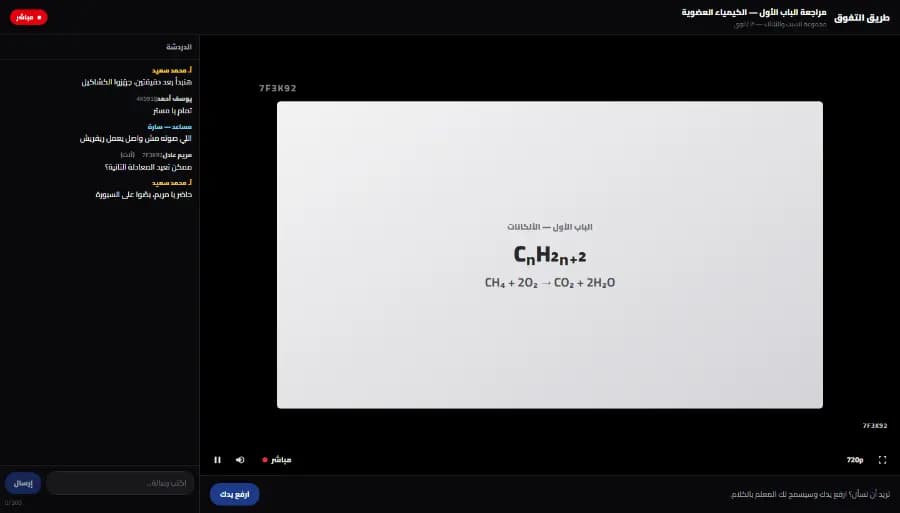
A live class on Snatr from the student's side: the teacher's explanation in the middle with a watermark showing a short code, the class chat on the side, and a raise-your-hand button below
The student's screen in a live class on Snatr, with no Zoom. The data shown is an illustrative example.

Run a tutoring center? Does Coursebox work for attendance, groups and parents?

No. Coursebox is built for courses and training, and has no branches, no QR card attendance and no parent portal. Snatr has all of this, along with online teaching, in one account.

In Snatr

  • Branches and groups with their schedules and seat limits, and an attendance sheet for every class.
  • Attendance with a printed QR card for each student, or manually.
  • Parents see their child's attendance and grades from a portal on your website.
  • Accounts for assistants and front-desk staff, and you choose which screens each one sees.

In ⁨Coursebox⁩

  • Student groups from Pro + LMS, with at most 20 groups on that plan.
  • Manual attendance for an event inside a group, which you download as a file that opens in Excel.
  • The five attendance methods in the help center include no QR and no branches.
  • A parent portal is not mentioned on their pages.
  • Anyone who edits courses or grades counts as an admin, at $100 a month.

Snatr has 4 ready-made permission presets: front desk, branch supervisor, academic assistant and full access. If you remove a permission from an assistant, it is removed instantly, without them signing out and back in.

Snatr's QR card carries a signed code that cannot be forged, and the assistant scans it at the door. But the card can be photographed and sent to someone else, so it is card attendance, not a fingerprint.

If you run a center and choose Coursebox, you will still need a notebook or another program for attendance and parents.

In short: The details are on Snatr's center management page.

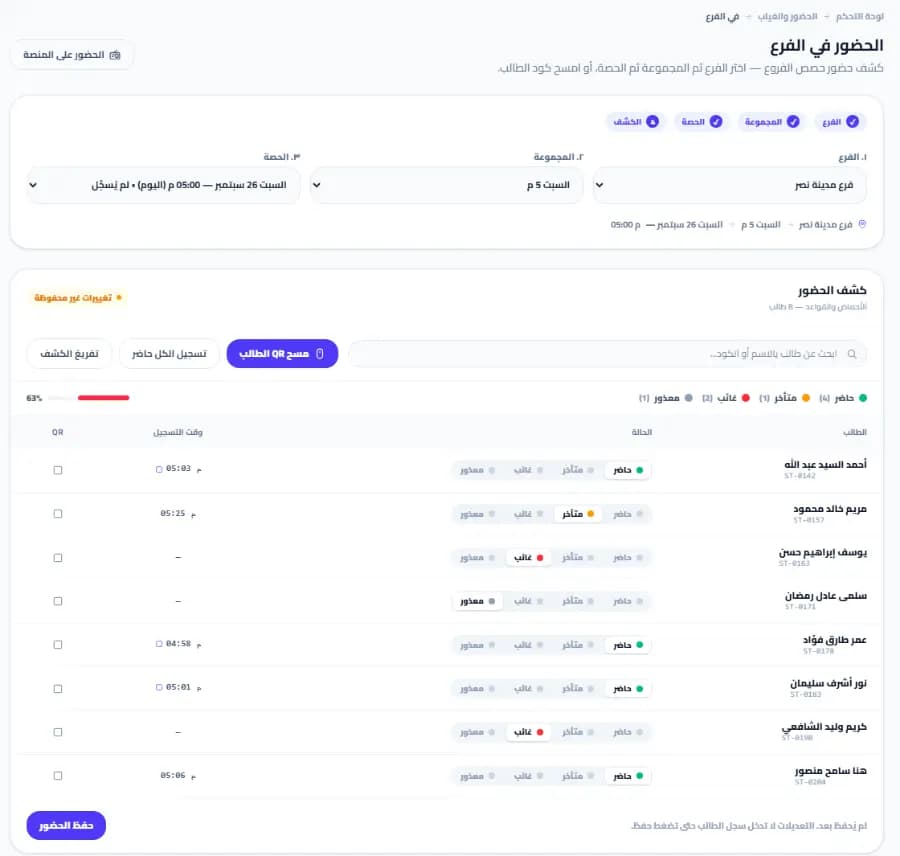
The branch attendance screen in the Snatr dashboard: branch, group and class selectors, an attendance sheet with student names and each one's status as present, late, absent or excused, and a button to scan a student's QR card
The branch attendance sheet in the Snatr dashboard. The data shown is an illustrative example.

A platform under your name: link, domain and app on Coursebox and Snatr

On Snatr, your website carries your name from the first plan, and a custom domain is on the Pro plan at 2,999 EGP. On Coursebox, your logo comes with Pro at $100, and your domain with Pro + LMS at $300. Coursebox has a mobile app, and Snatr does not.

In Snatr

  • Your platform starts on a site in your name.
  • A custom domain on the Pro plan: the Snatr team buys and connects it, and the first year is free.
  • 30 ready-made designs whose colors, text and images you edit with no code, and your first two designs are free.
  • No mobile app under your name: students open your platform in the phone's browser.

In ⁨Coursebox⁩

  • Your link is on coursebox.ai, and your own custom domain is on Pro + LMS and Enterprise only.
  • You buy the domain first from a company like GoDaddy, then connect it.
  • Your logo and colors on the platform from the Pro plan.
  • The Coursebox app on iOS and Android, where the student searches for your platform's name.
  • An app under your name is a paid add-on on Pro + LMS and Enterprise.

Coursebox says its team can connect the domain for you if you contact support. On Snatr, the custom domain is not available during the trial, and once it is connected, the old link redirects to it automatically and keeps your Google ranking.

Coursebox says a course needs internet even in the app, because grading and the AI assistant run online.

In short: Browse Snatr's designs before you choose; each design has a full preview.

Does Coursebox support Arabic? And is there support in Arabic?

Partly. Coursebox writes courses in Arabic, a course can be right to left, and its website has an Arabic version. But the help center is in English, and it does not say support is available in Arabic. Snatr is in Arabic from the dashboard to support.

In Snatr

  • The dashboard is built in Arabic, right to left, with English too.
  • Your website can be in Arabic, English or both.
  • Support in Arabic on WhatsApp and by email at support@snatr.com.

In ⁨Coursebox⁩

  • Courses are written in more than 100 languages, including Arabic.
  • You set right-to-left direction per course, page or section.
  • Changing the platform interface text is done with a JSON file, from the Pro plan.
  • The help center is in English, with support by email and a chat assistant, and video calls from Creator.

The language article in the Coursebox help center says Arabic is one of the course languages written right to left. But it does not say the dashboard is available in Arabic. Changing the interface text is done by editing a JSON file, and the article recommends getting help from someone with basic programming experience.

How to move from Coursebox to Snatr

  1. 1

    Try Snatr before you cancel anything

    Open your account on Snatr and use the 7-day free trial. Keep Coursebox running until you are sure everything has moved, because your Snatr website is closed when the trial ends without a subscription.

  2. 2

    Export your courses from Coursebox

    From the Share button on the course, download a PDF or HTML copy; this export is available from the Creator plan. The copy contains the text, questions, homework and images, but not the video, audio or interactive parts.

  3. 3

    Get your original videos ready and upload them

    Gather the original copies of your lesson videos on your computer, and upload them to Snatr so they get encrypted. If you have free lessons on YouTube, you can add their links instead of uploading them.

  4. 4

    Create your courses and exams in EGP

    Create each course with its lessons and exams, and move the questions over from the PDF file. Set each course's price in EGP, and remember that the online payment fee is added on top of your price, paid by the student.

  5. 5

    Enroll your current students

    Download your student list from the reports section in Coursebox. Enroll each student who already paid you in the course manually from the Snatr dashboard, with no commission, and send them your new platform link on WhatsApp.

  6. 6

    Cancel your Coursebox subscription

    Once your students are signing in to your new platform, cancel Coursebox from your account settings. Coursebox says it does not refund for a change of mind, so plan the move before your renewal date.

Snatr's limits, before you sign up

We list them up front so you decide knowing everything.

  • No AI: Snatr does not write the course or the questions, or make video with AI.
  • No permanent free plan: there is a 7-day free trial, and your website is closed when it ends without a subscription.
  • Each plan has a student limit: each extra student is charged to you once when they enroll, at the extra-student price, and sign-ups never stop.
  • No affiliate marketing: and no marketing emails. There are discount coupons and completion certificates, though.
  • No app under your name: students open your platform in the phone's browser.
  • Screen recording is not blocked: nor is a phone filming the screen. The watermark makes the student's name visible, but does not prevent it.
  • iPhone and iPad: video plays normally, but its protection is weaker against a technically skilled person.
  • Custom domain on the Pro plan only: and not available during the trial.
  • Plan changes go through support: not the dashboard.
  • Payment in EGP only: a student outside Egypt pays on Snatr with an international card; the amount is charged in EGP and their bank converts it. But there is no charging in dollars and no PayPal.

Frequently asked questions

Snatr or Coursebox: which is better for a teacher in Egypt?

Snatr is better for a teacher in Egypt whose students pay in EGP. It has Fawry and mobile wallets, live classes inside the platform, encrypted video showing the student's name, QR card attendance and a parent portal. Coursebox builds the course with AI, but payment on it is by card or PayPal, and it has no live classes or center management. Its cheapest plan with student groups is 300 dollars a month.

Coursebox AI review: is it really a good tool?

According to their website, it is rated 4.7 out of 5 on Capterra from 98 reviews, and many of the comments on their reviews page talk about how fast it builds a course. That really is its strongest point. For a teacher in Egypt, the problem is not the quality of the tool. The problem is that payment is by card or PayPal only, and there are no live classes, no stated video protection and no center management.

Where is Coursebox from, and is it trustworthy?

Coursebox is an Australian company called Coursebox Pty Ltd. It has a certificate of compliance with the European data protection law (GDPR), number 17412, says its ISO 27001 certification is still in progress, and that it does not currently hold SOC 2 certification. Your data is stored in France by default.

Can I use Coursebox and Snatr together?

You can. Build a course draft and questions on Coursebox with AI, export them as a PDF from the Creator plan, then create the course on Snatr, sell it in EGP and teach it yourself. But note that this way you pay two subscriptions.

Does Snatr take a percentage of my sales?

No. On Snatr, you receive your full price. If a student pays online, the payment fee is added on top of your price for them to pay, and is not deducted from you. A student who pays you cash is enrolled manually, with no commission.

If my students exceed my Snatr plan, will sign-ups close?

No, sign-ups do not close. Each extra student is charged once when they enroll, not every month, at your plan's extra-student price: 15 EGP on Starter, 10 EGP on Basic and 7 EGP on Pro.

Can I cancel my Coursebox subscription and get a refund?

You can cancel at any time from your account settings, with no contract. But Coursebox says it charges the subscription in advance and does not refund for a change of mind or because the tool does not suit you. After cancellation, your account stays active and your courses are not deleted.

If my students are outside Egypt, Snatr or Coursebox?

Snatr is the better choice if you have students both in Egypt and abroad. A student abroad pays with an international card, charged in EGP and converted by their bank, and students in Egypt pay by Fawry and wallets. What Snatr does not do is charge in dollars or through PayPal. Coursebox connects to Stripe and PayPal, with no Fawry or wallets.

Sources (30)

Every fact about ⁨Coursebox⁩ on this page comes from their official pages, checked on 7 October 2026. Prices and features change; if you find something out of date, tell us at support@snatr.com.