ComparisonLast reviewed: October 2026

Snatr vs Shater: a comparison for teachers and tutoring centers in Egypt (2026)

Snatr is the better choice for a teacher or a center in Egypt. Students pay by card, Fawry or wallet and the course opens automatically, with no receipts to check. Video is encrypted with the student's name on it, and you get a website in your name and 50 GB on the first plan at 999 EGP. Shater is a platform for running nurseries and centers from an Android app, and payment on it is a transfer receipt you approve by hand.

⁨Shater⁩

An Egyptian program for running nurseries and tutoring centers from a phone, with an Android app for the teacher, the student and the parent. Payment is by an InstaPay or Vodafone Cash transfer receipt.

Subscription for 100 students
500 EGP and 4 GB
How students pay
Transfer receipt, approved manually
Video protection
Details not stated
Website to sell courses
Not stated

Snatr and ⁨Shater⁩ in one table

We compared 20 things that matter to a teacher or a center, and the table shows which platform does each one better.

3

about even

7

only in ⁨Shater⁩

Swipe the table sideways to see every column.

What we comparedSnatr⁨Shater⁩
Price and money
Subscription for 100 students with 50 GB of video
999 EGPStarter, with online payment and your website
500 EGP with 4 GBThe first plan with 50 GB is Enterprise at 1,999
Students pay by card, Fawry and wallets
AvailableCard, Fawry and wallets such as Vodafone Cash
Transfer with a receiptInstaPay and Vodafone Cash; card and Fawry are not mentioned
Payment confirmed without checking receipts
AutomaticallyThrough the payment gateway, and the student gets into the course right away
Manual approvalThe teacher or center approves each receipt
Money reaches you with no wait
After 7 daysA current safety period, then you withdraw
Right awayThe student transfers directly to your number
Video and protection
Video encryption against download tools
Full encryptionExtensions and yt-dlp fail, and the measurement is published
Not statedIt says "secure viewing" with no details
Watermark with the student's name
AvailableIt moves across the video
Not stated
Limit on devices playing the video
One device at a timeSigning in on a new device signs out the old one
Not stated
Video storage on the first plan
50 GBAnd 300 on Pro
4 GBAnd 10 on Professional, and 50 on Enterprise
Live classes and exams
Live classes inside the platform
On the Pro planChat, hand raising and mic, with attendance recorded automatically
A Jitsi meetingInside the app, plus Zoom, from the Professional plan
Certificates for students
Completion certificatesPrintable, with a QR check
Certificates of meritThe teacher issues them, and the student and parent see them
Centers and parents
Attendance by QR card
AvailableA printed, signed card, or a manual register
AvailableThe teacher scans from the app and prints cards for all students
Branches and groups on every plan
AvailableSchedules and seat limits for each group
GroupsMultiple branches are on the Enterprise plan
Parents follow along from iPhone or Android
From the browserA portal on your website, with no app
Android appAnd their guide says iOS "may be added later"
Alerts and chat with parents
Not availableThe parent sees absences when they open their portal
AvailableInstant notifications and chat with the teacher
Cash box and accounts for the center
Not availableOnly online payments are recorded automatically
AvailableA cash box, reports and a list of late payers
More than one teacher in the same account
Not available
Available3 on Starter, and 50 on Enterprise
A dedicated nursery mode
Not available
AvailableA daily report for each child and safe pickup
Your platform, your name
A website under your name to sell courses
30 designsReady from day one, with a custom domain on Pro
Not statedThere is a "your center's link" with no details
A mobile app
NoneYour platform opens in the phone's browser
AndroidAn APK file for the teacher, the student and the parent
Language and support
Published user guide and API
Not availableSupport in Arabic on WhatsApp and email
AvailableA 13-chapter guide in Arabic and English, and a REST API

Snatr or ⁨Shater⁩?

Choose ⁨Shater⁩ if

  • you run a nursery or a Kids Area and need daily reports and safe pickup for children.
  • you run a center with many teachers sharing one cash box, and you do not sell courses online.
  • your work is all attendance and groups, you upload no videos and need no online payment.
  • all your parents are on Android and expect alerts and chat with the teacher.
  • you have a programmer and want to connect your software through a published API.
On this page
  1. What is Shater, and who is it for?
  2. How much is Shater, and what do you get in a Snatr subscription?
  3. Does Shater accept payment in EGP, Fawry and mobile wallets?
  4. Video protection on Shater and Snatr: which one stops downloading?
  5. Does Shater have live classes and online exams?
  6. Shater or Snatr for running a center or a nursery?
  7. Parent follow-up: the Shater app or the Snatr portal?
  8. A platform under your name to sell courses: Shater or Snatr?
  9. User guide, API and support on Shater and Snatr
  10. How to move from Shater to Snatr
  11. Snatr's limits, before you sign up
  12. Frequently asked questions

What is Shater, and who is it for?

Shater, at shater.net, is an online platform for running nurseries, kindergartens and tutoring centers. It describes itself as "an education platform for nurseries and education centers in Egypt and the region". The address on its website is in Cairo, and its prices are in EGP.

The nursery comes first on their website. It has classes, a daily report for each child covering mood, meals, naps and activities, attendance for caregivers, and a record of who picked the child up. Beside it is a mode for tutoring centers with scheduled groups, QR attendance, exams and homework, a cash box, and chat between the teacher, the student and the parent.

Shater works mainly through a mobile app for the manager, the teacher, the secretary, the student and the parent. The app is downloaded as an Android APK file from their website, and their guide says an iOS version "may be added later". It also has a complete Quran for free memorization, and a plan for children's play areas (Kids Area).

Payment on Shater is by receipt. The student or parent transfers by InstaPay or Vodafone Cash, uploads a photo of the receipt, and the teacher or center approves it. Their pages show no card or Fawry payment, and no sales page for your courses under your name.

Snatr, at snatr.com, is built for the teacher who teaches in a tutoring center and sells their lessons online at the same time. It has a website under your name, courses with encrypted video, online payment in EGP and live classes. Alongside them are branches, QR card attendance and a parent portal, in one account. If you are comparing Snatr with other platforms, see all Snatr comparisons.
How much is Shater, and what do you get in a Snatr subscription?

Shater is 500 EGP a month for 100 students and 4 GB, and students pay with a transfer receipt. Snatr is 999 EGP for the same number, with 50 GB, online payment confirmed automatically, encrypted video and a website in your name.

In Snatr

  • Starter: 999 EGP a month, 100 students, 50 GB, and 15 EGP per extra student.
  • Basic: 1,999 EGP, 200 students, 150 GB, and 10 EGP per extra student.
  • Pro: 2,999 EGP, 400 students, 300 GB, 7 per extra student, plus live classes and a custom domain.
  • A 7-day free trial, and no setup fee.
  • Enrollment does not stop if they go over, and a branch student with no online enrollment does not count toward the plan.

In ⁨Shater⁩

  • Starter: 500 EGP a month, 100 students, 3 teachers, 4 GB. The listed previous price is 600.
  • Professional: 1,299 EGP a month, 500 students, 10 teachers, 10 GB.
  • Enterprise: 1,999 EGP on the trial page, unlimited students, 50 teachers, 50 GB.
  • Extra students at 10, 6 or 4 EGP depending on the plan.
  • A 14-day free trial with no card, and a year paid upfront at the price of 10 months.

Example: a teacher with 100 students paying 300 EGP a month

On Snatr 29,001 EGP reaches you without checking a single receipt, with 50 GB instead of 4

Snatr (Starter)Shater (Starter)
Your monthly sales30,000 EGP30,000 EGP
Platform subscription999 EGP500 EGP
How students payCard, Fawry or wallet, and payment is confirmed automaticallyInstaPay or Vodafone Cash transfer, and you approve each receipt
Receipts you check by hand each monthNone100 receipts
Video storage50 GB4 GB
What you get each month29,001 EGP29,500 EGP

Prices are from the Shater and Snatr pages on 7 October 2026, all in EGP. On Snatr, a student who pays online pays the payment fee on top of the 300 EGP, so if you want them to pay exactly 300, set your price a little lower. On Shater the money reaches your number, and each payment needs you to approve its receipt.

Same number of students or same storageSnatrShater
100 students999 EGP, with 50 GB500 EGP, with 4 GB
400 students2,999 EGP (Pro), with 300 GB1,299 EGP (Professional), with 10 GB
Cheapest plan with 50 GB999 EGP (Starter)1,999 EGP (Enterprise)

These prices are from Shater's home page and trial page on 7 October 2026. The trial page also has a "Growth" plan for centers at 800 EGP a month, whose limits are not published. The Enterprise card on the home page says "by agreement". There are separate nursery plans at 500, 999 and 1,299 EGP, for 100, 250 and 500 children.

The biggest difference is storage. Shater's first plan has 4 GB, and Professional has 10. The cheapest Shater plan with 50 GB is Enterprise, at 1,999 EGP according to the trial page. The price of extra storage on Shater is not published. On Snatr, 50 GB comes with the first plan at 999.

On Snatr you get your price in full, and a student who pays online pays the payment fee on top of your price. On Shater the student transfers directly to your own number. See Snatr's pricing in detail.

In short: If you upload your lessons and sell them online, Snatr's storage and payments will make a difference for you: 50 GB from the first plan, and the student pays and the course opens without you checking a receipt.

Does Shater accept payment in EGP, Fawry and mobile wallets?

Shater accepts EGP by InstaPay or Vodafone Cash transfer: the student uploads a photo of the receipt and you approve it. Card and Fawry are not mentioned. On Snatr, students pay by card, Fawry or wallets, and payment is confirmed automatically.

In Snatr

  • Students pay in EGP by card, Visa and Mastercard.
  • Fawry: the student gets a code and pays it at any Fawry outlet within 24 hours.
  • Mobile wallets such as Vodafone Cash.
  • Payment is confirmed automatically by the payment gateway, and the student gets into the course without you checking anything.
  • The money goes into your wallet, and you withdraw it to Vodafone Cash, InstaPay or a bank.

In ⁨Shater⁩

  • The student or parent transfers to the center's InstaPay or Vodafone Cash number.
  • They upload a photo of the receipt from the app, and the teacher or center approves it.
  • The money reaches you right away, with no middleman and no waiting period.
  • Card and Fawry are not mentioned on any of their pages.
  • A record of all payments, and a list of students who are late paying.

Shater's home page says "receipt upload and manual approval". So with 100 students paying every month, you will open 100 receipts and approve them. If a payment is rejected, their guide tells the student to make sure the receipt photo is clear and the amount is right, and to contact the teacher with the transaction number.

On Snatr, money becomes available to withdraw after a safety period that is currently 7 days, and the minimum withdrawal is currently 100 EGP. You do not need to open an account with any payment company. A student who paid you cash at the center is enrolled manually by you, with no commission.

On Shater the money reaches your number right away, but only after you check the receipt. Snatr saves you from checking receipts, and accepts the student who has neither InstaPay nor a wallet, because they can pay cash at a Fawry outlet.

Video protection on Shater and Snatr: which one stops downloading?

Snatr encrypts the video file itself, so download tools fail, and this is measured. Shater's pages say "watch recorded lessons securely" without details, and do not mention file encryption or a watermark.

In Snatr

  • Uploaded video is encrypted, and its key goes to the browser's decryption module, not to the page.
  • Downloader extensions, "paste the link and download" sites and yt-dlp cannot download it.
  • A watermark that moves across the video and shows the student's name.
  • A student is signed in on one device at a time: signing in on a new device signs the old one out.
  • Storage is 50 GB on Starter, 150 on Basic and 300 on Pro.

In ⁨Shater⁩

  • The home page says "watch recorded lessons securely", without explaining how.
  • PDF files open in a protected viewer inside the app.
  • Video file encryption and a watermark with the student's name are not mentioned.
  • Storage is 4 GB on Starter, 10 on Professional and 50 on Enterprise.

At Snatr we measured the protection. Without the key, the file comes out as noise, with a similarity to the original of only 10.6 dB. With the key it comes out intact at 59.9 dB, and the higher the number, the closer the picture is to the original. Shater has not published any measurement like this.

On iPhone and iPad, video on Snatr plays normally, and ready-made download tools fail there too. But the protection on them is somewhat weaker against a technically skilled person. This protection covers video you upload: a YouTube link in a lesson stays an ordinary YouTube video.

Screen recording is not blocked on Snatr, nor is a phone filming the screen. The watermark deters, because the student's name shows on the recording, but it is not proof. Learn the details of video protection on Snatr.

Does Shater have live classes and online exams?

Yes, both have online classes and auto-graded exams. Shater runs the class as a video meeting inside its app, and Snatr has live classes inside your own platform on the Pro plan, with chat, hand raising and mic.

In Snatr

  • Streaming from inside your platform, with no Zoom or Google Meet, with chat and hand raising.
  • You can give a student the mic, and assistants can manage the mics, the chat and who gets in.
  • Class attendance is recorded automatically: present or late.
  • Auto-graded exams and homework, with the grade shown to the student and the parent.
  • A printable completion certificate, with a QR code that opens a verification page on your site.

In ⁨Shater⁩

  • The teacher schedules a meeting, and the student joins a Jitsi room inside the app.
  • "Live sessions and Zoom" are listed in the features of the Professional and Enterprise plans.
  • Multiple choice or written exams, with automatic or manual grading.
  • A student gets one attempt at each quiz, and the teacher can reopen it for them.
  • Certificates of merit issued by the teacher, and one-to-one classes booked by the student or parent.

Jitsi is a video meeting program like Zoom. Shater's guide says joining happens inside the app for security and attendance recording. A one-to-one class on Shater starts with a request from the student or parent, the teacher approves, and then the join link appears.

Recording a class on Snatr is a feature you switch on, and when it runs, the recording is added to the student group. Live streaming is not encrypted like uploaded video: it carries a watermark and a temporary link, and screen recording works.

In short: If certificates matter to your students, both have them: Shater has certificates of merit issued by the teacher, and Snatr has completion certificates with a QR code for verification. If you teach live classes to large groups, live streaming on Snatr gives you the mic, the chat and moderators in one place.

Shater or Snatr for running a center or a nursery?

Snatr is built for teachers and centers, not nurseries, and Shater has a nursery mode. At a center, both have groups, QR attendance and front desk staff. Shater has a cash box and multiple teachers, and Snatr has branches on every plan along with online sales and payments confirmed automatically.

In Snatr

  • Branches and groups with their schedules and each group's seat limit, on every plan.
  • Attendance by a printed, signed QR card for each student, or a manual register.
  • Assistants and front desk staff with their own accounts, and 4 ready-made permission presets.
  • A center student does not need an email or an online account.
  • No cash box or expense accounts, and one teacher on the platform.

In ⁨Shater⁩

  • Groups with a capacity and a price for each, and a recurring weekly schedule.
  • The teacher scans the student's QR from the app, and prints QR cards for all students.
  • A cash box, payments and reports, and a list of late payers.
  • 3 teachers on Starter, 10 on Professional and 50 on Enterprise.
  • A secretary with permissions the teacher sets, and multiple branches on the Enterprise plan.

Shater's nursery mode has classes instead of groups, and a daily report for each child covering mood, meals, naps and activities. Caregivers record their arrival and departure by QR. There is a list of people allowed to pick up the child, and an optional ID photo at pickup. The parent reads the report in the app after the caregiver publishes it. Snatr has none of this.

A Snatr QR card carries a signed code that cannot be forged, and an assistant scans it from the dashboard on a phone or a computer. But the card can be photographed and sent to someone else, so this is attendance by card, not by fingerprint. Scanning needs an internet connection.

On Shater, a secretary gets permissions such as payments only or attendance only. On Snatr, the four presets are front desk, branch supervisor, academic assistant and full access. If you remove a permission from an assistant, it is removed at that moment, without them having to sign out and back in.

A cash box and multiple teachers in one account are in Shater, and not in Snatr. But if you are a teacher who teaches at the center and sells online, Snatr brings both together in one account, and the student pays and the course opens automatically.

In short: See center management on Snatr: branches, groups, attendance and assistants. If you are comparing center software, also see Snatr vs TGO, Snatr vs Daftra and Snatr vs DEXEF.

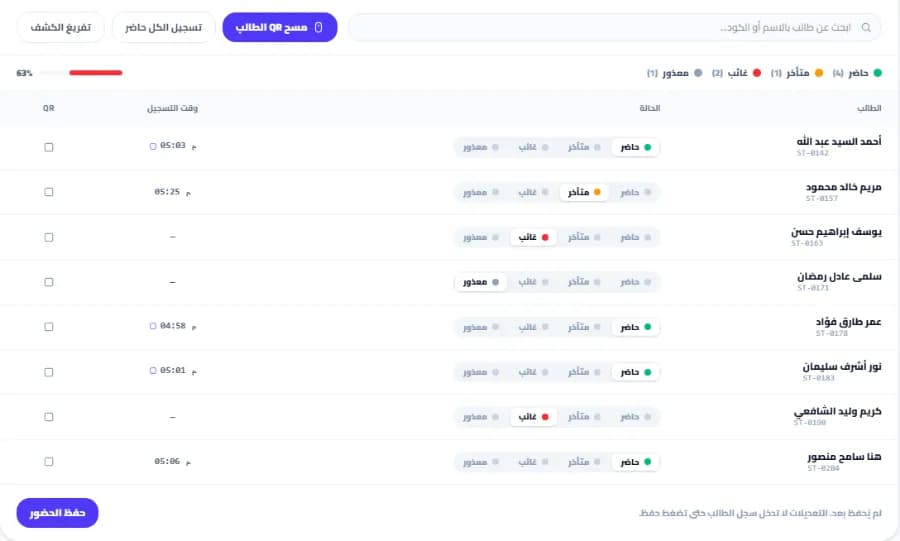
A session attendance register for a center on Snatr, with a button to scan a student's QR card, each student's status as present, late, absent or excused, the time recorded, and an attendance rate of 63%
A session attendance register at a branch on Snatr. The data shown is an illustrative example.

Parent follow-up: the Shater app or the Snatr portal?

Shater gives the parent an Android app with instant alerts and chat with the teacher. Snatr gives them a portal on your website that they open from any phone, even an iPhone, but with no alerts and no chat.

In Snatr

  • A portal on your own website, which they enter with a password you set.
  • It opens in any phone's browser, iPhone or Android, without installing anything.
  • They see their child's attendance at the branch and in live classes, in one place.
  • They see grades and payments, if their child is enrolled in your online courses.
  • No alerts reach their phone, and there is no chat with the teacher.

In ⁨Shater⁩

  • A parent app downloaded as an Android APK file from their website.
  • Instant alerts for attendance, homework, payments and nursery reports.
  • Chat with the teacher, and a parent group for each class.
  • They pay fees, book private classes and see certificates from the app.
  • Their guide says an iOS version "may be added later".

Shater's Starter plan description includes "WhatsApp notifications". The Enterprise plan has group messages to all parents, and a map of the student's location if they share it. These are communication tools Snatr does not have.

Each Shater plan has a limit on the number of linked parents: 150 on Starter, 1,000 on Professional and 20,000 on Enterprise. Shater's guide says parents use the app, with no web dashboard. So if many of your parents have iPhones, ask Shater before you subscribe: where will they follow along?

On Snatr, the notifications page in the portal shows the days the child was absent or late at the center, but no message reaches the parent on its own.

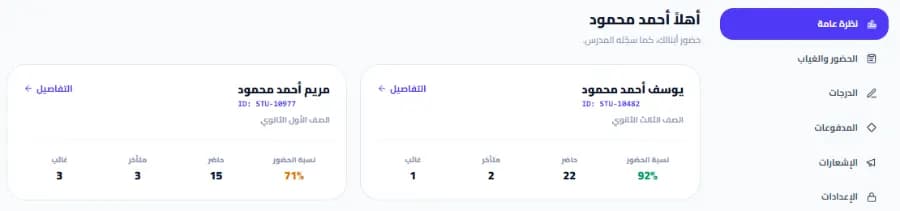
The parent portal on a teacher's Snatr website: a card for each child with their attendance rate and the number of times present, late and absent, and a side menu with attendance, absences, grades, payments and notifications
The parent portal on the teacher's Snatr website, which opens in any phone's browser. The data shown is an illustrative example.

A platform under your name to sell courses: Shater or Snatr?

Snatr gives you a website under your name with 30 designs, where students buy your courses and pay online. Shater gives you an account for your center inside the "Shater Net" app, and a website or design under your name is not mentioned on its pages.

In Snatr

  • Your platform starts on a site in your name.
  • 30 ready-made designs where you edit the text, colors and images without code, and your first two designs are free.
  • A custom domain such as mybrand.com on the Pro plan, and the Snatr team buys it and connects it.
  • Your website can be in Arabic, English or both.
  • No mobile app under your name. Students open your platform in the phone's browser.

In ⁨Shater⁩

  • Students and parents use the "Shater Net" app, and students also have a web portal.
  • Students and parents sign up themselves, and the center adds the teachers.
  • Parents find you by searching by city, according to the trial page.
  • A website under your name, designs or a custom domain are not mentioned.

This difference shows if you sell your lessons to students who do not know you from the center. On Snatr, a new student opens your website link, sees your courses and their prices, pays, and starts watching. On Shater, the student creates an account in the app or on the website, then books a place in your group and uploads a receipt.

On Snatr, a custom domain is not available during the trial, and its first year is free with the plan. Once it is connected, the old link redirects to it automatically, along with your Google ranking. Browse Snatr's designs.

Shater has an Android app for the teacher, the student and the parent, and Snatr has no app, but your platform opens in the browser of any phone, iPhone or Android.

User guide, API and support on Shater and Snatr

Shater has a 13-chapter user guide in Arabic and English, explainer videos, and published API documentation for developers. Snatr has no published guide and no API, and support is in Arabic on WhatsApp and email.

In Snatr

  • An Arabic right-to-left dashboard, also available in English.
  • Support in Arabic on WhatsApp and by email at support@snatr.com.
  • No user guide published on the website, and no API for developers.
  • A 7-day free trial you start yourself, and your website closes when it ends without a subscription.

In ⁨Shater⁩

  • A 13-chapter guide in Arabic and English, for the parent, the student, the teacher and the nursery.
  • 4 explainer videos on signing in, one for each role.
  • A REST API published on the developers page, with access tokens for apps.
  • The website, dashboards and app in right-to-left Arabic, and in English.
  • A 14-day free trial with no card, which starts in about a minute.

An API is a way a programmer connects another program to Shater, such as your own app. That is useful if you have a programmer, and most teachers will not need it.

Shater's guide explains step by step things like how a parent links their child, and how a student submits homework. On Snatr you would ask support on WhatsApp or by email.

How to move from Shater to Snatr

  1. 1

    Try Snatr before you cancel anything

    Open your Snatr account and use the 7-day free trial. Keep Shater running until you are sure everything has moved. Note that your Snatr website closes when the trial ends without a subscription.

  2. 2

    Take a copy of your students' data

    Export the attendance and grade reports you need from Shater, and prepare a list of your students, their groups and their parents. Snatr has no Excel import, so you will add them from the dashboard, and the list will make the work easier.

  3. 3

    Create your branches and groups and print the cards

    Create each branch and its groups with their schedules and seat limits, and add the students to them. Then print a QR card for each student from Snatr, because Shater's cards will not work on it.

  4. 4

    Open accounts for assistants and parents

    Open an account for each assistant or secretary and choose a permission preset for them. Create an account for each parent with a password, link it to their children, and send them the link to their portal on your website. Tell them they will follow along from the browser instead of the app.

  5. 5

    Upload your lessons and build your courses

    Upload the original copies of your videos to Snatr so they are encrypted, or add a YouTube link for free lessons. Set each course's price in EGP, and enroll any student who already paid you manually, with no commission.

  6. 6

    Cancel Shater before the renewal date

    Once your students and their parents start using Snatr, cancel your Shater subscription. Their page says you can cancel at any time, so do it before a new period renews.

Snatr's limits, before you sign up

We list them up front so you decide knowing everything.

  • Not built for nurseries: there is no daily report for each child, no caregiver attendance and no record of who picked the child up.
  • No alerts or chat with parents: no WhatsApp, SMS or notifications reach them automatically. The parent follows along from their portal on your website.
  • No cash box or center accounts: Snatr does not track center expenses or late payers. Only online payments are recorded automatically.
  • One teacher on the platform: there is no way to have several teachers with split earnings in the same account.
  • No mobile app: your platform opens in the phone's browser, and there is no app on Google Play or the App Store.
  • No plan below 999 EGP: the first plan is for 100 students, and it includes 50 GB, online payment and encrypted video.
  • Money waits for a safety period: currently 7 days before you can withdraw it.
  • A 7-day free trial: with no card. And there is no published user guide or API for developers.
  • Screen recording is not blocked: nor is a phone filming the screen. The watermark puts the student's name on the recording, which deters, but it is not proof.
  • Custom domain on the Pro plan only: and not available during the trial. Changing plans goes through support.

Frequently asked questions

Snatr or Shater: which is better for a teacher in Egypt?

Snatr is better for a teacher or a center in Egypt. Students pay by card, Fawry or wallet and payment is confirmed automatically, and video is encrypted with the student's name on it. You get a website in your name and 50 GB from 999 EGP, along with branches, QR attendance and a parent portal. Shater's subscription starts at 500 EGP for 100 students and 4 GB, and students pay with a transfer receipt you approve by hand.

Is Shater Egyptian?

The address on Shater's website is in Cairo, its contact number is Egyptian, and its prices are in EGP. It says it is for nurseries and education centers in Egypt and the region. Snatr is also built for Egyptian teachers, and its prices are in EGP.

Does Shater have an iPhone app?

As of 7 October 2026, Shater's website offers an Android APK file, and their guide says an iOS version "may be added later". Snatr has no app at all, but your platform and the parent portal open in any phone's browser, iPhone or Android.

Is there a free trial on Shater and on Snatr?

Yes, on both. Shater has a 14-day trial with no card, and you choose the plan as you sign up. Snatr has a 7-day trial you start yourself, and your website closes when it ends without a subscription.

Does Snatr work for a nursery?

No. Snatr is built for teachers and tutoring centers: courses, video, exams, live classes, branches, attendance and a parent portal. It has no daily report for each child, no caregiver attendance and no record of who picked the child up. If you run a nursery, Shater is built for that work, and its nursery plans start at 500 EGP a month for 100 children.

Does Shater have Quran memorization?

Yes. The Shater app has a complete Quran, more than 280 reciters, memorization tracking and offline reading. Their home page says this part is currently free for all users. Snatr has nothing like it.

Does Snatr take a share of my sales?

No. On Snatr you get your price in full. If a student pays online, the payment fee is added on top of your price for the student, and is not deducted from you. A student who pays you cash is enrolled manually by you with no commission.

If my students exceed my plan, does enrollment stop?

Not on Snatr. A new student enrolls as normal, and you pay for each extra student 15 EGP on Starter, 10 on Basic and 7 on Pro. On Shater each plan lists a price per additional student: 10 EGP on Starter, 6 on Professional and 4 on Enterprise.

Can I use Shater and Snatr together?

You can, but you will pay two subscriptions and record student attendance in two places. If you run a nursery on Shater and online courses on Snatr, keeping them separate makes sense. But if both are for the same center students, Snatr alone has attendance, branches and the parent portal, and one platform is easier for you and your students.

What does Shater have that Snatr does not?

Nursery mode with daily reports and safe pickup, an Android app for the teacher, the student and the parent, and instant alerts and chat. Also a cash box and center accounts, more than one teacher in the account, a published user guide, an API for developers, and a 14-day free trial.

Sources (8)

Every fact about ⁨Shater⁩ on this page comes from their official pages, checked on 7 October 2026. Prices and features change; if you find something out of date, tell us at support@snatr.com.