ComparisonLast reviewed: October 2026

Snatr vs Koshoof: A Comparison for Teachers and Tutoring Centers in Egypt (2026)

Snatr is the better choice for a teacher or a center owner in Egypt. It has QR card attendance, branches and a parent portal, plus a website in your name and courses with encrypted video. Students pay from home by Fawry, mobile wallets or card, and its prices are published from 999 EGP. Koshoof is a Windows program for the center that works offline on your laptop, its price is not published, and online teaching is not stated on its pages.

⁨Koshoof⁩

A Windows program for running a tutoring center that works offline: attendance by a rotating QR code with GPS, subscription accounts, and Telegram messages to parents.

Subscription
Price not published
Your data from any device
On your device only
Students pay you online
Not stated
Online
A Windows program for the center only

Snatr and ⁨Koshoof⁩ in one table

We compared 19 things that matter to a teacher or a center, and the table shows which platform does each one better.

2

about even

6

only in ⁨Koshoof⁩

Swipe the table sideways to see every column.

What we comparedSnatr⁨Koshoof⁩
Price and money
Prices published on the website
All publishedFrom 999 EGP a month
Not publishedNo pricing page, contact is on WhatsApp
Free trial
7 daysYou sign up and start on your own
AvailableYou request it on WhatsApp, length not stated
Students pay online by Fawry and mobile wallets
AvailableAnd by card, and you withdraw to Vodafone Cash or InstaPay
Not statedIt records money collected at the center
Center accounts and overdue payments
Not availableOnly online payments are recorded automatically
AvailableMonthly subscription, session bundles and single sessions
Video and protection
Video encrypted against download tools
EncryptionPlus a watermark with the student's name, and the measurement is published
Not statedNo courses or video on its pages
Live classes and exams
Live classes inside the platform
On the Pro planChat, raised hands and mic, and attendance is recorded automatically
Not stated
Online exams that grade themselves
AvailableAnd the grade reaches the parent
Not statedIt records grades from center exams
Recording grades from paper exams at the center
Not availableGrades come from platform exams only
AvailableAnd the grade is sent to the parent
Centers and parents
QR attendance
Printed cardSigned for each student, or a manual register
Code on the laptopThe student scans it with their phone
Stopping attendance by proxy
Signed cardA photo of the card can be sent to someone else
Rotating code and GPSEvery 5 minutes, according to its pages
A student without a phone
Attends with the cardNo phone or email needed
Not statedThe method described needs the student's phone
Working offline
Needs internetScanning the card and saving the register happen online
AvailableInternet only for the license and Telegram messages
Your data is not tied to one device
From any browserPhone or computer, and nothing is lost if a device breaks
On your device onlyAnd backups are your responsibility, according to its terms
Branches and groups with schedules
Branches and groupsAnd a number of seats for each group
GroupsAnd levels with schedules, branches not stated
Automatic messages to parents
Not availableThey see absences when they open their portal
On TelegramAttendance, absence, payment and grades
A parent portal with the full record
On your siteCenter attendance, live classes and platform grades
Not statedFollow-up is by Telegram messages
Assistants with permissions
4 presetsAnd a permission is removed instantly
AssistantsPermissions not stated
Your platform, your name
A site in your name to sell your courses
AvailableWith 30 designs
Not a websiteIt says it is not a website or a cloud app
Language and support
Importing students from Excel
Not availableYou add them from the dashboard
AvailableNames, phone numbers and parents

Snatr or ⁨Koshoof⁩?

Choose ⁨Koshoof⁩ if

  • all you need is software for the center on your laptop, and you do not plan to teach online.
  • the internet at your center is weak, and all your students attend in the room only.
  • your students pay cash at the door, and you do not need to collect from them online.
  • the parents at your center use Telegram, and all your students have phones with GPS.
On this page
  1. What is Koshoof, and who is it for?
  2. How much does Koshoof cost, and what do you get in a Snatr subscription?
  3. Does Koshoof accept payment in EGP, by Fawry and mobile wallets?
  4. Does Koshoof have an online platform and video protected from downloads?
  5. Exams, grades and live classes: Koshoof or Snatr?
  6. Koshoof or Snatr for running a tutoring center?
  7. Koshoof works offline and Snatr needs internet: does that difference matter to you?
  8. Parent follow-up: Telegram messages or a portal on your site?
  9. How do you get started with Koshoof and with Snatr, and who helps you?
  10. How to move from Koshoof to Snatr
  11. Snatr's limits, before you sign up
  12. Frequently asked questions

What is Koshoof, and who is it for?

Koshoof is a program for managing tutoring centers and private lesson groups, at koshoofos.me. It presents itself as an "administrative system" for private tutors and centers. You contact it on WhatsApp through an Egyptian number, and the footer of its website says "Arab Republic of Egypt".

Although its website calls it "the Koshoof platform", it is not a website. It is a Windows app installed on the teacher's laptop, and all student data is saved on that device. Its website says it works offline, and the internet is needed only for the license and for Telegram messages.

Koshoof's real strength is inside the center. The teacher shows a QR code on the laptop screen, and the student scans it with their phone. The code changes every 5 minutes, and GPS rejects any check-in from outside the room. It also has accounts for monthly subscriptions, session bundles and overdue payments, and Telegram messages to the parent with every attendance or payment.

What Koshoof's pages do not mention is the whole online side: courses, video, live classes and online payment for students. No prices are published, and the free trial is requested on WhatsApp. Koshoof says "hundreds of teachers" have replaced paper and Excel with it, and that figure comes from Koshoof itself.

Snatr, at snatr.com, is one platform that has the center and online teaching together. It gives you a site in your name, courses with encrypted video, online payment in EGP, live classes, branches and QR card attendance, and a parent portal. If you are comparing Snatr with other programs and platforms, see all Snatr comparisons.
How much does Koshoof cost, and what do you get in a Snatr subscription?

Koshoof does not publish its prices, and the trial is requested on WhatsApp. Snatr's prices are all published: from 999 EGP a month for 100 students, covering the center and the online platform together, with no setup fee.

In Snatr

  • Starter: 999 EGP a month, 100 students, 50 GB, and an extra student costs 15 EGP.
  • Basic: 1,999 EGP, 200 students, 150 GB, and an extra student costs 10 EGP.
  • Pro: 2,999 EGP, 400 students, 300 GB, an extra student costs 7 EGP, plus live classes and a custom domain.
  • A 7-day free trial you start yourself, and no setup fee.
  • The center, the online platform and online payment in the same subscription.

In ⁨Koshoof⁩

  • No pricing page, and the price is not stated on any of its pages.
  • The "Start your free trial" button opens a WhatsApp chat, and the trial length is not stated.
  • There is a "trial session" that you also request on WhatsApp.
  • The license is for the subscribing teacher or center, and you may not share it with another center.
  • The terms mention a "subscription account", but its length and payment method are not stated.

Example: a teacher with 100 students at the center, 40 of whom bought an online course from them for 300 EGP

Snatr: 999 EGP a month for the center and online, and the 12,000 EGP reaches you in full

Snatr (Starter)Koshoof
Attendance and groups for the 100 studentsIncluded in the subscriptionIncluded in the program
Cash subscription accounts and overdue paymentsNot availableIncluded in the program
Parent follow-upA portal without messagesAutomatic Telegram messages
Selling the course to the 40 students onlineFrom your platform, by Fawry, wallets and cardNot stated, needs another platform
What reaches your wallet from the courseThe full 12,000 EGPDepends on the other platform
What you pay a month, from published prices999 EGPKoshoof's price not published + another platform

Only the 40 who enrolled in the course count toward Snatr's plan; the 60 who only attend the center do not. Even if all 100 enrolled online, you would be within the Starter plan with no extra students. The online payment fee is added for the student on top of the 300 EGP, so the 12,000 reaches your wallet in full.

We read all of Koshoof's pages on 7 October 2026: the home page, QR attendance, accounts, the two comparisons with Excel and paper, privacy and terms. None of them shows a price or a number of students per subscription.

In Snatr, if your students go beyond your plan, registration does not stop. Each extra student is charged once when they join, at your plan's extra-student price, not every month. A student counts only once enrolled in a course or a group on the platform, so a center student who only attends a branch with no online enrollment does not count.

And in Snatr your price reaches you in full. A student who pays online pays the payment fee on top of your price. A student who paid you cash for an online course is recorded manually with no fee at all. See Snatr's pricing in detail.

In short: Before you compare, ask Koshoof for the price in writing, and ask: is it monthly, yearly or one-time? Is there a limit on the number of students or devices?

Does Koshoof accept payment in EGP, by Fawry and mobile wallets?

Koshoof records the cash collected at the center in EGP and tracks overdue payments. But its pages do not say that students can pay online by Fawry, mobile wallets or card. In Snatr students pay online, but there are no accounts for center cash.

In Snatr

  • Students pay in EGP by card, Visa and Mastercard.
  • Fawry: the student gets a code and pays it at any Fawry outlet within 24 hours.
  • Mobile wallets such as Vodafone Cash.
  • The money goes into your wallet, and you withdraw it to Vodafone Cash, InstaPay or the bank.
  • No tracking of cash center subscriptions or overdue payments.

In ⁨Koshoof⁩

  • Online payment by students is not stated on any of its pages.
  • A monthly subscription per student, or a bundle of 4 or 8 sessions with one session deducted per attendance.
  • A single session for a guest student without a full subscription.
  • An alert for students with overdue payments at the attendance scan, and reports on income, expenses and net profit.
  • A payment receipt and an overdue reminder reach the parent on Telegram.

Cash center accounts are in Koshoof, and not in Snatr. If your students pay cash at the door by the month or by the session, Koshoof tells you who paid and who is late as it scans attendance. In return, on Snatr the student pays online from home, and the course opens automatically.

In Snatr, money paid online becomes available to withdraw after a holding period, currently 7 days, and the minimum withdrawal is currently 100 EGP. You do not need to open an account with any payment company.

In short: If you have students outside the center, in another governorate for example, ask Koshoof before you subscribe: how will this student pay me? In Snatr they pay from home by Fawry, Vodafone Cash or card.

Does Koshoof have an online platform and video protected from downloads?

No. Koshoof describes itself as "not a website and not a cloud application", and its pages do not mention courses or video. Snatr gives you a site in your name to sell your courses from, and encrypted video with the student's name on it.

In Snatr

  • A site in your name, with 30 designs you edit without code.
  • Uploaded video is encrypted, and download extensions and yt-dlp cannot download it.
  • A moving watermark on the video with the student's name in it.
  • A student is signed in on one device at a time: signing in on a new device signs the old one out.
  • Screen recording is not blocked, and the watermark only deters.

In ⁨Koshoof⁩

  • A program on the teacher's laptop, not a website students visit.
  • Courses, video and recorded lessons are not mentioned on any page.
  • "Protection" for Koshoof means preventing attendance tampering and encrypting the database on your device.

At Snatr we measured the protection. Without the key the file comes out as noise, with a similarity to the original of only 10.6 dB. With the key it comes out clean at 59.9 dB, and the higher the number, the closer the picture is to the original.

On iPhone and iPad, video in Snatr plays normally, and ready-made download tools fail on them too. But the protection there is a little weaker against a technically skilled person. This protection covers the video you upload; a YouTube link in a lesson stays an ordinary YouTube video. Learn about video protection in Snatr.

So if you work with Koshoof and want to sell your lessons online, you will need another platform alongside it, a second subscription, and students registered in two places. In Snatr both are in one account. Browse Snatr's designs.

Exams, grades and live classes: Koshoof or Snatr?

Koshoof records grades from center exams and sends them to the parent on Telegram. Snatr has online exams that grade themselves, and live classes inside your platform on the Pro plan. But Snatr has no place to enter a grade from a paper exam.

In Snatr

  • Online exams and homework that grade themselves, which students take from your platform.
  • The grade appears to the student, and to the parent through their portal.
  • Live classes inside your platform, without Zoom, with chat, raised hands and mic.
  • Attendance at a live class is recorded automatically: present or late.
  • A paper exam grade from the center is not recorded in Snatr.

In ⁨Koshoof⁩

  • Recording quiz and exam grades, with a cumulative record of each student's level.
  • Grades and performance reports are sent to the parent on Telegram.
  • Student appeals against absences are reviewed and accepted or rejected inside the program.
  • Online exams and live classes are not mentioned on its pages.

Recording a paper exam mark and sending it to the parent on Telegram are in Koshoof. On Snatr the student takes the exam from home, and the mark comes out automatically and shows to the parent in their portal.

Recording live classes in Snatr is a feature that gets switched on, and when it runs the recording is added to the student group. Live classes are not encrypted like uploaded video: they carry a watermark and a temporary link, and screen recording works.

Koshoof or Snatr for running a tutoring center?

Both have QR attendance and groups with schedules. On Koshoof the code changes every 5 minutes and uses GPS, and the student must have a phone. Snatr has branches, assistants with permissions, and a printed card a student can attend with, without a phone.

In Snatr

  • Branches and groups with their schedules and number of seats, and an attendance register for every session.
  • A printed, signed QR card for each student, which the assistant scans at the door.
  • The student needs no phone, email or online account.
  • Anyone who arrives 10 minutes after the session starts is marked late automatically.
  • Assistants and front-desk staff with their own accounts, and 4 ready-made permission presets.

In ⁨Koshoof⁩

  • The teacher shows a QR code on the laptop screen, and the student scans it with their phone.
  • The code changes every 5 minutes, and GPS rejects any check-in from outside the room.
  • No cards, no printer and no fingerprint devices.
  • Groups and levels with schedules, and moving a student between groups with one click.
  • Branches and assistant permissions are not mentioned.

Koshoof's method makes it hard for a student to check in a classmate from home. A photo of the code expires after a few minutes, and the phone has to be inside the room, according to its pages.

In Snatr, the card carries a signed code that cannot be forged, but a photo of it can be sent to someone else. So this is attendance by card, not by fingerprint, and the assistant at the door is the one who sees who comes in. You print a card for each student once, and if a photo of it leaks you cancel the code and print a new one.

But Koshoof's method needs every student to have a phone with a camera and GPS. Its pages do not say how a student without a phone checks in. So if you have young students, ask Koshoof about this before you subscribe.

The four assistant presets are front desk, branch supervisor, academic assistant and full access. If you remove a permission from an assistant, it is removed at that moment, without them signing out and back in.

In short: See center management in Snatr: branches, groups, attendance, assistants and parents. If you are comparing center software, also see Snatr vs Daftra and Snatr vs DEXEF.

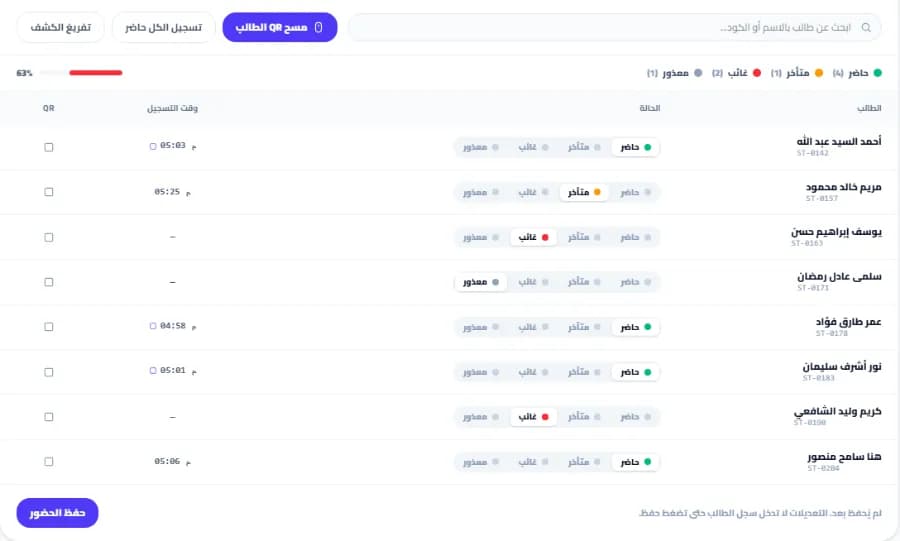
A session attendance register for a center on Snatr, with a button to scan a student's QR card, each student's status as present, late, absent or excused, the time they were recorded, and an attendance rate of 63%
A session attendance register at a branch on Snatr, where students attend with a printed QR card. The data shown is an illustrative example.

Koshoof works offline and Snatr needs internet: does that difference matter to you?

It matters if the internet at your center cuts out often. Koshoof is a Windows program that saves everything on your device and works offline. Snatr needs internet, but you open it from any phone or computer, and your data is not tied to one device.

In Snatr

  • The dashboard opens from any browser: a phone, or a Windows or Mac computer.
  • You and your assistants work at the same time, each from their own place.
  • If your laptop breaks or is stolen, you sign in from another device and find your data.
  • Scanning the card and saving the register need internet.

In ⁨Koshoof⁩

  • A Windows app on the teacher's laptop, with the database on that device.
  • Attendance, students and accounts work offline, according to its pages.
  • Internet is needed for the license and for sending Telegram messages to parents.
  • Your data is not uploaded to any server, and that is a real privacy advantage.
  • There is a backup on the device, and the terms say backups are your responsibility.

Koshoof's terms say they do not guarantee data recovery if the device breaks or is lost, and they advise a backup at least once a week. So if you choose Koshoof, keep a copy on a flash drive or another hard drive.

Two points are written in two different ways on Koshoof's pages, so ask them about both before you subscribe. The privacy page says the license check happens "only once", while the home page says it is a "periodic" check in the background. And the comparison page with paper says the assistant can see the register from their phone "anytime and from anywhere", even though the data is only on the teacher's device.

On Snatr your data is not tied to one device, so if the laptop breaks or is lost, your work is not lost. That matters if you have more than one branch, or assistants working from different places.

Parent follow-up: Telegram messages or a portal on your site?

Koshoof automatically sends the parent a Telegram message with every attendance, absence, payment or grade. Snatr gives them a portal on your site with their child's center attendance, live classes and grades, but no messages reach them.

In Snatr

  • A portal on your own site, which they enter with a password you set.
  • They see their child's attendance at the branch and in live classes, in one place.
  • They see grades and payments, if their child is enrolled in your online courses.
  • One parent follows all their children from the same account, with no app.
  • No message reaches them automatically, so they have to open the portal.

In ⁨Koshoof⁩

  • An automatic Telegram message as soon as the student is marked present or absent.
  • A payment receipt and a reminder about overdue fees on Telegram.
  • Grades and performance reports are sent to them on Telegram.
  • Messages are on Telegram, and WhatsApp is not mentioned.
  • A portal where the parent signs in and sees the full record is not mentioned.

Automatic messages are a Koshoof feature. Snatr has no WhatsApp, SMS or Telegram messages sent to parents.

But Koshoof's messages only reach parents who have a Telegram account. So ask your parents first: do they use Telegram?

In Snatr the advantage is that the parent sees the center and online together. Whether their child attended the session at the branch or joined the live class from home, both are on the same page. The portal is view-only, and no one can see any child but their own.

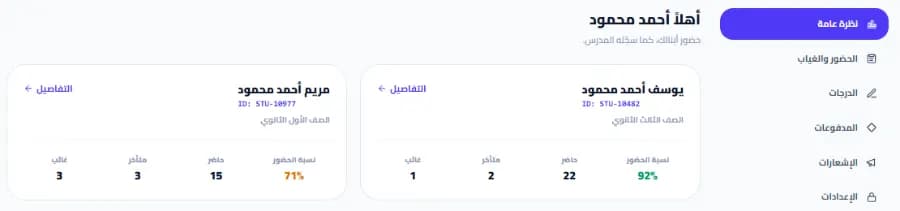
The parent portal on a teacher's Snatr site: a card for each child with their attendance rate and number of attendances, late arrivals and absences, and a side menu with attendance, absence, grades, payments and notifications
The parent portal on the teacher's Snatr site, which opens in the browser. The data shown is an illustrative example.

How do you get started with Koshoof and with Snatr, and who helps you?

With Snatr you sign up at snatr.com and start a 7-day free trial yourself. With Koshoof you request the trial or an intro session on WhatsApp. Koshoof imports your students from an Excel file, and Snatr has no import.

In Snatr

  • You sign up and start a 7-day free trial, without waiting for anyone.
  • An Arabic right-to-left dashboard, with English as well.
  • Support in Arabic on WhatsApp and by email at support@snatr.com.
  • You add your students from the dashboard, and there is no Excel import.

In ⁨Koshoof⁩

  • You request the free trial and the intro session on WhatsApp.
  • You need a Windows laptop, and internet the first time for the license.
  • It imports student names, their numbers and their parents' numbers from an Excel file in one go.
  • The interface is in Arabic, and contact is by WhatsApp, email and Facebook.

Excel import is a real advantage for Koshoof if you have hundreds of students in a ready spreadsheet. In Snatr you add each student from the dashboard, which takes longer in the first week.

In Snatr, your site closes when the trial ends without a subscription. Changing your plan after that is done through support.

How to move from Koshoof to Snatr

  1. 1

    Try Snatr before you stop Koshoof

    Open your Snatr account and use the 7-day free trial. Keep Koshoof running until you are sure everything has moved. Note that your Snatr site closes when the trial ends without a subscription.

  2. 2

    Take a copy of your Koshoof data

    Make a backup of your Koshoof data and export your reports to an Excel file, since Koshoof says it exports its reports to Excel. Snatr has no import, so the file will make it easier to enter students from the dashboard.

  3. 3

    Set up your branches and groups and print the cards

    Create each branch and its groups with their schedules and number of seats, and add the students to them. Then print a QR card for each student, so the assistant can scan it at the door.

  4. 4

    Open accounts for assistants and parents

    Open an account for each assistant and choose a permission preset for them. Create an account for each parent with a password, and link it to their children. Tell parents that follow-up now happens through their portal on your site, not through Telegram messages.

  5. 5

    Upload your lessons and build your courses

    Upload your videos to Snatr so they are encrypted, or add a YouTube link for free lessons. Set a price in EGP for each course, and record any student who paid you cash manually, with no fee.

  6. 6

    Decide how you will track cash accounts

    Snatr does not track cash center subscriptions or overdue payments. So decide how you will track them before you stop your Koshoof license. And keep a copy of your old data, so your attendance and account records stay with you.

Snatr's limits, before you sign up

We list them up front so you decide knowing everything.

  • No center accounts: Snatr does not track cash monthly subscriptions, session bundles, overdue payments or center expenses. Only online payments are recorded automatically.
  • Needs internet: scanning the card and saving the register happen online. If the internet cuts out, you cannot scan cards until it returns.
  • The card can be photographed: the code is signed and cannot be forged, but a photo of it can be sent to someone else. So this is attendance by card, not by fingerprint, with no rotating code or GPS.
  • No messages to parents: no WhatsApp, SMS or Telegram is sent automatically. Parents see absences and lateness when they open their portal.
  • No grades for paper exams at the center: the grades parents see come only from the platform's online exams.
  • No Excel import: you add your students from the dashboard, one by one.
  • One teacher per platform: you cannot have several teachers with split earnings in the same account.
  • The first plan is 999 EGP a month: even if you only use the center side. That price also includes the online platform and online payment.
  • Screen recording is not blocked: nor is a phone filming the screen. The watermark puts the student's name on the recording, which deters, but it is not proof.

Frequently asked questions

Snatr or Koshoof: which is better for a teacher in Egypt?

Snatr is better for a teacher or a center owner in Egypt, because it brings the center and online teaching together in one account from 999 EGP a month. It has QR card attendance, branches and a parent portal, plus courses with encrypted video and online payment by Fawry, mobile wallets and card. Koshoof is a Windows program for the center that works offline, with cash subscription accounts and Telegram messages to parents. But its price is not published, and courses, video and online payment are not stated on its pages, so to teach online you would need a second platform beside it.

Is Koshoof a program or a website?

Koshoof is a Windows app installed on the teacher's laptop, with its data on that device. Its website says it is "not a website and not a cloud application". Students use their phones to scan the attendance code from the laptop screen. Snatr is the opposite: an online platform you open from any browser.

How much does Koshoof cost?

Koshoof's prices were not published on its website on 7 October 2026. You request the free trial and the intro session on WhatsApp, and the trial length is not written. Snatr's prices are all published: 999, 1,999 and 2,999 EGP a month, and there is a 7-day free trial.

Does Koshoof work on a phone or a Mac?

According to its website, Koshoof is a Windows app that runs on the teacher's laptop, and Mac is not mentioned. The phone is used by students to scan the attendance code. In Snatr the dashboard opens from any browser, on a phone or a Windows or Mac computer.

Does Koshoof have an app on Google Play?

Koshoof's website (koshoofos.me) has no link to any app on Google Play or the App Store. On Google Play there are other apps called "Koshoof" from other publishers, and they are not part of this program. Snatr has no app in the stores either, and your platform opens from the phone's browser.

Does a student need a phone to check in on Koshoof?

According to Koshoof's pages, yes. The student scans the code from the laptop screen with their phone, and GPS confirms they are inside the room. Its pages do not mention another method for a student without a phone. In Snatr the student attends with a printed QR card, and the assistant is the one who scans it, so no phone is needed.

Is my students' data safer in Koshoof or in Snatr?

Koshoof saves everything on your device and does not upload your data to any server, which is a privacy advantage. But its terms say backups are your responsibility, and that they do not guarantee data recovery if the device breaks or is lost. In Snatr your data is saved online, no other teacher can reach it, and an assistant sees only the screens you allow.

Does Snatr take a percentage of my sales?

No. In Snatr your price reaches you in full. If a student pays online, the payment fee is added to what they pay, on top of your price, and is not deducted from you. A student who pays you cash for an online course is recorded manually with no fee at all.

If my students go beyond my plan in Snatr, does registration stop?

No. New students register as usual, and each extra student is charged once when they join, not every month. The extra-student price is 15 EGP on Starter, 10 on Basic and 7 on Pro. Koshoof says it manages "thousands of students", and the student limits in its license are not stated.

Can I use Koshoof and Snatr together?

Yes. You can use Koshoof for cash center accounts and Telegram messages, and Snatr for online courses, live classes and online payment. But you will pay two subscriptions and register each student in two places. Snatr on its own has attendance, branches and a parent portal, so if you do not need cash accounts or Telegram messages, one platform is easier for you and your students.

Sources (8)

Every fact about ⁨Koshoof⁩ on this page comes from their official pages, checked on 7 October 2026. Prices and features change; if you find something out of date, tell us at support@snatr.com.