ComparisonLast reviewed: October 2026

Snatr vs Google Classroom: A Comparison for Teachers and Tutoring Centers in Egypt (2026)

Snatr is the better choice for a private tutor or a tutoring center in Egypt. Students pay on your platform in EGP by Fawry, mobile wallet or card, and get into the course automatically after paying. The video is encrypted and carries the student's name, and parents follow attendance and grades from a portal on your site. Google Classroom is a free Google tool for organizing a class and assignments, built for schools, with no payments.

⁨Google Classroom⁩

A free Google tool for organizing a class, assignments and grades, part of Google Workspace for Education and built for schools.

Built for
School classes
Students pay you
No payments on the platform
Paid video
YouTube or Google Drive
Students open
A class on classroom.google.com

Snatr and ⁨Google Classroom⁩ in one table

We compared 20 things that matter to a teacher or a center, and the table shows which platform does each one better.

5

about even

3

only in ⁨Google Classroom⁩

Swipe the table sideways to see every column.

What we comparedSnatr⁨Google Classroom⁩
Price and money
Cost of the platform itself
From 999 EGPA month for 100 students, with a free 7-day trial
FreeWith a personal Google account, and no ads
Students pay you online in EGP
AvailableCards, Fawry and wallets such as Vodafone Cash
Not availableNo payments on the platform; transfers happen outside it
Students get access automatically after paying
AutomaticAs soon as the payment is confirmed
ManualAnyone with the class code can join until you change it
Number of students
Enrollment does not stopBased on your plan, with each extra student charged at its rate
250 per classWith a personal account, and 1,000 for school accounts
Video and protection
Encryption of uploaded video
EncryptedDownload extensions and yt-dlp cannot download it
Download lockFor Drive files only, and encryption is not mentioned
Watermark with the student's name
AvailableIt moves across the video
Not stated
Video storage
50 to 300 GBDepending on the plan
15 GBShared with Gmail and Photos, or YouTube with no protection
Live classes and exams
Live classes
On the Pro planChat, raised hands and a mic for the student
Google MeetWith a personal account: 60 minutes and 100 participants
Class recording
Gets switched onAnd the recording is added to the students' group
With a paid subscriptionNot available with the free account or Education Fundamentals
Class attendance recorded automatically
AvailablePresent or late
Not for your accountMeet attendance reports in Education Plus only
Auto-graded exams
AvailableAnd the grade reaches the parent
With Google FormsAnd grades are transferred to the class
Homework submitted as a file, with comments
Not availableStudents answer questions; they do not upload a file
AvailableFiles, Docs and a copy for each student
Centers and parents
QR card attendance, branches and groups
AvailableBranches, groups with schedules, and an attendance register
Not thereNot one of its features
Parent follow-up
PortalThey see their child's attendance and grades
Not for your accountEmail summaries are not available with a personal account, and have no grades
Assistants working with you
With permissions4 templates, and you choose the screens
Co-teacherCan do almost everything except delete the class
Your platform, your name
A site and platform under your name
AvailableA site in your name and 30 designs, no code
Not availableA class inside classroom.google.com
Custom domain such as mybrand.com
On the Pro planThe Snatr team buys and connects it, and the first year is free
Not there
Mobile app
NoneYour platform opens in the phone's browser
Android and iOSUnder Google's name, not yours
Language and support
Arabic interface
Fully ArabicAlso available in English
AvailableArabic is one of 73 languages
Support in Arabic
WhatsApp and email
Articles and a forumThe Help Center is available in Arabic

Snatr or ⁨Google Classroom⁩?

Choose ⁨Google Classroom⁩ if

  • you teach at a school that has Google Workspace for Education, and you do not sell lessons.
  • you do not take money from students, and only need a class for assignments and announcements.
  • all your work is file assignments you comment on, and you need no video protection or parent follow-up.
On this page
  1. What is Google Classroom, and who is it for?
  2. Is Google Classroom really free? And what does Snatr cost by comparison?
  3. Does Google Classroom accept payment in EGP, Fawry and mobile wallets?
  4. Protecting paid video: does Google Classroom stop video downloads?
  5. Live classes: Google Meet with Google Classroom, or streaming inside Snatr?
  6. Assignments and exams: what does each platform have?
  7. Does Google Classroom have parent follow-up and center attendance?
  8. A platform under your name, or a class inside Google Classroom?
  9. Is Google Classroom in Arabic? And how does support work?
  10. How to move from Google Classroom to Snatr
  11. Snatr's limits, before you sign up
  12. Frequently asked questions

What is Google Classroom, and who is it for?

Google Classroom is a Google tool for organizing a class. The teacher creates a class, students join it with a code or a link, and the teacher posts announcements, assignments and materials for them, grades the work and gives marks. It is part of Google Workspace for Education, so it works with Google Drive, Google Docs, Google Forms and Google Meet.

On its app page, Google describes it as "a free service for schools, non-profits, and anyone with a personal Google account". A personal account is allowed for anyone over 13. Qualifying schools get the Education Fundamentals edition free, and there is a paid edition called Education Plus, priced by contacting Google.

In Google's eyes, a private tutor is not a school. The Google Workspace for Education terms name tutoring programs and for-profit education companies as not eligible. The account types page says a personal account is the one used outside school, such as at a tutoring center. So you would be working with an ordinary Gmail account.

That personal account has limits written in Google Classroom Help: 250 teachers and students at most per class, a 60-minute limit on group Google Meet calls, and no email summaries for parents. Google also says that children aged 13 or under may use Google Classroom only with a school or non-profit account.

Google Classroom is free with no ads, easy, has a mobile app, and is built for a school class. But it is not a sales platform: it has no payments, no site under your name, and no protection for paid video.

Snatr, at snatr.com, is built for exactly this case: a private tutor or a center owner who sells lessons in EGP, with students online and students at the center. If you are comparing Snatr with other platforms, see all Snatr comparisons, including Snatr vs Moodle.
Is Google Classroom really free? And what does Snatr cost by comparison?

Yes, Google Classroom is free with a personal Google account, and Snatr starts at 999 EGP a month for 100 students. So the difference is about 10 EGP a month per student, and the question is what those 10 EGP get you.

In Snatr

  • Starter: 999 EGP a month, 100 students, 50 GB, and each extra student at 15 EGP.
  • Basic: 1,999 EGP, 200 students, 150 GB, and each extra student at 10 EGP.
  • Pro: 2,999 EGP, 400 students, 300 GB, each extra student at 7 EGP, plus live classes and a custom domain.
  • Your price reaches you in full, and the online payment fee is added on top of your price for the student.
  • A free 7-day trial, and enrollment does not stop if your students go over your plan.

In ⁨Google Classroom⁩

  • Free for anyone over 13 with a personal Google account, and no ads.
  • With a personal account: 250 teachers and students at most in a single class.
  • Google's free storage is 15 GB, shared between Google Drive, Gmail and Photos.
  • Education Fundamentals is free only for qualifying schools, and a center is not one of them.
  • No commission, because there are no payments on the platform at all.

Example: a teacher with 100 students paying 300 EGP a month

About 10 EGP per student a month buys online payment, automatic access, encrypted video and a parent portal

Snatr (Starter)Google Classroom (personal account)
Your monthly sales30,000 EGP30,000 EGP
Platform subscription999 EGP0 EGP
Platform commission taken from your money0 EGP0 EGP
Collecting paymentOn your platform, and the student gets access automaticallyTransfers you check, then you add the student by hand
Payment feesPaid by the student, on top of your priceDepends on the wallet, not counted
What reaches you each month29,001 EGP30,000 EGP before transfer fees

On Snatr the student pays the online payment fee on top of the 300 EGP, so if you want them to pay exactly 300, set your price a little lower. On Google Classroom, nothing removes a student who has not paid from the class except your own checking.

If your videos are on Google Drive and you use up the 15 GB, the smallest Google One plan in Egypt is 100 GB for 94.99 EGP a month, according to its pricing page in October 2026. If they are on YouTube, storage is not a problem, but an unlisted video can be watched and passed on by anyone who has the link.

The calculation below assumes your students transfer the money to you themselves, as happens with Google Classroom. Transfer fees vary from wallet to wallet, so they are not counted.

On Snatr, if you have 120 students on the Starter plan, you pay for 20 extra students at 15 EGP, which is 300 EGP. A student who paid you cash at the center is enrolled manually with no commission at all. See Snatr's pricing in detail.

In short: The 999 EGP takes off your hands the work Google Classroom leaves to you: checking transfers, adding whoever paid by hand, and removing whoever did not renew. Video protection and parent follow-up come with it.

Does Google Classroom accept payment in EGP, Fawry and mobile wallets?

No. Google Classroom has no way for a student to pay, not in EGP or any other currency. On Snatr the student pays on your platform by card, Fawry or mobile wallet, and gets into the course as soon as the payment is confirmed.

In Snatr

  • The student pays in EGP by card, with a Fawry code within 24 hours, or with a wallet such as Vodafone Cash.
  • As soon as the payment is confirmed, the student gets into the course automatically, without you checking anything.
  • The money goes into your Snatr wallet and becomes available to withdraw after a safety period, currently 7 days.
  • You withdraw to Vodafone Cash, InstaPay or your bank account, and the minimum withdrawal is currently 100 EGP.
  • Every payment is recorded with the student's name and date, so you know who paid and who did not.

In ⁨Google Classroom⁩

  • No payments or prices among Google Classroom's features, because it is not a sales platform.
  • The student transfers money to you outside the platform, and you check the transfer yourself.
  • You add whoever paid by hand, or send them the class link or code.
  • Anyone with the class code can join, until you change the code or turn it off.
  • You remove whoever did not renew this month from the class by hand.

This comes from Google Classroom's official page and its Help Center in October 2026. The features are all about the class, assignments, grades and communication, with nothing about selling or payments.

Google Classroom lets you reset or turn off the class code, and the old code stops working. But that is manual work you do every month, and any student with the code can send it to a friend before you turn it off.

Over time you end up with screenshots of transfers on WhatsApp and a class with some people who paid and some who did not, and you are the one matching them up. On Snatr, paying online is the same step as enrolling in the course.

In short: If your students transfer money to you on Vodafone Cash and you check the transfer screenshots and add them by hand, that is exactly the work Snatr does for you.

Protecting paid video: does Google Classroom stop video downloads?

You can turn off downloading in Google Drive, and that is all. Video in Google Classroom is either a YouTube link or a file on Drive, and encryption and a watermark with the student's name are not mentioned. Snatr encrypts uploaded video, so well-known download tools cannot download it.

In Snatr

  • Uploaded video is encrypted, and the key to unlock it goes to a locked component inside the browser, not to the page.
  • Download extensions, "paste the link and download" sites and programs like yt-dlp cannot download it.
  • A moving watermark with the student's name, so any screen recording shows their name.
  • A student is signed in on one device at a time: signing in on a new device signs the old one out.

In ⁨Google Classroom⁩

  • In an assignment you add a YouTube video, a Google Drive file or a link.
  • An unlisted YouTube video can be watched and passed on by anyone with the link.
  • Drive file: the owner can turn off downloading, printing and copying for viewers.
  • Key-based encryption or a watermark with the student's name: not mentioned on Google Classroom's pages.
  • Class materials are saved automatically in folders on Google Drive, which helps with organization.

At Snatr we measured the protection: without the key the file comes out as noise, with a similarity to the original of 10.6 dB. With the key it comes out intact at 59.9 dB, and the higher the number, the closer the picture is to the original. Google Classroom does not publish any measurement like this.

Screen recording is not blocked on Snatr, nor is a phone filming the screen. The watermark only deters, because the student's name shows on the recording. On iPhone and iPad the video plays normally, but its protection is weaker against someone with technical expertise.

This protection covers only the video you upload to Snatr. If you put a YouTube link in a lesson, it stays an ordinary YouTube video. Learn the details of video protection on Snatr.

Live classes: Google Meet with Google Classroom, or streaming inside Snatr?

Snatr has live classes from inside your platform on the Pro plan, and attendance is recorded automatically. Google Classroom uses Google Meet, and with a personal account a group call stops at 60 minutes, with no class recording.

In Snatr

  • Students watch on your platform and under your name, with chat and raised hands, and you can give a student the mic.
  • Class attendance is recorded automatically: present or late.
  • Assistants can moderate the mics, the chat and who gets in.
  • Class recording is a feature that gets switched on, and when it is on, the recording is added to the students' group.

In ⁨Google Classroom⁩

  • With a personal account: 100 participants at most, and group calls of 60 minutes.
  • A fixed Meet link for the class and more control over the call, for school accounts only.
  • Class recording is not available with the free account, nor in Education Fundamentals.
  • Meet attendance reports are for Education Plus admins only.
  • A student without a Google account can join Meet if you admit them.

This comes from Google Classroom Help on account types, the Google Meet page and the meeting recording page, in October 2026. If your class runs longer than an hour on the free account, you will have to end the meeting and start a new one.

Live classes on Snatr are not encrypted like uploaded video. They carry a watermark and a temporary link, and screen recording still works.

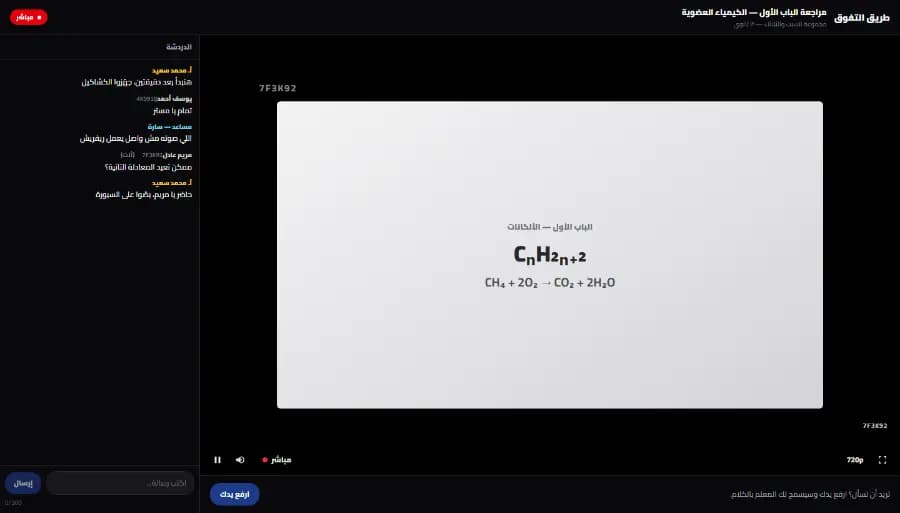
A live class screen on the Snatr platform from the student's side: the teacher's lesson in the middle with a watermark showing a short code, the class chat on the side, and a raise-your-hand button below
The student's screen in a live class on the Snatr platform, without Google Meet. The data shown is an illustrative example.

Assignments and exams: what does each platform have?

In Google Classroom the student submits an assignment as a file or a document, and you comment and give a grade. Auto-graded exams exist in both, and on Snatr the grade reaches the parent in their portal without you sending it.

In Snatr

  • True or false, multiple choice and multiple-answer questions, all graded automatically.
  • A written question that you grade yourself, in group exams only.
  • The grade shows up for the student, and for the parent in their portal.
  • Students do not upload a file or a photo for their homework.

In ⁨Google Classroom⁩

  • Assignments with files and documents, and a copy of the document for each student in their name.
  • A Google Forms quiz graded automatically, with grades transferred to Google Classroom.
  • A grade out of 100 or any number, a grading rubric, and comments on the student's work.
  • Locked mode, which stops other pages from being opened, on school-managed Chromebooks only.

On Snatr a multiple-choice or true-or-false exam is graded automatically, its timer runs on the server, and the grade reaches the parent. On Snatr the student answers questions on the platform and does not upload a file or a photo for homework.

Locked mode in Google Forms needs a Google Workspace for Education account and a Chromebook managed by the school, so it is not available for private tutoring.

Does Google Classroom have parent follow-up and center attendance?

Not with a personal account. Email summaries for parents are not available on it, and even on school accounts they have no grades. There is no attendance and no branches. Snatr has a parent portal with attendance and grades, QR card attendance, branches and assistants.

In Snatr

  • Parents log into a portal on your site and see their child's attendance and grades.
  • Attendance with a printed QR card for each student, or manually from the class register.
  • Branches and groups with their schedules and the number of seats in each group.
  • Assistants and front-desk staff with their own accounts, and you choose which screens each one sees.

In ⁨Google Classroom⁩

  • Daily or weekly email summaries for parents, not available with a personal account.
  • The summary covers missing and upcoming work and class announcements, with no grades.
  • Parents cannot open the grades page in Google Classroom.
  • Co-teachers who can do almost everything except delete the class.
  • No center attendance and no branches, because they are not among its features.

This comes from Google Classroom Help pages on guardian summaries in October 2026. Google itself tells parents: if you want grades, ask your child or contact the teacher.

Snatr has 4 ready-made permission templates for assistants: front desk, branch supervisor, academic assistant and full access. If you remove a permission from an assistant, it is removed that same moment.

The QR card carries a signed code that cannot be forged, but it can be photographed and sent to someone else, so this is attendance by card, not by fingerprint.

In short: See center management on Snatr if you have branches and groups at your center.

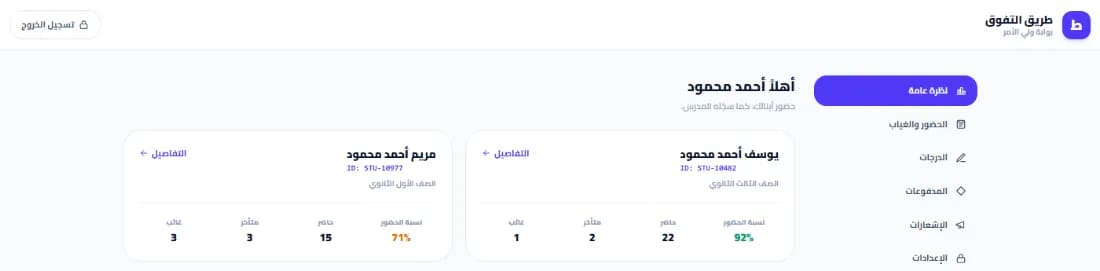
The parent portal on the Snatr platform: a card for each child with their name, grade, attendance rate and number of times present, late and absent
The parent portal on the Snatr platform, where parents see each child's attendance without the teacher sending it. The data shown is an illustrative example.

A platform under your name, or a class inside Google Classroom?

Snatr gives you a site and a platform under your name to sell your courses from. Google Classroom is a class inside Google's site, and students join it with a code or a link. On the other hand, Google Classroom has a mobile app, and Snatr does not.

In Snatr

  • Your platform starts on a site in your name.
  • 30 ready-made designs where you change the colors, text and images without code, and the first two designs are free.
  • Custom domain such as mybrand.com on the Pro plan, and the Snatr team buys and connects it.
  • No mobile app under your name, and students open your platform in their phone's browser.

In ⁨Google Classroom⁩

  • The class is on classroom.google.com, and students join with a code, a link or an email invitation.
  • No course page with prices and no custom domain, because it is not a sales platform.
  • The Google Classroom app on Android and iOS, but under Google's name, not yours.
  • Students find your class on the same page as any other classes they are enrolled in.

On Snatr, the first year of the custom domain is free with the Pro plan, and it is not available during the trial. Once it is connected, the old link redirects to it automatically, and your Google ranking moves with it.

A student who opens your platform on Snatr sees your logo, your colors, your courses and their prices. That makes a difference when a parent searches for your name before paying.

In short: Browse Snatr's designs before you choose; each design has a full preview.

Is Google Classroom in Arabic? And how does support work?

Yes, Google Classroom is available in Arabic among 73 languages, and its Help Center has articles in Arabic. The difference is in support: with Google Classroom you search the Help Center and the forum, and with Snatr you talk to the support team on WhatsApp and email.

In Snatr

  • The dashboard is in Arabic, right to left, and also available in English.
  • Your site can be in Arabic, English or both.
  • The dashboard uses the Egyptian teacher's own terms: groups, classes, branches and parents.
  • Support in Arabic on WhatsApp and by email at support@snatr.com.

In ⁨Google Classroom⁩

  • The interface is available in Arabic, among 73 languages in Google's list.
  • Some features are not in every language, such as Read Along, Practice Sets and plagiarism detection.
  • Help: Help Center articles and the Google Classroom Community forum.

Language is not the difference here, because both are in Arabic. The difference is that the wording inside Snatr is made for the center and private tutoring, and inside Google Classroom it is made for a school class.

How to move from Google Classroom to Snatr

  1. 1

    Try Snatr before you close the class

    Open your account on Snatr and try it free for 7 days. Keep your Google Classroom class running until you are sure everything has moved over. Note that your site on Snatr is closed when the trial ends without a subscription.

  2. 2

    Gather your videos and files

    Class materials are saved in the class folder on your Google Drive. Download the original copies of your videos and upload them to Snatr so they get encrypted. For free lessons on YouTube, you can put the link in the lesson.

  3. 3

    Download your students' grades

    From the Student work page of any assignment, open the settings and choose Download all grades as CSV, or Copy all grades to Google Sheets. Keep that file as a record, because grades do not move between platforms on their own.

  4. 4

    Create your courses and groups with prices in EGP

    Create each course with its lessons and exams, and set its price in EGP. Remember that the online payment fee is added on top of your price for the student, so choose the price you want the student to see.

  5. 5

    Enroll your current students without them paying again

    For a student who has already paid you this month, enroll them manually in the course or group from the dashboard. Manual enrollment carries no commission at all.

  6. 6

    Post the new link as a class announcement

    Write an announcement in your Google Classroom class with your platform's link, and send it to the WhatsApp group too.

  7. 7

    Archive the old class instead of deleting it

    Once everyone is using your platform, archive the class in Google Classroom. The archive keeps the materials and the students' work, and you and your students can still open it. Deleting a class, on the other hand, cannot be undone.

Snatr's limits, before you sign up

We list them up front so you decide knowing everything.

  • Snatr is not free: it starts at 999 EGP a month for 100 students, after a 7-day free trial.
  • No file-based homework submission: students answer questions on the platform; they do not upload a file or a photo for their homework.
  • No app under your name: your platform runs in the phone's browser.
  • Screen recording is not blocked: nor is a phone filming the screen. The watermark makes the student's name visible, but it does not stop them.
  • iPhone and iPad: the video plays normally, but its protection is weaker against someone with technical expertise.
  • No parent messages: no WhatsApp, SMS or email messages are sent automatically. Parents follow along from their portal on your site.
  • No AI tools: you write your questions and content yourself.
  • Custom domain on the Pro plan only: and it is not available during the trial.
  • No installments: students cannot pay in installments with valU or banks.
  • Plan changes go through support: you do not change your plan yourself from the dashboard.

Frequently asked questions

What is the alternative to Google Classroom for a private tutor in Egypt?

Snatr. It has lessons, exams and groups like a class, and adds what a private tutor needs on top. Students pay on your platform in EGP with Fawry, mobile wallets and cards, the video is encrypted and carries the student's name, and parents follow attendance and grades. It also has QR card attendance, branches and assistants. Its subscription starts at 999 EGP a month, and live classes inside the platform are on the Pro plan (2,999 EGP a month).

Can a tutoring center get Google Workspace for Education free?

No. Google says Google Workspace for Education is only for government-accredited schools. It names tutoring programs, for-profit education companies and language schools as not eligible. So private tutors and centers use Google Classroom with a personal Google account, with its limits.

How many students can be in a Google Classroom class?

With a personal account, 250 teachers and students at most per class, and you can create 30 classes a day and send 100 invitations a day. For school accounts the limit is 1,000 per class. On Snatr the number of students depends on your plan, and if you go over it enrollment does not stop, with each extra student charged at your plan's rate.

Does the student need a Google account?

On Google Classroom, yes, and a personal account is for anyone over 13. Google says children aged 13 or under may use Google Classroom only with a school or non-profit account. On Snatr the student does not need a Google account: they create an account on your platform, or you create one for them from the dashboard.

Does Google Classroom have ads? Is my data safe?

There are no ads in Google Classroom. Google says your content and your students' data are never used for advertising, and that it does not own your data.

Does Google Classroom have a mobile app? Does Snatr?

Google Classroom has an app on Android, iOS and Chrome. Snatr has no app under your name on Google Play or the App Store, and students open your platform in their phone's browser.

Can I use Google Classroom and Snatr together?

Yes, you can keep Google Classroom for assignments handed in as files, and sell your lessons, protect your videos and record attendance on Snatr. But your students will deal with two places and two accounts. If most of your work is lessons and exams, Snatr alone is enough, and one place is easier for you and for them.

Does Snatr take a share of my sales?

No. On Snatr your price reaches you in full. If the student pays online, the payment fee is added on top of your price for them and is not deducted from you. A student who pays you cash is enrolled manually with no commission at all.

Can I try Snatr before I pay?

Yes, there is a free 7-day trial. If the trial ends without a subscription, your site is closed. The custom domain is not available during the trial.

Sources (26)

Every fact about ⁨Google Classroom⁩ on this page comes from their official pages, checked on 7 October 2026. Prices and features change; if you find something out of date, tell us at support@snatr.com.