ComparisonLast reviewed: October 2026

Snatr vs LearnWorlds: A Comparison for Teachers and Tutoring Centers in Egypt (2026)

Snatr is the better choice for a teacher in Egypt whose students pay in EGP. Students pay by Fawry, mobile wallets and card, there are no fees on your sales, and video is encrypted and carries the student's name from the first plan at 999 EGP. It also has center management and a parent portal. LearnWorlds is a global platform for selling courses and training in dollars, a teacher in Egypt receives money on it through PayPal, and Arabic is not one of its built-in languages.

⁨LearnWorlds⁩

A global platform for selling courses and training online, in English and priced in dollars, strong in interactive video and exams.

Subscription and sales fees
29 dollars, and 5 per student
Paying from Egypt
PayPal in dollars, no Fawry
Live classes
Your own Zoom, from 99 dollars
Center management
Not available

Snatr and ⁨LearnWorlds⁩ in one table

We compared 20 things that matter to a teacher or a center, and the table shows which platform does each one better.

1

about even

7

only in ⁨LearnWorlds⁩

Swipe the table sideways to see every column.

What we comparedSnatr⁨LearnWorlds⁩
Price and money
Subscription in Egyptian pounds
In EGPFrom 999 EGP a month
In dollarsFrom 29 dollars, about 1,521 EGP
Platform fees on your sales
NoneYour price reaches you in full, and the online payment fee is on the student
5 dollars per studentOn Starter, and none from Pro Trainer (99 dollars)
Payment by Fawry and mobile wallets
AvailableCard, Fawry and wallets such as Vodafone Cash, in EGP
Not availableStripe, PayPal or Shopify, through your own account
Receiving your money while in Egypt
AvailableWithdraw to Vodafone Cash, InstaPay or a bank
Through PayPalAnd Stripe does not open accounts in Egypt
Free trial
7 days
30 daysWithout a payment gateway or a custom domain
Number of students on the first plan
100 studentsAn extra student costs 15 EGP once, and registration does not stop
1,000 studentsActive students a month, and 2,000 from Pro Trainer
Video and protection
Encryption of uploaded video
EncryptedDownload extensions and yt-dlp fail, and it is measured
Not statedIt says access is locked to your school's domain
Watermark on the video
On every planIt moves and shows the student's name
From Learning CenterThe student's email or ID, at 299 dollars a month
Video storage
50 to 300 GBDepending on the plan, and extra is charged to you
UnlimitedOn every plan
Live classes and exams
Live classes
On the Pro planInside the platform, with chat, raised hands and student mic, and attendance is recorded automatically
Through your Zoom accountOr Meet, Teams or Webex, from Pro Trainer
Exams and automatic grading
AvailableAnd the grade reaches the parent
AvailableIncluding answers by file, video or audio
Interactive video and certificates
Certificates only
AvailableFrom Pro Trainer, and full interactive video from Learning Center
Centers and parents
QR card attendance, branches and groups
AvailableBranches, groups with schedules and an attendance register
Not availableAttendance is recorded for Zoom and Teams sessions only
Parent portal
AvailableThey see their child's attendance and grades
Not available
Assistants and front-desk staff with permissions
On every plan4 ready-made presets, and you choose the screens
From Pro Trainer5 users, and custom roles from Learning Center
Your platform, your name
Custom domain like mybrand.com
On ProThe Snatr team buys and connects it, and the first year is free
On every planYou buy and connect it yourself
Mobile app in your name
NoneYour platform opens in the phone's browser
Paid add-onFrom 149 dollars a month on top of the plan
Coupons, community and affiliate marketing
Coupons only
AvailableCoupons and community on every plan, and affiliates from Pro Trainer
Language and support
Site in Arabic, right to left
Fully ArabicAnd the dashboard and site have English too
By translation and requestArabic is not among its 19 languages, and right-to-left needs a support ticket
Support in Arabic
WhatsApp and email
Not statedThe help center is in English only

Snatr or ⁨LearnWorlds⁩?

Choose ⁨LearnWorlds⁩ if

  • you sell professional courses in dollars to an audience outside Egypt, and you have PayPal or Stripe.
  • you teach a language and need audio answers or interactive video, and need no center.
  • you train company employees, and need SCORM and client groups.
  • you need an app in your name and a student community, and need no Fawry or parents.
On this page
  1. What is LearnWorlds, and who is it for?
  2. Does LearnWorlds accept payment in EGP, by Fawry and mobile wallets?
  3. LearnWorlds pricing in EGP: what do you really pay?
  4. Video protection in LearnWorlds and Snatr: which does more to stop downloads?
  5. Does LearnWorlds have live classes, or do you need Zoom?
  6. Exams and interactive video: what LearnWorlds has and what Snatr has
  7. Do you run a tutoring center? Attendance, branches and parents in LearnWorlds and Snatr
  8. A platform in your name: custom domain, app and design
  9. Sales, marketing and community tools: what LearnWorlds has and what Snatr has
  10. Does LearnWorlds work for an Arabic-speaking teacher? Arabic and right-to-left text
  11. How to move from LearnWorlds to Snatr
  12. Snatr's limits, before you sign up
  13. Frequently asked questions

What is LearnWorlds, and who is it for?

LearnWorlds is a global platform that builds you an online school in your name, where you sell courses and run training. It was founded in 2014, and its offices are in Cyprus and Greece. Its website is in English and four European languages, with no Arabic.

You pay it a monthly subscription in dollars, and it takes care of video hosting, the website and the checkout page for you. According to its website, more than 13,000 education and training businesses use it. That figure is published on their website, not ours.

LearnWorlds' real strength is interactivity. It has video with questions and buttons inside, exams where the student answers with a file, audio or video, certificates, and a student community. On the larger plans you can build a mobile app in your name. Today it presents itself as a platform for training companies, along with trainers and course creators.

What is not among LearnWorlds' features is what an Egyptian teacher deals with every day. There is no payment by Fawry or mobile wallets, no attendance register for the center, and no portal for the parent who wants to know whether their child attended. That is the main difference between it and Snatr.

Snatr, at snatr.com, is built for a different situation: an Egyptian teacher selling in EGP, with students online and students at the center, who wants to manage them from one place. If you are comparing Snatr with other global platforms, see Snatr vs Teachable and Snatr vs Thinkific, or all Snatr comparisons.
Does LearnWorlds accept payment in EGP, by Fawry and mobile wallets?

No. LearnWorlds has no payment gateway of its own, and it connects your own Stripe, PayPal or Shopify account. Stripe does not open accounts in Egypt, PayPal does not accept EGP, and there is no Fawry and no wallets.

In Snatr

  • Students pay in EGP by card, with a Fawry code within 24 hours, or with a wallet such as Vodafone Cash.
  • The money goes into your Snatr wallet and becomes available to withdraw after a holding period, currently 7 days.
  • You withdraw to Vodafone Cash, InstaPay or your bank account, and the minimum withdrawal is currently 100 EGP.
  • You do not need an account with any payment company, or a company registered outside Egypt.
  • A student who paid you cash at the center is recorded manually, with no fee at all.

In ⁨LearnWorlds⁩

  • You connect your own Stripe, PayPal or Shopify account, on every plan.
  • Stripe does not open accounts in Egypt, and monthly student subscriptions work on Stripe only.
  • PayPal accepts 25 currencies, and EGP is not one of them, so your price would be in dollars, for example.
  • The money collects in a PayPal account, and withdrawing it to a bank in Egypt costs 125 EGP each time.
  • No Fawry, no Vodafone Cash and no Egyptian wallet.

This is according to the LearnWorlds help center and its pricing page in October 2026. Stripe is an American payment company, and the list of countries on its official page does not include Egypt; the only Arab country on it is the UAE. The PayPal withdrawal fee is from PayPal's fees page for Egypt, updated on 28 September 2026.

Shopify is the third gateway, where students pay from your Shopify store. That means a separate Shopify subscription, setting up a custom app and connection keys, and syncing courses by hand after every change. If you connect Shopify, the other two gateways are switched off.

If a student transfers money to your wallet outside LearnWorlds, you enroll them in the course by hand. Their help center says no invoice is issued for that sale, and coupons and affiliate marketing do not apply to it.

LearnWorlds pricing in EGP: what do you really pay?

LearnWorlds starts at 29 dollars a month, plus 5 dollars for every paying student on the Starter plan. From Pro Trainer at 99 dollars there is no per-student fee, but PayPal's fees still fall on you.

In Snatr

  • Starter: 999 EGP a month, 100 students, 50 GB, and an extra student costs 15 EGP.
  • Basic: 1,999 EGP, 200 students, 150 GB, and an extra student costs 10 EGP.
  • Pro: 2,999 EGP, 400 students, 300 GB, an extra student costs 7 EGP, plus live classes and a custom domain.
  • An extra student is charged once when they join, not every month, and registration does not stop.
  • The features are the same on all three plans, except live classes and the custom domain on Pro. There are no fees on your sales.

In ⁨LearnWorlds⁩

  • Starter: 29 dollars (1,521 EGP), 1,000 active students, and 5 dollars for every paying student.
  • Pro Trainer: 99 dollars (5,194 EGP), 2,000 active students, and no per-student fee.
  • Learning Center: 299 dollars (15,686 EGP), 2,000 active students, and no LearnWorlds branding.
  • Paying yearly saves about 20%: that is 24, 79 and 249 dollars a month.
  • No free plan: there is a 30-day trial, without a payment gateway or a custom domain.

Example: a teacher with 100 students paying 300 EGP a month

Snatr leaves you about 4,200 EGP more a month than Pro Trainer

Snatr (Starter)LearnWorlds (Starter)LearnWorlds (Pro Trainer)
What students pay (your price)30,000 EGP30,000 EGP30,000 EGP
Platform subscription999 EGP1,521 EGP (29 dollars)5,194 EGP (99 dollars)
Platform fees on students0 EGP26,230 EGP (5 dollars × 100)0 EGP
Online payment feesOn the student, on top of your priceDeducted from you, not countedDeducted from you, not counted
What reaches you a month29,001 EGP2,249 EGP before PayPal fees24,806 EGP before PayPal fees

The dollar rate is 52.46 EGP, the Central Bank of Egypt's selling rate on 7 October 2026. On Starter, the math assumes each student buys the month's course again, because monthly subscriptions are not on that plan. The difference with Pro Trainer is about 4,195 EGP a month, close to 50,340 EGP a year. In Snatr, a student who pays online pays the payment fee on top of the 300 EGP.

PlanStarterPro TrainerLearning Center
A month29 dollars99 dollars299 dollars
In EGP1,521 EGP5,194 EGP15,686 EGP
A month if you pay a year in advance24 dollars79 dollars249 dollars
LearnWorlds fee per paying student5 dollarsNoneNone
Active students a month1,0002,0002,000
Admin users1525
Live classes with Zoom, Meet or TeamsNot availableOne accountMore than one account
Watermark on videoNot availableNot availableAvailable

These prices are from LearnWorlds' pricing page in October 2026, all in dollars. There is also a Corporate plan for companies, priced by contacting sales. An "active student" for them is any student who entered the school during the month, and what happens if you exceed the limit is not stated.

On Starter there is no monthly student subscription, so if your course is monthly, the student buys it again every month, and each purchase carries 5 dollars. The 5 dollars is about 262 EGP, which is 87% of the price of a 300 EGP course. That is why Starter does not suit a course priced in the hundreds of pounds.

With 400 students paying 300 EGP (120,000 EGP a month), Snatr's Pro plan leaves you 117,001 EGP. LearnWorlds' Pro Trainer leaves you 114,806 EGP before PayPal fees. If you pay Pro Trainer a year in advance, you pay 948 dollars at once, about 49,732 EGP.

In short: Full details and what each plan includes are on the Snatr pricing page.

Video protection in LearnWorlds and Snatr: which does more to stop downloads?

Snatr encrypts the video you upload, so well-known download tools cannot download it. LearnWorlds says access to your videos is locked to your school's domain, encryption is not mentioned, and the watermark is on Learning Center only.

In Snatr

  • The video is encrypted, and its key goes to a locked component inside the browser, not to the page.
  • Download extensions, "paste your link and download" sites and programs like yt-dlp cannot download it.
  • A moving watermark with the student's name, on every plan.
  • A student is signed in on one device at a time: signing in on a new device signs the old one out.
  • Storage from 50 to 300 GB depending on the plan, and extra is charged to you.

In ⁨LearnWorlds⁩

  • Video hosting with unlimited storage, on every plan.
  • Access to video and PDFs is locked to your school's domain, according to their help center.
  • A moving watermark with the student's email or ID, from Learning Center (299 dollars).
  • A stamp on PDF files with the student's email, also from Learning Center.
  • Key-based video encryption (DRM): not mentioned on their pages or in their help center.

At Snatr we measured the protection: without the key the file comes out as noise, with a similarity to the original of 10.6 dB. With the key it comes out clean at 59.9 dB. The higher the number, the closer the picture is to the original. LearnWorlds has not published any measurement like this.

Screen recording is not blocked on either platform, nor is a phone filming the screen. The watermark only deters, because the student's name shows on the recording. The difference is that Snatr's watermark is on the cheapest plan, while on LearnWorlds you need a 299-dollar-a-month plan.

On iPhone, iPad and Safari, video in Snatr plays normally, and ready-made download tools still fail. But the protection is weaker against a technically skilled person. This protection covers uploaded video only, so a lesson that is a YouTube link is not encrypted.

In short: Full details are on the Snatr video protection page.

Does LearnWorlds have live classes, or do you need Zoom?

LearnWorlds connects your sessions to Zoom, Google Meet, Microsoft Teams or Webex from your own account, from the Pro Trainer plan. Snatr has live classes inside your platform on the Pro plan (2,999 EGP a month), with no other program.

In Snatr

  • Students watch from your platform, with chat and raised hands, and you can give a student the mic.
  • Attendance at the session is recorded automatically: present or late.
  • Assistants can moderate mics, chat and who gets in.
  • Recording the session is a feature you switch on, and the recording is added to the student group.
  • No Zoom account or other subscription needed.

In ⁨LearnWorlds⁩

  • Live classes through your Zoom, Meet, Teams or Webex account, from Pro Trainer (99 dollars).
  • Their own help center says free Zoom stops after 40 minutes.
  • On a computer the student joins from inside the platform, and on a phone from the Zoom app.
  • Attendance is recorded automatically from Zoom and Teams, and the recording is saved in the Zoom cloud.
  • More than one Zoom account for more than one teacher, from Learning Center.

On Starter there is appointment booking through Calendly, not live classes. The plan card says "Live 1:1 and group sessions", but the pricing table says live classes with Zoom, Meet, Teams and Webex start from Pro Trainer.

Live classes in Snatr are not encrypted like uploaded video. They carry a watermark and a temporary link, but screen recording works.

In short: If you hold live classes for groups every week, Snatr's Pro plan saves you a Zoom subscription, and attendance is recorded automatically.

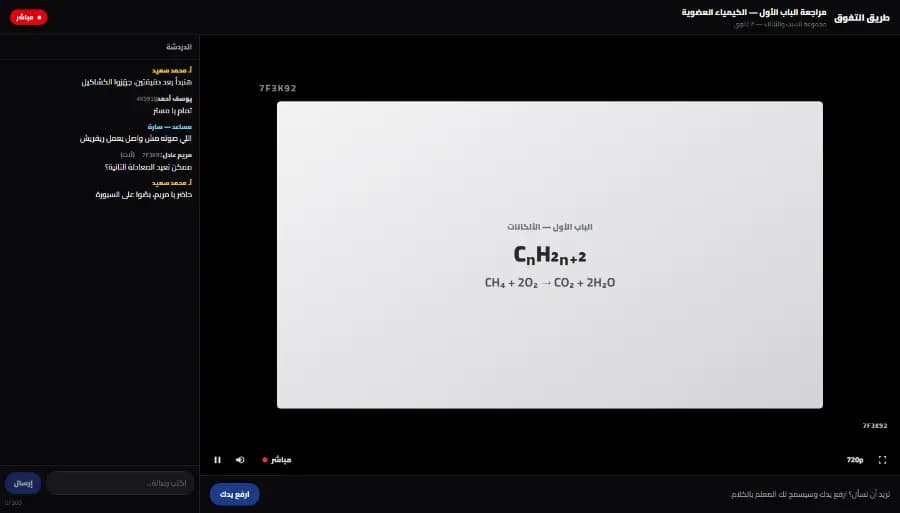
A live class screen on the Snatr platform from the student's side: the teacher's lesson in the middle with a watermark showing a short code, the class chat on the side, and a raise-your-hand button below
The student's screen in a live class on the Snatr platform, without Zoom. The data shown is an illustrative example.

Exams and interactive video: what LearnWorlds has and what Snatr has

LearnWorlds has video with questions inside, and exams where the student answers with a file, audio or video. Snatr has exams that grade themselves, with the grade reaching the parent. Both have certificates.

In Snatr

  • True or false, multiple choice and multiple answers, all graded automatically.
  • A written question you grade yourself, in group exams only.
  • The grade appears to the student, and to the parent through their portal.
  • Completion certificates, but no interactive video and no file uploads from the student.

In ⁨LearnWorlds⁩

  • Multiple choice, true or false, short answer, and answers by file, video or audio.
  • Interactive video with questions, buttons and a table of contents: basic on Pro Trainer, full from Learning Center.
  • Certificates and SCORM packages from Pro Trainer.
  • AI tools that help you write the course and the questions, on every plan.

Interactive video and audio answers serve language courses and professional training. If you teach a school curriculum, the grade the parent sees matters more, and both have certificates.

Do you run a tutoring center? Attendance, branches and parents in LearnWorlds and Snatr

LearnWorlds has no center management: no branches, no attendance register for an in-person session, and no parent portal. Snatr has all of this, along with online teaching, in one account.

In Snatr

  • Branches and groups with their schedules and the capacity of each group, plus sessions and an attendance register.
  • Attendance with a printed QR card for each student or manually, and the code is signed and cannot be forged.
  • Parents see their child's attendance and grades from a portal on your site.
  • Accounts for assistants and front-desk staff on every plan, and you choose which screens each one sees.

In ⁨LearnWorlds⁩

  • Attendance is recorded for online Zoom and Teams sessions only.
  • No branches, no in-person attendance register and no parents, in its features or help center.
  • Its "groups" are for companies: up to 10 client groups on Learning Center.
  • Team members: one on Starter, 5 on Pro Trainer and 25 on Learning Center.

Snatr has 4 ready-made permission presets: front desk, branch supervisor, academic assistant and full access. If you remove a permission from an assistant, it is removed instantly, without them signing out and back in. On LearnWorlds, roles you build yourself come from Learning Center.

The QR card can be photographed and sent to someone else, so this is attendance by card, not by fingerprint.

If you run a center and choose LearnWorlds, you will need another program alongside it for attendance and parents.

In short: Details are on the Snatr center management page.

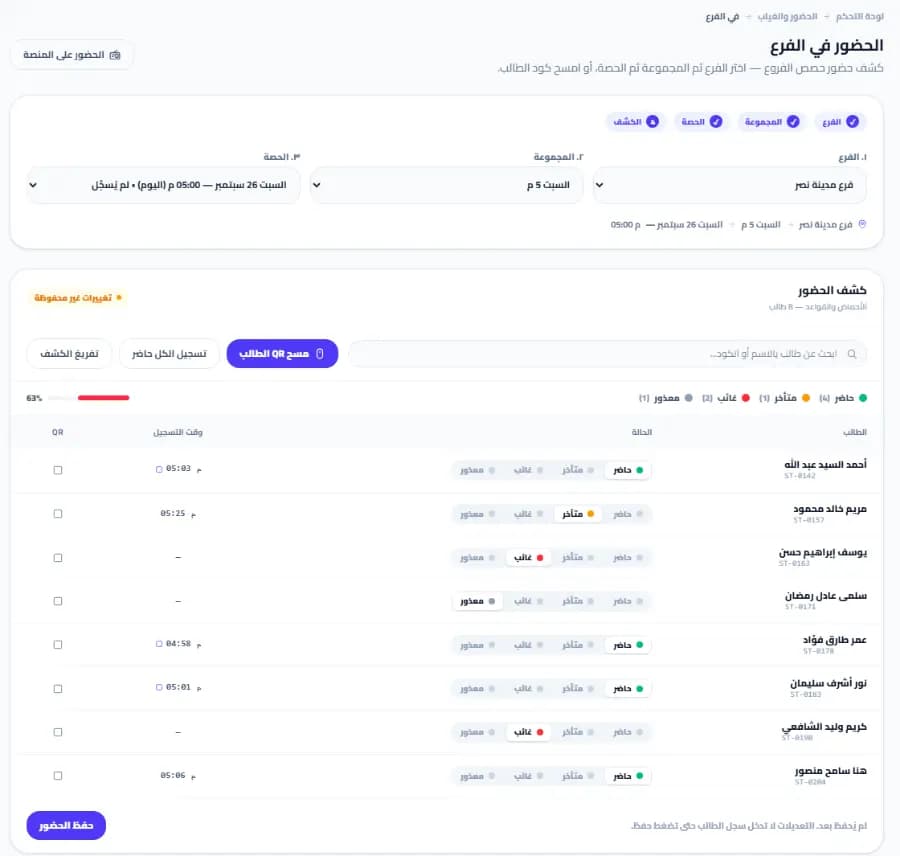
The branch attendance screen in the Snatr dashboard: a choice of branch, group and session, an attendance register with student names and each one's status, and a button to scan a student's QR card
The branch attendance register screen in the Snatr dashboard, a part that does not exist in LearnWorlds. The data shown is an illustrative example.

A platform in your name: custom domain, app and design

Both give you a site in your name. The custom domain on LearnWorlds is on every plan and you connect it, and on Snatr it is on Pro and the Snatr team connects it. LearnWorlds has an app in your name as a paid add-on, and Snatr does not.

In Snatr

  • Your platform starts on a site in your name.
  • A custom domain like mybrand.com on Pro: the Snatr team buys and connects it, and the first year is free.
  • 30 ready designs whose colors, text and images you edit without code. The first two are free.
  • No mobile app in your name: students open your platform in the phone's browser.

In ⁨LearnWorlds⁩

  • Your link is like yourschool.learnworlds.com, and a custom domain is on every paid plan.
  • You buy the domain yourself and do its technical setup, and it is not available during the trial.
  • Removing the LearnWorlds name from your site entirely, from Learning Center.
  • An app in your name on iOS and Android: an add-on from 149 dollars a month, on top of Pro Trainer or higher.
  • Plus an Apple developer account at 99 dollars a year, and Google at 25 dollars once.

The 149 dollars is about 7,817 EGP a month, on top of the plan itself. There are also one-time publishing and setup fees, and the amount is not stated. The app needs an international company registration number called D-U-N-S, which can take up to 30 days.

If a student buys inside the app, Apple takes up to 30%, and Google takes 15%. The technical domain setup on LearnWorlds means a record called CNAME that you create with the company you bought the domain from.

In Snatr, the custom domain is not available during the trial. Once it is connected, the old link redirects to it automatically, and your Google ranking moves with it.

In short: Browse Snatr's designs before you choose; every design has a full preview.

Sales, marketing and community tools: what LearnWorlds has and what Snatr has

LearnWorlds has sales pages, affiliate marketing, bulk emails and a student community, and Snatr does not have these. Both have coupons. Snatr focuses on payment in EGP, the center and parents.

In Snatr

  • Discount coupons, but no affiliate marketing and no marketing emails.
  • No community or forum for students, and no installments.
  • Marketing is up to you, and you share your platform link with your students yourself.

In ⁨LearnWorlds⁩

  • Coupons, discounts and offers shown at checkout, on every plan.
  • A community inside the school with posts, comments and messages, on every plan.
  • Affiliate marketing, course bundles, subscriptions and installments, from Pro Trainer.
  • Bulk emails: 2,000 a month on Pro Trainer and 5,000 on Learning Center.
  • AI sales pages: 15 on Pro Trainer, and unlimited after that.

Monthly subscriptions on LearnWorlds work on Stripe only, so they will not work for a teacher whose account is in Egypt. Installments are possible with PayPal buttons.

Think about your students before choosing on marketing tools. A secondary-school student does not arrive from an ad on a sales page. They come from the center, the WhatsApp group and their parent. So if that is your audience, payment in EGP, attendance and parents will matter more to you than marketing tools.

Does LearnWorlds work for an Arabic-speaking teacher? Arabic and right-to-left text

Partly. Arabic is not one of LearnWorlds' built-in languages, so you translate the site's text yourself, and right-to-left is switched on by request to the support team. Snatr is in Arabic from the dashboard to support.

In Snatr

  • The dashboard is built in Arabic, right to left, with English as well if you like.
  • Your site can be in Arabic, English or both.
  • Support in Arabic on WhatsApp and by email at support@snatr.com.

In ⁨LearnWorlds⁩

  • 19 built-in site languages, and Arabic is not one of them.
  • You translate button and menu text yourself, from the site language page.
  • Right-to-left is switched on through a support ticket, preferably from the start of the design.
  • Invoices in Arabic script require contacting support, and video file names must be in Latin letters.
  • The help center is in English, and its website is in five languages, none of them Arabic.

This is from the LearnWorlds help center in October 2026. If you want your site in more than one language, LearnWorlds connects a service called Weglot, which is a separate subscription. The language of the teacher's own dashboard is not mentioned in their help center.

The LearnWorlds app in your name works right to left, provided it is switched on for the site first.

In short: If you decide to try LearnWorlds, ask for right-to-left to be switched on from day one, before you design your pages.

How to move from LearnWorlds to Snatr

  1. 1

    Try Snatr before you cancel anything

    Open your Snatr account and try it free for 7 days. Keep your LearnWorlds school running until you are sure everything has moved. Note that your Snatr site closes when the trial ends without a subscription.

  2. 2

    Export your student and sales data

    From Users then All Users in LearnWorlds, you can export student data to a CSV or Excel file. From Reports Center then Sales you export sales. Their help center says a whole course cannot be exported in one file.

  3. 3

    Gather the original copies of your videos and files

    Collect copies of your videos and PDF files from your computer. Upload the videos to Snatr so they are encrypted, and if you have free lessons on YouTube, you can add their link instead of uploading them.

  4. 4

    Build your courses and set their prices in EGP

    Create each course with its lessons and exams, and set its price in EGP. The online payment fee in Snatr is added for the student on top of your price, so choose the price you want the student to see.

  5. 5

    Enroll your current students without them paying again

    Any student who already paid you, enroll them in the course manually from the dashboard, with no fee. Then send them your new platform's link on WhatsApp.

  6. 6

    Cancel LearnWorlds before the renewal date

    LearnWorlds' terms say the subscription can be cancelled at any time without a refund, and the school stays live until the end of the paid period. So plan the move before renewal. If you have a custom domain on it, ask Snatr support before you cancel.

Snatr's limits, before you sign up

We list them up front so you decide knowing everything.

  • No app in your name: students open your platform in the phone's browser.
  • No interactive video: and no exams where the student answers with a file, audio or video.
  • Fewer marketing tools: there are discount coupons, but no affiliate marketing, no marketing emails and no student community.
  • Screen recording is not blocked: nor is a phone filming the screen. The watermark makes the student's name visible in any recording, but does not prevent it.
  • Apple devices: on iPhone, iPad and Safari video plays normally, but its protection is weaker against a technically skilled person.
  • The first plan has 100 students: an extra student costs 15 EGP once, and enrollment does not stop.
  • The trial is only 7 days: and your site closes when the trial ends without a subscription.
  • Custom domain on Pro only: and not available during the trial.
  • Live classes on the Pro plan only: that is 2,999 EGP a month, and Starter and Basic have no live classes.
  • Changing plans goes through support: not from the dashboard.
  • No installments: students cannot pay in installments through valU or bank installments.

Frequently asked questions

LearnWorlds review: what are its honest pros and cons?

LearnWorlds' real strengths: interactive video with questions, exams with file, audio or video answers, certificates, a student community, and an app in your name as an add-on. On its website it says it is rated 4.7 out of 5 from more than 388 reviews on G2. Its drawbacks for a teacher in Egypt: it has no payment gateway of its own, and Stripe is not available in Egypt, which leaves PayPal in dollars. Arabic is not one of its built-in languages, the watermark starts on the 299-dollar plan, and there is no center or parent management. If your students are in Egypt, Snatr is the better choice.

Is LearnWorlds free?

No. LearnWorlds has no free plan. There is a 30-day free trial, but during the trial you cannot connect a payment gateway or a custom domain. If the trial ends without a subscription, your school is deleted a few weeks later. After the trial, the cheapest plan is 29 dollars a month, according to their pricing page in October 2026.

Does LearnWorlds take a commission on my sales?

On the Starter plan it takes 5 dollars for every paying student, about 262 EGP. From Pro Trainer there is no LearnWorlds fee, but PayPal or Stripe fees are deducted from you on every plan. In Snatr nothing is deducted from your price, and the online payment fee is added for the student.

How do you pay for a LearnWorlds subscription from Egypt?

The LearnWorlds subscription is in dollars, so you need a card that pays online in dollars. At the Central Bank of Egypt's rate on 7 October 2026, the cheapest plan (29 dollars) is about 1,521 EGP, and Pro Trainer (99 dollars) is about 5,194 EGP a month. Snatr's subscription is in EGP and starts at 999 EGP.

Can a student pay me by Vodafone Cash while I am on LearnWorlds?

Not as a payment method inside the platform. The student can transfer to your wallet outside LearnWorlds, and you enroll them in the course by hand. But their help center says no invoice is issued for that sale, and coupons and affiliate marketing do not apply to it. In Snatr the student pays by wallet on your platform, and the course opens for them automatically.

Does LearnWorlds have a mobile app in my name?

Yes, as an add-on starting at 149 dollars a month, on top of the Pro Trainer plan or higher. It also needs an Apple developer account at 99 dollars a year, Google at 25 dollars once, and a one-time publishing fee. Snatr has no app, and students open your platform in the phone's browser.

If my students go beyond my plan in Snatr, will registration close?

No, registration does not close. Each extra student is charged once when they join, not every month, at your plan's extra-student price: 15 EGP on Starter, 10 EGP on Basic and 7 EGP on Pro.

Can I try Snatr before I pay?

Yes, there is a 7-day free trial. If the trial ends without a subscription, your site closes. The custom domain is not available during the trial.

If my students are outside Egypt, Snatr or LearnWorlds?

Snatr is the better choice if you have students both in Egypt and abroad. A student abroad pays with an international card, charged in EGP and converted by their bank, and students in Egypt pay by Fawry and wallets. What Snatr does not do is charge in dollars or euros. LearnWorlds charges in them through your own Stripe or PayPal account.

Sources (33)

Every fact about ⁨LearnWorlds⁩ on this page comes from their official pages, checked on 7 October 2026. Prices and features change; if you find something out of date, tell us at support@snatr.com.