Snatr vs Edu QR: a comparison for teachers and tutoring centers in Egypt (2026)
For a teacher or a center owner in Egypt, Snatr is the better choice. It has the center with its branches, attendance and parent portal, plus courses and encrypted video. Students pay online by card, Fawry or wallet, and the course opens automatically, in one account from 999 EGP a month. Edu QR is an attendance and collection system for the center, and its website mentions no course sales, video or online payment.
S
Snatr
An Egyptian platform for teachers, centers and academies, in EGP and under your own name.
Subscription starts at
999 EGP a month
Selling lessons online
Courses and encrypted video
Students pay you online
Card, Fawry and wallets
A website in your name
30 ready designs
E
Edu QR
A browser-based system for managing attendance and payments in tutoring centers and for teachers: barcode attendance, collection per lesson or by package, assessments, and WhatsApp messages to parents. 500 EGP a month, or 4,000 EGP a year.
Edu QR is a system for running tutoring centers and education centers. Its website is eduqr.dev, and its prices are in EGP. It describes itself as "a system for managing attendance and payments for centers and teachers", and says it works in every Arab country.
The system runs in any browser on a phone or computer, with nothing to install. Each student gets a barcode generated automatically, and the secretary scans it with a phone camera or a scanner. Each group has its own payment method: per lesson, or a package of lessons deducted from the student's balance.
Edu QR is focused on the detail of daily collection. It has balances per group, renewals, exceptional grace, and a financial log that is never deleted. It also has attendance with another group to make up an absence without double charging, and student import with a preview before saving.
What Edu QR does not have is the online side. Its website does not mention selling courses, uploading video, live classes, a website in the teacher's name, or online payment by students.
Snatr at snatr.com brings both together in one account. It has the center, with its branches, QR card attendance and a parent portal, alongside the online side, with courses, encrypted videos and EGP payments. If you are comparing Snatr with other platforms, see all Snatr comparisons.
Price and money
How much is Edu QR, and what do you get in a Snatr subscription?
Edu QR is 500 EGP a month, 1,300 a term or 4,000 a year, with the same features, for attendance and collection at the center. Snatr starts at 999 EGP a month and includes the center plus courses, encrypted video and online payment.
In Snatr
✓Starter: 999 EGP a month, 100 students, 50 GB, and an extra student costs 15 EGP.
✓Basic: 1,999 EGP, 200 students, 150 GB, and an extra student costs 10 EGP.
✓Pro: 2,999 EGP, 400 students, 300 GB, with live classes and a custom domain.
✓An extra student is charged once, and a branch student with no online enrollment does not count toward the plan.
✓A free 7-day trial with no card, and published prices are monthly only.
In Edu QR
Monthly: 500 EGP, and you can cancel at any time.
Term: 1,300 EGP for 3 months, with free training and a 7-day refund guarantee.
Yearly: 4,000 EGP, which is 2,000 EGP less than 12 months on the monthly plan.
The same features on every plan, and the student limit per plan is not stated.
You order through WhatsApp, and the trial's length is not stated.
Example: a teacher with 100 students in a center who wants to sell lessons online at 300 EGP a month
Snatr leaves you 29,001 EGP a month from online sales, with the center in the same subscription
Snatr (Starter)
Edu QR (monthly)
Center management: attendance, groups and parents
Included
Included
Online courses with encrypted video
Included
Not stated
Online course sales: 100 students at 300 EGP
30,000 EGP reaches you in full
Online sales not stated
Software subscription per month
999 EGP
500 EGP
What you keep from online sales per month
29,001 EGP
Not available
Over a year, Edu QR is 4,000 EGP on the yearly plan or 6,000 monthly, and to sell online you would need a second platform beside it. Snatr Starter is 11,988 EGP a year for the center and online together. On Snatr, the online payment commission is paid by the student on top of the 300 EGP.
Edu QR
Monthly
Term
Yearly
Price
500 EGP a month
1,300 EGP for 3 months
4,000 EGP a year
Equivalent per month
500 EGP
About 433 EGP
About 333 EGP
Saving over monthly
None
200 EGP
2,000 EGP
Features
All
All
All
Extras
Cancel at any time
Free training and a 7-day refund guarantee
Higher support priority and yearly onboarding follow-up
These prices come from the pricing section of the Edu QR home page on 10 October 2026. The website says the features are the same on all three plans, and the difference is the length, the saving and the support.
The number of students allowed for 500 EGP is not written on their website. They ask you to send your number of students and groups on WhatsApp, so ask them if your center is large.
An example from Snatr: with 120 students enrolled in courses or groups on the Starter plan, you pay for 20 extra students at 15 EGP, which is 300 EGP once, and the seats stay yours. See Snatr's prices in detail.
How does Edu QR collect money? And does it accept online student payments?
Edu QR is a collection system for the center: you record payment per lesson or by package, with balances and renewals for each group. Online payment by students is not mentioned. On Snatr, the student pays by card, Fawry or wallet, and there is no center collection.
In Snatr
✓The student pays in EGP: card, Fawry, or a mobile wallet such as Vodafone Cash.
✓The money goes into your Snatr wallet, and you withdraw to Vodafone Cash, InstaPay or a bank.
✓Your price reaches you in full, and the platform commission is added on top for the student.
✓Discount coupons by percent or amount, and printed prepaid cards you sell for cash.
✓No collection for center groups and no late-payer tracking.
In Edu QR
Each group has a method: payment per lesson with each attendance, or a package deducted from the balance.
Separate balances for each group, renewals, and exceptional grace.
A financial log that is never deleted, daily and monthly collection, and who owes what.
Online student payment and withdrawals: not stated.
Per-lesson and package collection is in Edu QR, and not in Snatr. If a student takes two groups, each group keeps its own balance. When a balance runs out, the screen tells you who needs to renew.
On Snatr, money becomes available to withdraw after a safety period that is currently 7 days, and the minimum withdrawal is currently 100 EGP. You do not need to open an account with any payment company.
If your students are used to paying cash, Snatr gives you two options. You enroll the student manually with no commission, or you print prepaid cards and sell them. A card either unlocks a specific course or group, or adds credit to the student's account on your website. That credit is for buying on your website, not a balance of center lessons.
Video and protection
Can I sell courses and protected video on Edu QR?
The Edu QR website does not mention selling courses or uploading video. Snatr has courses with encrypted video that you sell in EGP, and well-known download tools cannot save it.
In Snatr
✓Courses with video lessons you upload, or a YouTube link for free lessons.
✓Uploaded video is encrypted, and its key goes to the browser's decryption module, not the page.
✓Download extensions, "paste the link" sites and yt-dlp cannot save it.
✓A moving watermark on the video, with the student's name.
✓A student can be signed in on only one device at a time.
In Edu QR
An attendance and payment system, and online courses are not among its listed features.
Uploading or protecting video: not stated.
We at Snatr measured the protection. Without the key, the file plays as noise, only 10.6 dB similar to the original. With the key it plays cleanly at 59.9 dB, and the higher the number, the closer the picture is to the original.
Screen recording is not blocked on Snatr, and neither is a phone filming the screen. The watermark deters, because the student's name shows on the recording, but it is not proof. On iPhone and iPad the video plays normally, but the protection there is somewhat weaker against a technical expert.
If someone signs in to the student's account on another device, the first device is signed out automatically. That makes it harder for a student to share an account with friends. Learn how Snatr protects video.
Live classes and exams
Does Edu QR have exams and live classes?
Edu QR records exams, homework and quizzes with marks you enter in bulk, and shows the top students in each group. Snatr has online exams that mark themselves, live classes on the Pro plan, and a course completion certificate with a QR code.
In Snatr
✓Exams and homework the student takes on your platform, with true/false and multiple choice marked automatically.
✓The timer runs on the server, not on the student's phone.
✓The mark shows to the student, and to the parent in their portal.
✓Live classes inside your platform, with chat, raised hands and microphone, on the Pro plan.
✓A printable course completion certificate with a QR code that opens a verification page.
In Edu QR
An exam, homework or quiz for each group.
Bulk mark entry, and each student's level tracked in their file.
The top students in each group on the assessments screen.
Exams students take online, live classes and certificates: not stated.
Ranking the top students is useful for a center that announces its top students or sends them to parents. Snatr shows each student's mark to them and their parent, and has no ready-made ranking report.
Attendance in a Snatr live class is recorded automatically: present or late. Recording the class is a feature you switch on, and when it runs the recording is added to the student group. Live classes are not encrypted like uploaded video: they carry a watermark and a temporary link, and screen recording still works.
In short: On Snatr the student takes the exam from home, and the mark comes out automatically and shows to the parent. The exam time is counted on the server, so refreshing the page gives the student no extra time.
Centers and parents
Edu QR or Snatr for running a center and taking attendance?
Both record attendance with a code per student from a phone camera. Edu QR has per-lesson collection, make-up attendance with another group, and student import. Snatr has branches, assistant permissions and a parent portal, with the online side in the same account.
In Snatr
✓Branches and groups with their schedules and seat counts, and a register for every lesson.
✓A printed, signed QR card for each student, or a manual register: present, late, absent or excused.
✓A report per student with center and live attendance and marks, exported as a CSV file.
✓Assistants with their own accounts and 4 permission templates, and a removed permission ends at once.
✓A student is recorded in their own group only, and there is no Excel import.
In Edu QR
A barcode generated for each student, scanned with a phone camera or a scanner.
Attendance with another group to make up an absence, without moving the student or charging twice.
Student import into a group, with a preview before saving so nothing is duplicated.
A daily backup, and CSV and ZIP export that opens in Excel.
Assistant accounts, their permissions, and branches: not stated.
Make-up attendance with another group is an Edu QR feature, and it is not in Snatr. A student who missed Saturday's lesson attends with Sunday's group, stays in their original group, and is not charged twice. On Snatr, the scanner rejects a student who is not in that group.
Import is also in Edu QR. If you have a student list in a file, Edu QR imports it and holds similar names back for review. On Snatr you add students one by one in the dashboard.
On Snatr, the QR card carries a signed code that cannot be forged. But a card can be photographed and sent to someone else, so this is attendance by card, not by fingerprint. The four assistant templates are front desk, branch supervisor, academic assistant and full access.
Edu QR says it tested the system on data with 12,000 students and 1,200,000 attendance records. Its screenshots page shows an "add group" screen where you choose the teacher, but assistant accounts and their permissions are not explained. Ask them if you have secretaries.
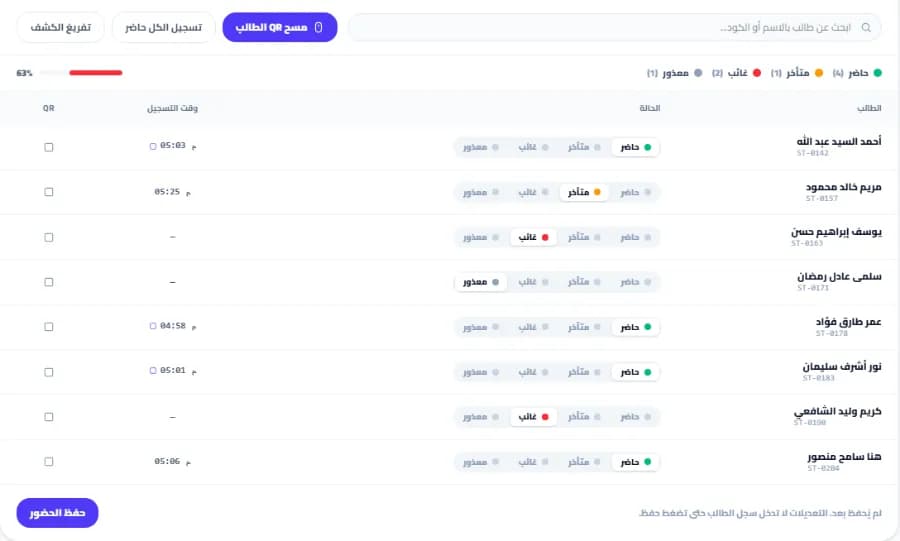
A branch lesson register on Snatr, where students check in with a printed QR card. The data shown is an example.
Parent follow-up: Edu QR messages or the Snatr portal?
Edu QR sends parents ready WhatsApp messages about attendance, absence and balance, and says a notification reaches them when their child is marked present. Snatr gives the parent a portal on your website with the child's attendance and marks, without messages.
In Snatr
✓A portal on your own website, opened with a password you set.
✓The parent sees the child's branch and live class attendance in one place.
✓The parent sees marks from exams taken on your platform.
✓One parent follows all their children from the same account.
✓No messages or notifications reach the parent's phone.
In Edu QR
Attendance, absence or balance messages, sent from the student's file without typing.
A notification to the parent when the barcode is scanned, per its "how it works" section.
A portal or account parents sign in to themselves: not stated.
A message that reaches the parent is an Edu QR feature. Many parents wait for a message after the lesson, and not all of them will open a portal.
On Snatr, the advantage is that the parent sees the center and online together. Whether the child attended in the branch or joined a live class from home, both are on the same page. The portal is read-only, and nobody can see a child other than their own.
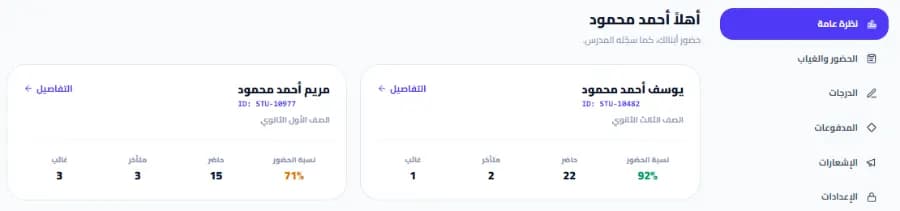
The parent portal on the teacher's Snatr website, opened in the browser. The data shown is an example.
Your platform, your name
A platform and website in your name: Edu QR or Snatr?
Snatr gives you a website in your name with 30 designs you edit yourself. Edu QR is a management system, and it does not mention a website in the teacher's or center's name. Both run in the browser without an app.
In Snatr
✓Your platform on a link in your name, and a custom domain like mybrand.com on the Pro plan.
✓30 ready designs whose text, colors and images you edit without code, the first two free.
✓You choose the sign-up fields: governorate, city, stage, ID card photo and parent's phone.
✓Every teacher's site has its own sitemap that helps Google find its pages.
✓No mobile app. Students open your platform in their phone's browser.
In Edu QR
Runs in any browser on a phone or computer, with nothing to install.
Works in every Arab country, and the payment method is arranged on WhatsApp.
A website in the teacher's name with designs, or a custom domain: not stated.
On Snatr, the custom domain is not available during the trial. The Snatr team buys and connects it, and the first year is free with the plan. Once it is connected, the old link redirects to it automatically, along with your Google ranking.
This website is where students sign up with their phone number or email, see your courses, pay and watch. If you sell lessons online, it is your storefront for students and parents. Browse Snatr's designs.
Language and support
How do you get started with Edu QR and with Snatr? And who helps you?
On Edu QR you order the system on WhatsApp, and there is a trial version whose length is not stated. On Snatr you sign up at snatr.com and start a 7-day trial yourself. Both offer support in Arabic.
In Snatr
✓You sign up and start a 7-day trial yourself, with no card.
✓An Arabic right-to-left dashboard, with English too.
✓Support in Arabic over WhatsApp and email at support@snatr.com, 24 hours.
✓No import of a student list from an Excel file. You add students in the dashboard.
In Edu QR
You send your number of students, groups and collection method on WhatsApp, and they suggest a setup.
Free training on the system on the term and yearly plans.
A refund guarantee within 7 days.
Support over WhatsApp, phone and a Facebook page.
On Snatr, your site closes when the trial ends without a subscription. After that, changing your plan is done through support.
The "try the trial version" button on the Edu QR website opens a version on another website. Its length and terms are not written down, so ask them on WhatsApp.
How to move from Edu QR to Snatr
1
Try Snatr before stopping anything
Open your Snatr account and use the free 7-day trial. Keep Edu QR running until you are sure everything has moved. Note that your Snatr site closes when the trial ends without a subscription.
2
Export your student data from Edu QR
Edu QR exports data as CSV and ZIP files that open in Excel. Export your students, their groups and their parents. Snatr has no Excel import, so you will add them in the dashboard with the file in front of you.
3
Set up your branches and groups, and print the cards
Create each branch and its groups with their schedules and seat counts, and add students to them. Then print a QR card for each student, so an assistant can scan it at the door. Old Edu QR barcodes will not work on Snatr.
4
Open assistant and parent accounts
Open an account for each assistant and choose a permission template. Create an account for each parent with a password, link it to their children, and send them the link to their portal on your website.
5
Start online: upload your lessons and build your courses
Upload your videos to Snatr so they are encrypted, or add a YouTube link for free lessons. Set a price in EGP for each course. If your students pay cash, print prepaid cards for them or enroll them manually with no commission.
6
Decide what to do with your Edu QR subscription
Per-lesson and package collection and make-up attendance are not in Snatr. If you need them, you can stay on Edu QR for center accounts only. If you do not, do not renew the subscription when it comes due.
Snatr's limits, before you sign up
We list them up front so you decide knowing everything.
!No center collection: Snatr does not track per-lesson payment, lesson packages or late payers. Only online payments are recorded automatically.
!No make-up attendance with another group: a student is marked present in their own group only, and the scanner rejects a student from another group.
!No Excel import: you add your students in the dashboard.
!No messages to parents: no WhatsApp, SMS or automatic notifications. Parents see absences and marks when they open their portal.
!No cheaper plan for the center alone: the first plan is 999 EGP a month, and it includes the center and online teaching together, and published prices are monthly only.
!Live classes and a custom domain are on the Pro plan only: and the domain is not available during the trial. Changing plans is done through support.
!QR attendance needs internet: scanning happens in the dashboard, and it stops if the connection drops.
!One teacher per platform: there is no way to have several teachers with split earnings in one account. If your center has many teachers, each one needs their own platform.
!Screen recording is not blocked: and neither is a phone filming the screen. The watermark puts the student's name on the recording, which deters, but it is not proof.
Frequently asked questions
Snatr or Edu QR: which is better for a teacher in Egypt?
Snatr is better for a teacher or a center owner in Egypt. It has the center, courses, encrypted video, online payment in EGP and a parent portal, in one account from 999 EGP a month. Edu QR is an attendance and collection system for the center, at 500 EGP a month or 4,000 a year, with per-lesson and package collection. But its website mentions no course sales, video or online payment, so to teach online you would need a second platform beside it.
Is there a free trial on Edu QR and on Snatr?
Edu QR has a "try the trial version" button, its length is not written on the website, and it offers a refund guarantee within 7 days. Snatr has a free 7-day trial with no card that you start yourself, and your site closes when it ends without a subscription.
Do I need to download an app for Edu QR?
No. According to their website, Edu QR runs in any browser on a phone or computer with nothing to install, and the camera opens in the browser for scanning. Snatr also runs in the browser and has no app.
Does Edu QR send WhatsApp messages to parents?
Yes. It has ready WhatsApp messages about attendance, absence and balance follow-up, sent from the student's file without typing. Their website also says a notification reaches the parent when their child is marked present. Snatr has no messages, and parents follow through a portal on your website.
Can I sell courses online on Edu QR?
The Edu QR website does not mention selling courses, uploading video or online payment by students. It is an attendance and collection system for centers. On Snatr you sell courses with encrypted video, and the student pays by card, Fawry or mobile wallet, or with a prepaid card bought from you for cash.
Does Edu QR work outside Egypt?
Their website says yes, in every Arab country, and the setup and payment method are arranged with them on WhatsApp. Snatr's prices and payments are in Egyptian pounds, a student abroad pays with an international card that their bank converts, and your website can be in Arabic, English or both.
Does Snatr take a percentage of my sales?
No. On Snatr your price reaches you in full. If a student pays online, the payment commission is added on top of your price for them, and it is not deducted from you. A student who pays you cash is enrolled manually with no commission at all.
If my students exceed my Snatr plan, do I pay for them every month?
No. New students sign up as normal, and each extra student is charged once when they join, not every month: 15 EGP on Starter, 10 on Basic and 7 on Pro. The student limit on Edu QR plans is not written on their website, so ask them if your center is large.
Does Snatr have prepaid cards you can sell for cash in the center?
Yes. You print cards with codes and sell them to students for cash. A card either unlocks a specific course or group, or adds credit to the student's account on your website. There are also discount coupons by percent or fixed amount, and each student can use a coupon once.
Can I use Edu QR and Snatr together?
You can, but you will pay two subscriptions and record each student's attendance in two places. You could use Edu QR for per-lesson and package collection, and Snatr for courses, video, online payment and live classes. But Snatr alone has attendance, branches and a parent portal, so if you do not need center collection, one platform is easier for you and your students.
Try Snatr yourself before you decide
Set up your own platform in minutes, try it free for 7 days, and compare for yourself.
Every fact about Edu QR on this page comes from their official pages, checked on 10 October 2026. Prices and features change; if you find something out of date, tell us at support@snatr.com.