ComparisonLast reviewed: October 2026

Snatr vs Moodle: When Free Costs You More

Snatr is the better choice for a private tutor or a tutoring center in Egypt. Your platform is ready with no server and no programmer, students pay with Fawry and mobile wallets, video is encrypted, and you get attendance and a parent portal, from 999 EGP. Moodle is free, open source software, but running it is on you: a server, an update every two months, and plugins for Egyptian payments.

⁨Moodle⁩

A free, open-source learning management system that you run on your own server or on MoodleCloud, and that presents itself to universities, schools and companies.

Yearly cost, 100 students
13,871 EGP on MoodleCloud
Running and updating
Server and developer, or MoodleCloud
Fawry and wallet payments
Via a plugin and a merchant account
Center and parents
Plugins and manual setup

Snatr and ⁨Moodle⁩ in one table

We compared 20 things that matter to a teacher or a center, and the table shows which platform does each one better.

3

about even

6

only in ⁨Moodle⁩

Swipe the table sideways to see every column.

What we comparedSnatr⁨Moodle⁩
Price and money
Cost of the software itself
Monthly subscriptionFrom 999 EGP, including the server and updates
FreeOpen source, no license
Fawry and wallet payments
ReadyCard, Fawry and wallets such as Vodafone Cash
Via pluginsPaymob and Fawry from an independent developer, not on MoodleCloud
Receiving money without a merchant account
AvailableYou withdraw to Vodafone Cash, InstaPay or the bank
Not availableThe Paymob plugin needs a Paymob account in your name
Video and protection
Video encryption against downloading
EncryptedDownloader extensions and yt-dlp fail, and it is measured
Not includedA regular video player, encryption needs an outside service
Watermark with the student's name
AvailableIt moves across the video
Not built in
Video storage for 100 students
50 GBOn the Starter plan
2.5 GBOn MoodleCloud Mini, and on your server it depends on what you pay
Live classes and exams
Live streaming
On the Pro planInside the platform, with chat, hand raising and mic, and attendance is recorded automatically
BigBlueButtonNeeds a server or login credentials, ready on MoodleCloud for up to 100
Exams and question types
AvailableTrue or false and multiple choice, and the grade goes to the parent
16 question typesplus a question bank
H5P and SCORM interactive content
Not available
Inside MoodlePlus connecting other tools through LTI
Certificates and badges
Certificates onlyA completion certificate with a QR check; no badges
AvailableBadges inside Moodle, and certificates via a free plugin
Centers and parents
Attendance
QR card or by handA printed card for each student, scanned by the assistant
Via a free pluginAttendance: the student scans a QR code with their phone
Branches and groups with schedules and capacity
Available
Groups onlyInside the course, and no branches
Parent portal
ReadyThe parent sees their child's attendance and grades
Manual setupA Parent role is set up for each parent
Assistants with permissions
Available4 ready-made presets, and a permission is removed instantly
AvailableDetailed roles and permissions
Your platform, your name
Custom domain like mybrand.com
On the Pro planThe Snatr team buys and connects it, and the first year is free
On your serverAnd on MoodleCloud from Medium, for an extra fee
Mobile app
NoneYour platform opens in the phone's browser
Free appUnder the Moodle name, with offline viewing
Plugins and code changes
Not availableA ready-made platform
Open source1,781 plugins updated in the last 3 years
Language and support
Arabic right-to-left dashboard
Fully ArabicWith English too
99% translatedThe Arabic pack for Moodle 5.3
Support in Arabic
WhatsApp and email
Not statedCommunity forums, MoodleCloud support or a paid partner
Running without a server or developer
Ready
MoodleCloud onlyNo plugins, and up to 750 users

Snatr or ⁨Moodle⁩?

Choose ⁨Moodle⁩ if

  • you are a university, school or company with a permanent technical team to run the server.
  • you train adults and need advanced exams, badges, and SCORM and H5P content.
  • you want to own the code and the server, and you have a programmer who changes and updates it.
  • your students do not pay online, and you need no encrypted video or parent portal.
On this page
  1. What is Moodle, and who is the Moodle learning platform built for?
  2. Is Moodle really free, or are there hidden costs?
  3. Does Moodle accept Fawry and Vodafone Cash in Egypt?
  4. Does Moodle protect lesson videos from downloading?
  5. Live classes in Moodle: do you need a BigBlueButton server?
  6. Exams and badges: what Moodle has and what Snatr has
  7. Run a tutoring center? Attendance, branches and parents in Moodle and Snatr
  8. Domain, design and app: Moodle or Snatr?
  9. Moodle in Arabic: does Moodle support right-to-left Arabic?
  10. Moodle's drawbacks: do I need a developer to run Moodle?
  11. How to move from Moodle to Snatr
  12. Snatr's limits, before you sign up
  13. Frequently asked questions

What is Moodle, and who is the Moodle learning platform built for?

Moodle is a free, open-source learning management system. That means its code is available for anyone to download and modify without paying for a license. You use it to build courses, exams, assignments, forums and a gradebook for your students.

Moodle launched in 2001, and its latest version, Moodle 5.3, came out on 5 October 2026. Its statistics page lists 147,793 registered sites in 237 countries, 763 of them from Egypt.

Moodle itself says there are no license fees, but you need to arrange hosting and support yourself, or bring in a certified partner. That is why there are two ways to run it: on your own server, or on MoodleCloud. MoodleCloud is a yearly subscription hosted by the Moodle team itself.

The Moodle learning platform presents itself to universities, schools, companies and government bodies, and MoodleCloud to individuals selling courses and small organizations. Its strength is flexibility: more than 1,700 plugins, exams with 16 question types, interactive content, and detailed roles and permissions. That matters for an organization with a permanent technical team.

Snatr is built for a different case: a teacher or a tutoring center in Egypt that wants a ready-made platform under its own name, sells in EGP, and manages center students and parents alongside it. If you are comparing Snatr with other platforms, see all Snatr comparisons.
Is Moodle really free, or are there hidden costs?

The software really is free, but running it is not. A teacher with 100 students will pay about 13,871 EGP a year on MoodleCloud, and about 17,328 EGP on their own server including payment fees, before the developer's fee. Snatr is 11,988 EGP.

In Snatr

  • Starter: 999 EGP a month, 100 students and 50 GB.
  • Basic: 1,999 EGP a month, 200 students and 150 GB.
  • Pro: 2,999 EGP a month, 400 students, 300 GB, live classes and a custom domain.
  • The server, updates and Egyptian payments are included in the subscription, with no plugins.
  • The subscription is in EGP, and registration does not stop if your students go over your plan.

In ⁨Moodle⁩

  • The software itself is free with no license, if you install it on your own server.
  • MoodleCloud is yearly in Australian dollars: Mini for 100 users costs 380, that is 13,871 EGP.
  • Small for 200 costs 25,551 EGP, and Medium for 500 costs 62,053 EGP a year.
  • On your own server: a Moodle server at Hostinger Egypt starts at 319 EGP a month.
  • Paymob fees, the developer's fee and a streaming server all come on top of the server price.

Example: a teacher with 100 students paying 300 EGP a month, cost per year

Free costs you about 17,300 EGP a year before the developer's fee

Snatr (Starter)MoodleCloud (Mini)Moodle on your server
Platform subscription per year11,988 EGP13,871 EGP0 EGP
Server per yearIncludedIncluded3,828 EGP (Hostinger)
Video storage50 GB2.5 GB50 GB for the whole server
Online payment feesOn the student, on top of your priceNo Fawry or wallets13,500 EGP deducted from you (Paymob)
Installing and updating every two monthsSnatr's jobThe Moodle team's jobA developer, not counted here
What you pay per year11,988 EGP13,871 EGP, without Egyptian payments17,328 EGP + developer's fee

Exchange rate from the Central Bank of Egypt on 7 October 2026: the Australian dollar at 36.5017 EGP (selling rate). Paymob's published fee is 2.75% + 3 EGP, that is 11.25 EGP on each 300 EGP payment, and 1,200 payments a year. The Hostinger server is at its first-term price, and after renewal the total becomes 19,848 EGP. On Snatr the student pays the payment fee on top of the 300 EGP, so it is not counted against you here.

300 students paying 300 EGPSnatr (Pro)MoodleCloud (Medium)Moodle on your server
Platform subscription per year35,988 EGP62,053 EGP0 EGP
Server per yearIncludedIncluded5,148 EGP (8 GB RAM)
Video storage300 GB20 GB100 GB for the whole server
Online payment feesOn the student, on top of your priceNo Fawry or wallets40,500 EGP deducted from you
What you pay per year35,988 EGP62,053 EGP45,648 EGP + developer's fee

MoodleCloud is Moodle hosted and updated by the Moodle team itself. It is paid yearly in Australian dollars, so you need a card that pays in foreign currency, and taxes may be added depending on the country. Selling with Stripe starts from the Small plan, and Stripe is not available in Egypt in the first place.

The Hostinger server in the example has 4 GB of RAM and 50 GB of storage, and that is the first-term price, paid upfront. After that it renews at 529 EGP a month, and prices exclude VAT. The developer's fee is not counted, because it varies from one developer to another.

The server price alone is not the whole cost. You will still need someone to install and update Moodle, with no encrypted video and no ready-made parent portal. On Snatr all of this is included in the subscription.

With 300 students the gap grows: Snatr Pro is 35,988 EGP a year, MoodleCloud Medium about 62,053 EGP, and Moodle on your own server about 45,648 EGP before the developer's fee. See Snatr's pricing in detail.

Does Moodle accept Fawry and Vodafone Cash in Egypt?

Not on its own. Moodle comes with a PayPal gateway only. Fawry and wallets come through plugins from an independent developer, and need a merchant account and your own server. On Snatr, Egyptian payments are ready from day one.

In Snatr

  • The student pays in EGP: Visa and Mastercard, a Fawry code, or a wallet such as Vodafone Cash.
  • You do not need a merchant account with any payment company.
  • The money goes into your wallet and is currently available to withdraw after 7 days.
  • You withdraw to Vodafone Cash, InstaPay or the bank, and the minimum withdrawal is currently 100 EGP.
  • A student who paid you cash is recorded by hand, with no commission at all.

In ⁨Moodle⁩

  • Moodle 5.3 comes with only one payment gateway: PayPal.
  • A free Paymob plugin: cards, Meeza, wallets and Aman outlets, and it needs a Paymob account in your name.
  • Paymob's published fee is 2.75% + 3 EGP per transaction, deducted from you.
  • A Fawry plugin with a reference code, listed as working up to Moodle 4.5.
  • MoodleCloud has no plugins, and sells with Stripe, which is not available in Egypt.

Both plugins come from an independent developer, not the Moodle team. The Paymob plugin was last updated on 15 September 2025, is installed on 43 sites, and is listed as working up to Moodle 5.0. The Fawry plugin was last updated on 18 December 2024 and is installed on 9 sites.

So if you update Moodle to a version the plugin is not listed as supporting, payments may stop. You or your developer are the ones who will have to keep track of that. These figures come from their pages on the Moodle Marketplace in October 2026.

On Snatr the student pays the online payment fee on top of your price, so you receive your full price. Figures marked "currently" are settings that may change.

Does Moodle protect lesson videos from downloading?

No, not on its own. The video players that come with Moodle play video as a regular file with no encryption. Snatr encrypts the video you upload, so the well-known download tools cannot download it.

In Snatr

  • Video is encrypted, and the key to open it goes to a locked component inside the browser, not to the page.
  • Downloader extensions, "paste the link and download" sites and yt-dlp cannot download it.
  • A watermark moves across the video and shows the student's name.
  • A student is signed in on one device at a time: signing in on a new device signs the old one out.

In ⁨Moodle⁩

  • The video players in Moodle 5.3: HTML5, VideoJS, YouTube and Vimeo, none with key-based encryption.
  • A watermark with the student's name does not come with Moodle itself.
  • Moodle's documentation recommends YouTube or Vimeo when server storage is low.
  • There are plugins for outside video services, such as FastPix, which says it supports encryption.
  • MoodleCloud storage: 2.5 GB for 100 users, and 20 GB for 500.

We measured the protection at Snatr. Without the key, the file plays as noise, with a similarity to the original of only 10.6 dB. With the key, it plays cleanly at 59.9 dB, and the higher the number, the closer the picture is to the original.

Snatr does not block screen recording, or a phone filming the screen. The watermark deters, because the student's name shows on the recording, but it is not proof. On iPhone and iPad the video plays normally, but the protection there is weaker against a technically skilled person.

This protection covers only video you upload to Snatr. If you put a YouTube link in a lesson, it stays a regular YouTube video. Learn the details of Snatr's video protection.

Live classes in Moodle: do you need a BigBlueButton server?

Usually, yes. Live classes in Moodle run on BigBlueButton, which needs your own server or login credentials from Blindside Networks, and on MoodleCloud they are ready for up to 100 users. Snatr has live streaming inside your own platform on the Pro plan at 2,999 EGP.

In Snatr

  • Students watch the lesson on your platform, with chat and hand raising.
  • You can give a student the mic to speak in front of their classmates.
  • Class attendance is recorded automatically: present or late.
  • Assistants can manage the mics, the chat and who gets in.
  • Class recording is a feature you switch on, and the recording is added to the students' group.

In ⁨Moodle⁩

  • BigBlueButton is inside Moodle, but it shows as "not configured" until the administrator finishes setting it up.
  • Setup needs your own BigBlueButton server, or login credentials from Blindside Networks.
  • Class recording works only if the server supports it.
  • On MoodleCloud, live classes are built in for up to 100 users.

Live streaming on Snatr is not encrypted like uploaded video. It has a watermark and a temporary link, and screen recording works.

On Snatr the class, attendance and the group are in one place, with no second server and no one needed to manage it.

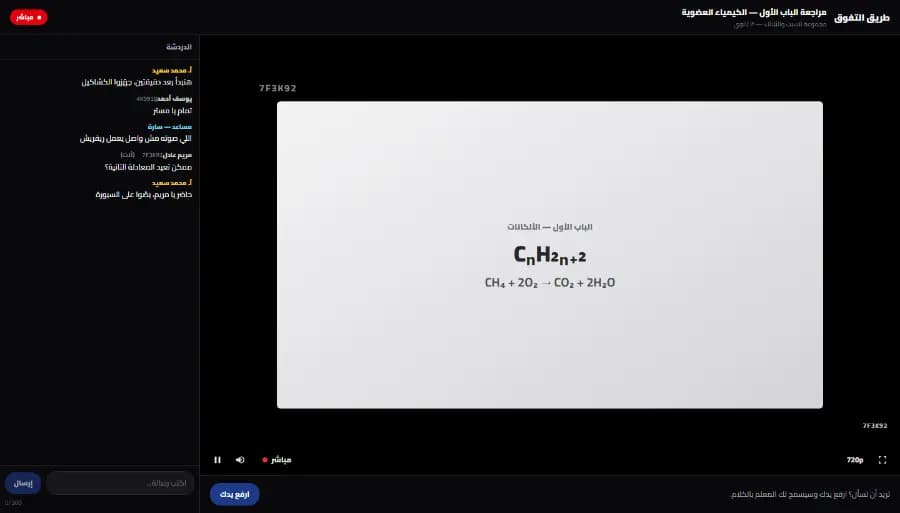
A live class screen on Snatr from the student's side: the teacher's lesson in the middle with a watermark showing a short code, the class chat on the side, and a raise-hand button below
The student's screen in a live class on Snatr, with no separate streaming server. The data shown is an illustrative example.

Exams and badges: what Moodle has and what Snatr has

Moodle has 16 question types, a question bank and badges. Both have certificates: Moodle through a free plugin, and Snatr with a completion certificate that carries a QR code for verification. On Snatr exams grade themselves, and the grade reaches the parent.

In Snatr

  • True or false, multiple choice and multiple answer, all graded automatically.
  • A written question you grade yourself, in group exams only.
  • The grade shows to the student, and to the parent through their portal.
  • A completion certificate with a QR check, but no SCORM or H5P content.

In ⁨Moodle⁩

  • 16 question types, such as matching, ordering, drag and drop and calculated questions.
  • A question bank you reuse across exams.
  • H5P interactive content, SCORM packages, and connecting other tools through LTI.
  • Badges inside Moodle, and certificates through a free plugin from the Moodle Workplace team.
  • Forums and wikis, and a Workshop activity where students assess each other's work.

If you teach a school curriculum, what the parent wants is the grade and the attendance, not a certificate. On Snatr both reach the parent through their portal with no setup.

Run a tutoring center? Attendance, branches and parents in Moodle and Snatr

Moodle records attendance through a free plugin and gives parents access through manual setup, but it has no branches. Snatr has branches, groups, QR cards and a parent portal ready, with your online teaching in the same account.

In Snatr

  • Branches and groups with schedules and seat limits, and an attendance register for every class.
  • A printed QR card for each student that the assistant scans at the door, or attendance by hand.
  • The parent logs in to a portal on your website and sees their child's attendance and grades.
  • Assistants and front-desk staff with their own accounts, and 4 ready-made permission presets.

In ⁨Moodle⁩

  • A free Attendance plugin: present, absent, late and excused, with export to Excel.
  • It has a QR code the teacher displays, which the student scans with their phone to mark themselves present.
  • A parent gets a Parent role that the site administrator creates by hand and links to each student.
  • Groups inside the course, but no branches with schedules and capacity.
  • Detailed roles and permissions for each user.

The Attendance plugin is among the MoodleCloud plugins, and is listed as working up to Moodle 5.2. It is installed on more than 23 thousand sites.

A Snatr QR card carries a signed code that cannot be forged, and the student does not need a phone to be marked present. But a card can be photographed and sent to someone else, so this is attendance by card, not by fingerprint.

The four presets are front desk, branch supervisor, academic assistant and full access. If you remove a permission from an assistant, it is removed that same moment.

In short: Details are on Snatr's center management page.

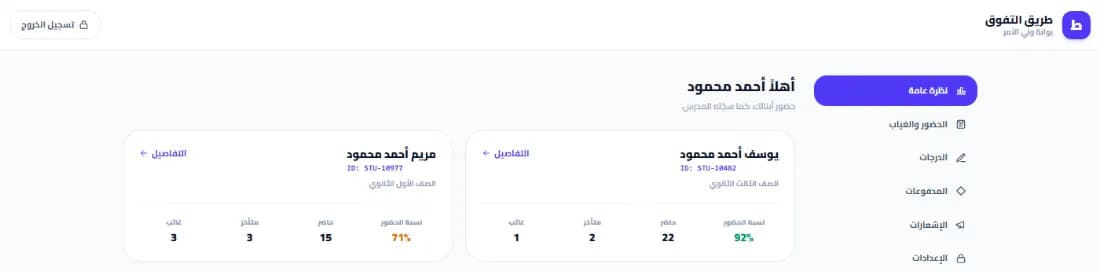
The parent portal on a teacher's Snatr website: a card for each child with their name, school year, attendance rate and the number of times present, late and absent
The parent portal on Snatr, ready with no role setup. The data shown is an illustrative example.

Domain, design and app: Moodle or Snatr?

Moodle on your own server is on your own domain from day one, and it has a free mobile app under the Moodle name. Snatr gives you a link under your name and 30 ready-made designs, a custom domain on the Pro plan, and no app.

In Snatr

  • Your platform starts on a site in your name.
  • Custom domain on the Pro plan: the Snatr team buys and connects it, and the first year is free.
  • 30 ready-made designs whose colors, text and images you edit without code. Your first two designs are free.
  • No mobile app under your name. The student opens your platform in the phone's browser.

In ⁨Moodle⁩

  • On your own server, the site is on the domain you choose.
  • On MoodleCloud, a custom domain from Medium costs 160 Australian dollars a year, and is free on Standard.
  • One design comes with Moodle, called Boost, and the rest are plugins.
  • The Moodle app is free on Android and iOS, with two courses available offline.
  • Premium costs 499 euros a year and is free with MoodleCloud, and an app under your own name is a separate plan.

On Snatr a custom domain is not available during the trial. Once it is connected, the old link redirects to it automatically, and your Google ranking moves with it.

The free Moodle app has notifications for only 50 devices. The Premium version costs 499 euros, about 29,298 EGP a year at the Central Bank rate on 7 October 2026.

In short: Look through Snatr's designs before you choose. Each design has a full preview.

Moodle in Arabic: does Moodle support right-to-left Arabic?

Yes. Moodle supports right-to-left Arabic, and the Arabic pack for Moodle 5.3 is 99% translated. The difference from Snatr is in plugins and support: plugins have their own translations, and support is not stated to be in Arabic.

In Snatr

  • The dashboard is in Arabic, right to left, with English too.
  • Your website can be in Arabic, English or both.
  • The dashboard speaks a teacher's language: groups, classes, branches and parents.
  • Arabic support on WhatsApp and by email at support@snatr.com.

In ⁨Moodle⁩

  • The Arabic pack for Moodle 5.3: 32,610 strings translated out of 32,811.
  • Right-to-left direction switches on automatically with Arabic.
  • The pack is installed from site administration, under Language packs.
  • MoodleCloud support: a knowledge base, and priority support if the site goes down.

If you teach students at language schools, you can show your Snatr website in English, or in Arabic and English together.

Moodle's drawbacks: do I need a developer to run Moodle?

Usually, yes. Moodle's biggest drawback for a private tutor is that running it is a job in itself: a server, an update every two months, and plugins you have to keep track of. MoodleCloud takes that off your hands, but with no plugins at all.

In Snatr

  • Your platform is ready with no server, no installation and no developer.
  • Updates and the server are the Snatr team's job, not yours.
  • Payments, encrypted video and center tools are ready with no plugins, and live classes come with the Pro plan.
  • Your data is on Snatr's servers, and you cannot change the code.

In ⁨Moodle⁩

  • You need a server with PHP 8.3 and a database, and someone to install and secure it.
  • A major version every 6 months and an update every two months, and updating is on you.
  • The Paymob plugin is listed up to Moodle 5.0, and Fawry up to 4.5.
  • Security support for Moodle 5.0 ended on 5 October 2026.
  • MoodleCloud has no plugins at all, and goes up to 750 users at most.

Moodle itself compares self-hosting with its official hosting. It says that with self-hosting, your team is the one that plans and tests updates, fixes problems, and is responsible for security and plugins.

Some hosting companies install Moodle in one click and take a weekly backup, such as Hostinger Egypt. That saves you the installation, but you are the one who manages the server and the Moodle on it.

If you are going to hire a developer, count the hours for installation, the update every two months, and checking the plugins after every update.

How to move from Moodle to Snatr

  1. 1

    Try Snatr and keep Moodle running

    Open your Snatr account and use the 7-day free trial. Keep your Moodle site running until you are sure everything has moved over. Note that your Snatr website closes when the trial ends without a subscription.

  2. 2

    Gather copies of your videos and files

    Collect the original copies of your lesson videos and files from your computer. If you do not have them, Moodle has a "Download course content" feature that downloads the course files as a zip file. But files above a certain size are left out of the download.

  3. 3

    Export your student data

    From bulk user actions in Moodle's administration, you can export your student data to a file. That file has your students' names and details, so you know who to add on Snatr.

  4. 4

    Create the courses and upload the videos

    Create your courses with their lessons and exams from the dashboard, and price each course in EGP. Upload the video to Snatr so it gets encrypted, or add a YouTube link for free lessons. Moodle questions do not move over on their own, so you will write them again.

  5. 5

    Register your current students without them paying again

    For a student who already paid you, add them from the students screen and enroll them in the course by hand, with no commission at all. Then send them your new platform link on WhatsApp.

  6. 6

    If you run a center, set up branches and cards

    Create your branches and groups with their schedules, and print a QR card for each student. Open an account for each assistant with the permissions you choose, and an account for each parent with a password you give them.

  7. 7

    Shut down the Moodle site

    Once all your students are using your new platform, take one last backup of the Moodle site. Then cancel the server or the MoodleCloud subscription before the renewal date.

Snatr's limits, before you sign up

We list them up front so you decide knowing everything.

  • No mobile app: there is no app under your name on Google Play or the App Store, and the student opens your platform in the phone's browser.
  • Fewer question types: there is true or false, multiple choice, multiple answer, and a written question in group exams. There is no SCORM or H5P content.
  • No badges or student forum: and no affiliate marketing.
  • No plugins or code changes: Snatr is a ready-made platform, and you cannot install outside plugins.
  • Your data is on Snatr's servers: not on a server of your own.
  • Screen recording is not blocked: nor is a phone filming the screen. The watermark makes the student's name visible, but it does not stop the recording.
  • iPhone and iPad: the video plays normally and ready-made download tools fail, but the protection is weaker against a technically skilled person.
  • Custom domain on the Pro plan only: and not during the trial.
  • Live classes on the Pro plan only: that is 2,999 EGP a month, and Starter and Basic have no live classes.
  • The free trial is 7 days: and your site closes when it ends without a subscription.
  • Changing plans goes through support: you do not change it yourself from the dashboard.
  • One teacher per platform: there is no setup for several teachers with split earnings.

Frequently asked questions

Is the Moodle learning management system suitable for schools and tutoring centers in Egypt?

It suits a school or university with a technical team to run and update it, and according to Moodle's statistics there are 763 registered Moodle sites from Egypt. For a center or a private tutor the picture is different. There are no branches, no QR card for each student, no ready-made parent portal, and Fawry and wallet payments need plugins. That is why Snatr is the better choice for a center or a private tutor.

How do I switch Moodle to Arabic?

From Moodle's site administration, go to Language, then Language packs, and install the Arabic pack. The Arabic pack for Moodle 5.3 is 99% translated, and right-to-left direction switches on automatically. After that you can make Arabic the site's main language. Plugins you install may still have English text if nobody has translated them.

Moodle vs Google Classroom: which suits a teacher better?

Google Classroom is a Google tool for organizing a class: assignments, announcements and grades. It works with a regular Google account for anyone over 13, has a mobile app, and needs no server. Moodle is a bigger system you run on your own server or on MoodleCloud, with many more exam types and plugins. Neither has ready-made Fawry and wallet payments. If you want to sell your lessons in EGP and run your center, Snatr is built for exactly that.

How much does MoodleCloud cost in EGP?

MoodleCloud is paid yearly in Australian dollars. At the Central Bank rate on 7 October 2026: Starter for 50 users is about 8,395 EGP, Mini for 100 about 13,871 EGP, and Small for 200 about 25,551 EGP. Medium for 500 is about 62,053 EGP, and Standard for 750 about 109,505 EGP. There is a 28-day free trial, and taxes may be added depending on the country.

Is Moodle secure, or can it be hacked?

Moodle releases security updates regularly, and the long-term support version 5.3 gets security fixes until October 2029. But security is up to whoever runs the site. If you stay on a version whose support has ended, such as Moodle 5.0, whose security support ended on 5 October 2026, you will not get fixes. On Snatr, updates and the server are the Snatr team's job.

Does Snatr take a percentage of my sales?

No. On Snatr you receive your full price. If the student pays online, the payment fee is added on them on top of your price, and is not deducted from you. A student who pays you cash is recorded by hand with no commission at all.

Can I try Snatr before I pay?

Yes, there is a 7-day free trial. If the trial ends without a subscription, your website closes. A custom domain is not available during the trial.

Can I use Moodle and Snatr together?

You can, but you will be running two platforms, and your students may get confused between two links. For example, you could keep Moodle for the school or university where you teach, and sell your private lessons on Snatr. But if both are for the same students, one platform is easier for you and for them.

Sources (28)

Every fact about ⁨Moodle⁩ on this page comes from their official pages, checked on 7 October 2026. Prices and features change; if you find something out of date, tell us at support@snatr.com.